Get Fabric or SQL Certified for Free.
Get certified for free when you join Fabric Data Days 2026 and dive into Fabric, Power BI, SQL, AI, and other essential data skills.
Join now- Power BI forums
- Get Help with Power BI
- Desktop
- Service
- Report Server
- Power Query
- Mobile Apps
- Developer
- DAX Commands and Tips
- Custom Visuals Development Discussion
- Health and Life Sciences
- Power BI Spanish forums
- Translated Spanish Desktop
- Training and Consulting
- Instructor Led Training
- Dashboard in a Day for Women, by Women
- Galleries
- Data Stories Gallery
- Themes Gallery
- Contests Gallery
- QuickViz Gallery
- Quick Measures Gallery
- Visual Calculations Gallery
- Fabric Apps Gallery
- Notebook Gallery
- Translytical Task Flow Gallery
- TMDL Gallery
- R Script Showcase
- Webinars and Video Gallery
- Ideas
- Custom Visuals Ideas (read-only)
- Issues
- Issues
- Events
- Upcoming Events
July 28 - August 9 | Final Round of the Power BI Dataviz World Championships. This is your chance. Learn more
- Power BI forums
- Forums
- Get Help with Power BI
- Desktop
- Help with Manage Roles - Syntax error, unrecognize...
- Subscribe to RSS Feed
- Mark Topic as New
- Mark Topic as Read
- Float this Topic for Current User
- Bookmark
- Subscribe
- Printer Friendly Page


- Mark as New
- Bookmark
- Subscribe
- Mute
- Subscribe to RSS Feed
- Permalink
- Report Inappropriate Content
Help with Manage Roles - Syntax error, unrecognized expression: .o-content-listItem
I am working on a report and adding row level security via a DAX expression. One of my tables I am getting an error. "Syntax error, unrecognized expression: .o-content-listItem"
Not quite sure how to handle this or really what it means. Any help would be greatly appreciated.
Thanks
Wade


- Mark as New
- Bookmark
- Subscribe
- Mute
- Subscribe to RSS Feed
- Permalink
- Report Inappropriate Content
- Mark as New
- Bookmark
- Subscribe
- Mute
- Subscribe to RSS Feed
- Permalink
- Report Inappropriate Content
Hello,
I am wanting to add this "[company_id] = VALUE(USERNAME())" however I do not get the opportunity as when I click on the table under manage roles I get "
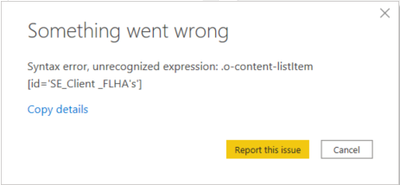
Which is just identifying the table ID.
- Mark as New
- Bookmark
- Subscribe
- Mute
- Subscribe to RSS Feed
- Permalink
- Report Inappropriate Content
- Mark as New
- Bookmark
- Subscribe
- Mute
- Subscribe to RSS Feed
- Permalink
- Report Inappropriate Content
That part isn't really relevant because I do not get the opportunity to add anything because of the error.
- Mark as New
- Bookmark
- Subscribe
- Mute
- Subscribe to RSS Feed
- Permalink
- Report Inappropriate Content
@SafetyEv , Open power query and check do see more issue details there. Share those
refer how to handle error in power query
https://www.youtube.com/watch?v=OE6DPmKqN7s
https://www.youtube.com/watch?v=9-Lag0VOiTs
debug issue
https://www.youtube.com/watch?v=OE6DPmKqN7s
- Mark as New
- Bookmark
- Subscribe
- Mute
- Subscribe to RSS Feed
- Permalink
- Report Inappropriate Content
I do not see any errors in power query.
I tried going back to an older version of the pbix file, and found that I can add the table I am having issues with and I do not have the same issue, so I'm not sure if it wouldn't be quicker to rebuild everything I have although painful. Then I can see step by step if the issue reappears.
- Mark as New
- Bookmark
- Subscribe
- Mute
- Subscribe to RSS Feed
- Permalink
- Report Inappropriate Content
Hi SafetyEv
I had the same issue and I fixed it removing apostrophes from the table name. In your case, you could rename SE_Client_FLHA's to SE_Client_FLHA. Hope it will fix your issue. Let me know.
Have an amazing day!
- Mark as New
- Bookmark
- Subscribe
- Mute
- Subscribe to RSS Feed
- Permalink
- Report Inappropriate Content
It was solved by removing apostrophes from the table name. Thank you

Helpful resources

Fabric Community Sticker Challenge - Barcelona 2026
If you love stickers, then you will definitely want to check out our community sticker challenge, Barcelona edition!

Power BI Monthly Update - July 2026
Check out the July 2026 Power BI update to learn about new features.

Power BI DataViz World Championships - June 2026
A new Power BI DataViz World Championship is coming this June! Don't miss out on submitting your entry.

| User | Count |
|---|---|
| 29 | |
| 28 | |
| 20 | |
| 20 | |
| 19 |


| User | Count |
|---|---|
| 35 | |
| 26 | |
| 20 | |
| 18 | |
| 17 |


