Join us at FabCon Atlanta from March 16 - 20, 2026, for the ultimate Fabric, Power BI, AI and SQL community-led event. Save $200 with code FABCOMM.
Register now!Get Fabric Certified for FREE during Fabric Data Days. Don't miss your chance! Request now
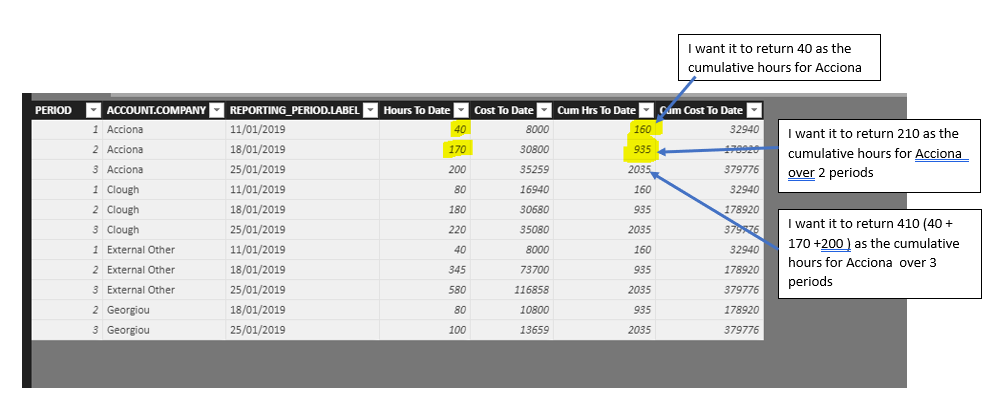
Hi I would like to have a Cumulative Total calculate by Company.
My issue is that it is giving the cumulative total for the whole period and not differentiating by the Company type.
The formula I used for the cumulative totals was as follows:
**bleep** Hrs To Date = CALCULATE(SUM(ACCOUNT_HISTORY[Hours To Date]),ALL(ACCOUNT_HISTORY),'ACCOUNT_HISTORY'[PERIOD]<=EARLIER('ACCOUNT_HISTORY'[PERIOD]))
**bleep** Cost To Date = CALCULATE(SUM(ACCOUNT_HISTORY[Cost To Date]),ALL(ACCOUNT_HISTORY),'ACCOUNT_HISTORY'[PERIOD]<=EARLIER('ACCOUNT_HISTORY'[PERIOD]))
Any ideas on how to add in an IF Function to do the cumulative by Company?
Sam
Solved! Go to Solution.
I found a solution!!
Cumlt Hrs to Date Company = CALCULATE(SUM(ACCOUNT_HISTORY[Hours To Date]), ACCOUNT_HISTORY[PERIOD]<=EARLIER(ACCOUNT_HISTORY[PERIOD]),ALLEXCEPT(ACCOUNT_HISTORY, ACCOUNT_HISTORY [ACCOUNT.COMPANY]))
It works 🙂
@Anonymous,
To be general, you modify your measure using dax below and check if it can meet your requirement:
Hrs To Date =
CALCULATE (
SUM ( ACCOUNT_HISTORY[Hours To Date] ),
FILTER (
ACCOUNT_HISTORY,
'ACCOUNT_HISTORY'[ACCOUNT.COMPANY] = 'ACCOUNT_HISTORY'[ACCOUNT.COMPANY]
&& 'ACCOUNT_HISTORY'[PERIOD] <= EARLIER ( 'ACCOUNT_HISTORY'[PERIOD] )
)
)
Cost To Date =
CALCULATE (
SUM ( ACCOUNT_HISTORY[Cost To Date] ),
FILTER (
ACCOUNT_HISTORY,
'ACCOUNT_HISTORY'[ACCOUNT.COMPANY] = 'ACCOUNT_HISTORY'[ACCOUNT.COMPANY]
&& 'ACCOUNT_HISTORY'[PERIOD] <= EARLIER ( 'ACCOUNT_HISTORY'[PERIOD] )
)
)
Community Support Team _ Jimmy Tao
If this post helps, then please consider Accept it as the solution to help the other members find it more quickly.
I found a solution!!
Cumlt Hrs to Date Company = CALCULATE(SUM(ACCOUNT_HISTORY[Hours To Date]), ACCOUNT_HISTORY[PERIOD]<=EARLIER(ACCOUNT_HISTORY[PERIOD]),ALLEXCEPT(ACCOUNT_HISTORY, ACCOUNT_HISTORY [ACCOUNT.COMPANY]))
It works 🙂
Thanks for the suggestion.
It still returned the same values as my original formula.
Any other ideas?
Check out the November 2025 Power BI update to learn about new features.
Advance your Data & AI career with 50 days of live learning, contests, hands-on challenges, study groups & certifications and more!