cancel
Showing results for 
Search instead for 
Did you mean: 

Next up in the FabCon + SQLCon recap series: The roadmap for Microsoft SQL and Maximizing Developer experiences in Fabric. All sessions are available on-demand after the live show. Register now

Reply
Anonymous
Not applicable

Help with IF Formula

Hello, 

I have the following tableau formula, which I want to recreate in Power Bi desktop, but I do get an error message saying "too many arguments passed to the if function". Could you help me on that? 

Tableau Formula: 

if [GOAL)]<0.1 then 0

elseif [GOAL)] >= 0.10 and [GOAL)]< 0.25 then 0.5

elseif [GOAL)] >= 0.25 and [GOAL)]< 0.50 then 0.55

elseif [GOAL)] >= 0.50 and [GOAL)]< 0.75 then 0.65

elseif [GOAL)] >= 0.75 and [GOAL)]< 1.00 then 0.85

elseif [GOAL)] >= 1.00 and [GOAL)]< 1.20 then 1

elseif [GOAL)] >= 1.20 and [GOAL)]< 1.35 then 1.2

elseif [GOAL)] >= 1.35 and [GOAL)]< 1.50 then 1.35

elseif [GOAL)] >= 1.50 and [GOAL)]< 1.70 then 1.5

else 1.7

Power Bi Dax Formula :

IF([GOAL)]<0.1,0,

 IF(AND([GOAL)]>=0.10,

 [GOAL)]<0.25),0.5,

 IF(AND([GOAL)]>=0.25,

 [GOAL)]<0.50),0.55,

 IF(AND([GOAL)]>=0.50,

 [GOAL)]<0.75),0.65,

 IF(AND([GOAL)]>=0.75,

 [GOAL)]<1.00),0.85,

 IF(AND([GOAL)]>=1.00,

 [GOAL)]<1.20),1, 

 IF(AND([GOAL)]>=1.20,

 [GOAL)]<1.35),1.2,

 IF(AND([GOAL)]>=1.35,

 [GOAL)]<1.50),1.35,

 IF(AND([GOAL)]>=1.50,

 [GOAL)]<1.70),1.5,"1.7")


1 ACCEPTED SOLUTION
NishPatel
Resolver II
Resolver II

Please use below If formula replacing Table with your table name and Column with your desired column name.

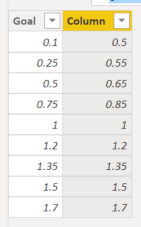
Column = IF(Table1[Goal]<0.1,0,IF(AND(Table1[Goal]>=0.1,Table1[Goal]<0.25),0.5,IF(AND(Table1[Goal]>=0.25,Table1[Goal]<0.5),0.55,IF(AND(Table1[Goal]>=0.5,Table1[Goal]<0.75),0.65,IF(AND(Table1[Goal]>=0.75,Table1[Goal]<1.0),0.85,IF(AND(Table1[Goal]>=1.0,Table1[Goal]<1.2),1,IF(AND(Table1[Goal]>=1.2,Table1[Goal]<1.35),1.2,IF(AND(Table1[Goal]>=1.35,Table1[Goal]<1.5),1.35,IF(AND(Table1[Goal]>=1.5,Table1[Goal]<1.7),1.5,1.7)))))))))
 
Below is the result
 
NishPatel_0-1667301656598.png


View solution in original post

6 REPLIES 6
NishPatel
Resolver II
Resolver II

Please use below If formula replacing Table with your table name and Column with your desired column name.

Column = IF(Table1[Goal]<0.1,0,IF(AND(Table1[Goal]>=0.1,Table1[Goal]<0.25),0.5,IF(AND(Table1[Goal]>=0.25,Table1[Goal]<0.5),0.55,IF(AND(Table1[Goal]>=0.5,Table1[Goal]<0.75),0.65,IF(AND(Table1[Goal]>=0.75,Table1[Goal]<1.0),0.85,IF(AND(Table1[Goal]>=1.0,Table1[Goal]<1.2),1,IF(AND(Table1[Goal]>=1.2,Table1[Goal]<1.35),1.2,IF(AND(Table1[Goal]>=1.35,Table1[Goal]<1.5),1.35,IF(AND(Table1[Goal]>=1.5,Table1[Goal]<1.7),1.5,1.7)))))))))
 
Below is the result
 
NishPatel_0-1667301656598.png


Anonymous
Not applicable

Swith is doing the same as if on this example, it will read each value and give the final result automaticcaly

https://dax.guide/switch/

Anonymous
Not applicable

Thanks for providing me with additionnal info. I've already read it, but how to write  with switch the condition between certain number and another number to accept some value. ( ex: elseif [GOAL)] >= 0.10 and [GOAL)]< 0.25 then 0.5). Thats why I tried to recreate it with IF(AND.. 

Anonymous
Not applicable

The switch wll test each value and if you put it in order asc you will hacve the good result

ex :

switch( TRUe,

exp1,0 ===>False

exp 2,1 this on switch will see if it is >1 and <2 automatically

Anonymous
Not applicable

HI use swith instead

SWITCH (

    TRUE,
    [GOAL)]<0.1, 0,
    [GOAL)]<0.25, 0.25,
    [GOAL)]<0.50, 0.50,
    etc...
)
Anonymous
Not applicable

Hi, I am not very sure I understand this switch formula, as I am trying to use if then else condition. Could you please advise how to do it with the IF AND formula , if possible?

Helpful resources

Announcements
New to Fabric survey Carousel

New to Fabric Survey

If you have recently started exploring Fabric, we'd love to hear how it's going. Your feedback can help with product improvements.

Power BI DataViz World Championships carousel

Power BI DataViz World Championships - June 2026

A new Power BI DataViz World Championship is coming this June! Don't miss out on submitting your entry.

Join our Fabric User Panel

Join our Fabric User Panel

Share feedback directly with Fabric product managers, participate in targeted research studies and influence the Fabric roadmap.

March Power BI Update Carousel

Power BI Community Update - March 2026

Check out the March 2026 Power BI update to learn about new features.