Get certified for free when you join Fabric Data Days 2026 and dive into Fabric, Power BI, SQL, AI, and other essential data skills.
Join nowTry your skills in the Power BI Dataviz World Championship! Round one ends June 26. Join now
Hi all,
I am trying to create a calculated column where in if date is equal to "2019/11/24" then print Static otherwise the date value. I am using the below two logic but keep getting an error - "Expression that yield variant date-type cannot be used to define calculated column"
The date column is of type "Date/time" with format "dd-mm-yyyy hh:min:sec(G)" - Please help
Column = If(Table1[date] = Date(2019,11,24),"Static",Table1[date])
Column = If(Table[date] = DateValue("2019-11-24"),"Static",Table1[date])
Thanks,
Vikash
Solved! Go to Solution.
Try like
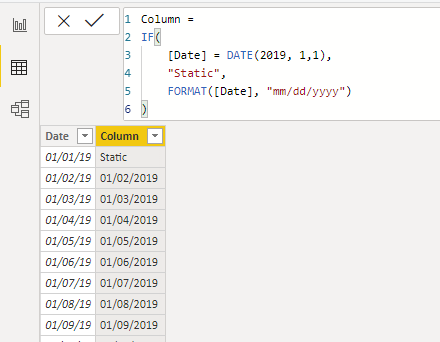
Column = If(Table1[date] = Date(2019,11,24),"Static",format(Table1[date],"dd-mm-yyyy hh:mi:ss"))
for full set of options refer
https://docs.microsoft.com/en-us/dax/custom-date-and-time-formats-for-the-format-function
Hi @Anonymous ,
This error is reported because your calculated column returned two types of data: text & date.
So, you can refer to @amitchandak 's answer.
Best regards,
Lionel Chen
If this post helps, then please consider Accept it as the solution to help the other members find it more quickly.
Try like
Column = If(Table1[date] = Date(2019,11,24),"Static",format(Table1[date],"dd-mm-yyyy hh:mi:ss"))
for full set of options refer
https://docs.microsoft.com/en-us/dax/custom-date-and-time-formats-for-the-format-function
Thanks very much @amitchandak , It worked. I now understand that the return type has to be same datatype.
Go into Power Query (Transform Data button on home ribbon) and verify that is truly a date column. I bet it shows ABC/123 as the column data type. Click that and change it to date, or date/time.
Just because visually it looks like a date doesn't mean Power BI will see it as a date. It must actually be the Date data type.
DAX is for Analysis. Power Query is for Data Modeling
Proud to be a Super User!
MCSA: BI ReportingDon't miss out on Data Days, June 15 through August 7. Learn Fabric, Power BI, SQL, AI and more.
Check out the May 2026 Power BI update to learn about new features.
| User | Count |
|---|---|
| 22 | |
| 22 | |
| 21 | |
| 19 | |
| 12 |
| User | Count |
|---|---|
| 58 | |
| 53 | |
| 41 | |
| 34 | |
| 32 |