Join us at FabCon Atlanta from March 16 - 20, 2026, for the ultimate Fabric, Power BI, AI and SQL community-led event. Save $200 with code FABCOMM.
Register now!The Power BI Data Visualization World Championships is back! It's time to submit your entry. Live now!
Hi All,
We have our data as follows.
| ID | Cricket | Football | Baseball | Hockey | Rugby | Motorsport | Basketball | Tennis | Golf |
1 | TRUE | TRUE | TRUE | FALSE | FALSE | FALSE | FALSE | FALSE | TRUE |
2 | FALSE | FALSE | FALSE | TRUE | FALSE | FALSE | FALSE | FALSE | FALSE |
| 3 | FALSE | FALSE | FALSE | FALSE | FALSE | FALSE | FALSE | TRUE | FALSE |
| 4 | FALSE | TRUE | FALSE | TRUE | FALSE | TRUE | TRUE | FALSE | FALSE |
| 5 | FALSE | FALSE | FALSE | FALSE | FALSE | FALSE | FALSE | TRUE | FALSE |
| 6 | TRUE | FALSE | FALSE | TRUE | FALSE | FALSE | FALSE | FALSE | TRUE |
| 7 | FALSE | FALSE | FALSE | FALSE | FALSE | FALSE | TRUE | TRUE | FALSE |
We are looking to create a visualisation which shows total ID's along with Sport Name and interest as TRUE only. so the output we are looking to get is something like follows but in a visualisation with common axes as total of ID's
| Sport | Total |
| Cricket | 2 |
| Football | 2 |
| Baseball | 1 |
| Hockey | 3 |
| Rugby | 0 |
| MotorSport | 1 |
| Basketball | 2 |
| Tennis | 3 |
| Golf | 2 |
Could anyone please help with this?
Will highly appreciate your help with this.
Regards
Sanjay
Solved! Go to Solution.
Hi @dandamudisanjay ,
Here what you want to achieve is to unpivot your dataset, to go from what you have to:
Customer ID / Sport
1 Cricket
1 Football
1 Baseball
1 Golf
2 Hockey
3 Tennis
....
You'll find here a .pbix with an example based on your use case.
The steps I took are the following
1. Unpivot and prepare your data in Power Query
2. Filter out rows for which the value is false
3. Create a measure that counts the number of players per sport
Step 1 : unpivoting the data
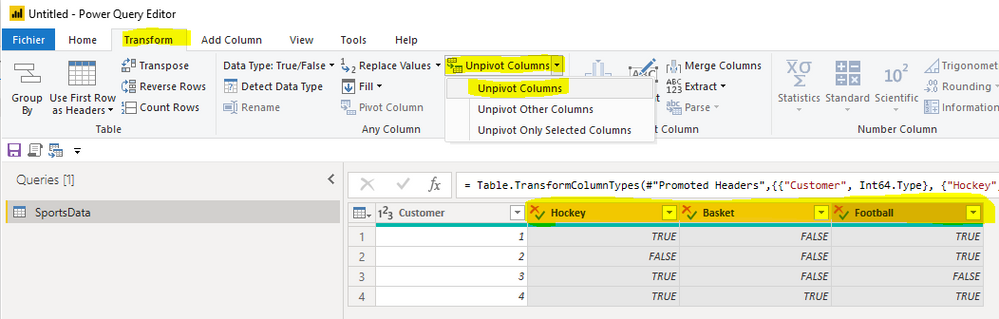
- you select the columns with names of sport
- and then Transform > Unpivot Columns > Unpivot Columns
The next steps in Power Query are:
- renaming Attribute to something more meaningful like Sport
- filtering out on the value column rows with FALSE
- removing the value column which is now useless as it only contains TRUE
Step 2 : creating your measure in Power BI
Here it's simple:
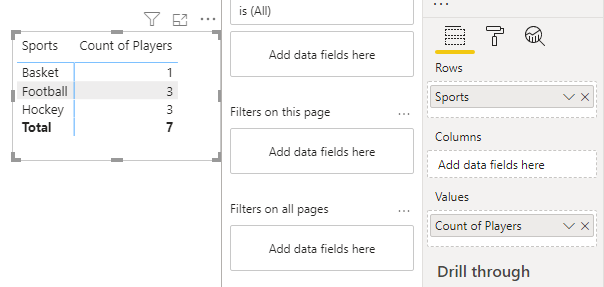
Count of Players = COUNTROWS( SportsData )
Step 3 : create your visual
Also, there are some great content which explain you more about the unpivot step in PowerQuery, I'll let you search the web/youtube.
I hope it helps. Does it?
Best,
Thomas
Hi @dandamudisanjay ,
Here what you want to achieve is to unpivot your dataset, to go from what you have to:
Customer ID / Sport
1 Cricket
1 Football
1 Baseball
1 Golf
2 Hockey
3 Tennis
....
You'll find here a .pbix with an example based on your use case.
The steps I took are the following
1. Unpivot and prepare your data in Power Query
2. Filter out rows for which the value is false
3. Create a measure that counts the number of players per sport
Step 1 : unpivoting the data
- you select the columns with names of sport
- and then Transform > Unpivot Columns > Unpivot Columns
The next steps in Power Query are:
- renaming Attribute to something more meaningful like Sport
- filtering out on the value column rows with FALSE
- removing the value column which is now useless as it only contains TRUE
Step 2 : creating your measure in Power BI
Here it's simple:
Count of Players = COUNTROWS( SportsData )
Step 3 : create your visual
Also, there are some great content which explain you more about the unpivot step in PowerQuery, I'll let you search the web/youtube.
I hope it helps. Does it?
Best,
Thomas
Thanks a lot Thomas. Worked like a treat.
@dandamudisanjay , If better to unpivot this data
https://radacad.com/pivot-and-unpivot-with-power-bi,
Refer: https://www.youtube.com/watch?v=2HjkBtxSM0g
Transpose : https://yodalearning.com/tutorials/power-query-helps-transposing-data/
The Power BI Data Visualization World Championships is back! It's time to submit your entry.
Check out the January 2026 Power BI update to learn about new features.
| User | Count |
|---|---|
| 60 | |
| 46 | |
| 30 | |
| 24 | |
| 23 |
| User | Count |
|---|---|
| 146 | |
| 108 | |
| 64 | |
| 38 | |
| 31 |