Get Fabric or SQL Certified for Free.
Get certified for free when you join Fabric Data Days 2026 and dive into Fabric, Power BI, SQL, AI, and other essential data skills.
Join now- Power BI forums
- Get Help with Power BI
- Desktop
- Service
- Report Server
- Power Query
- Mobile Apps
- Developer
- DAX Commands and Tips
- Custom Visuals Development Discussion
- Health and Life Sciences
- Power BI Spanish forums
- Translated Spanish Desktop
- Training and Consulting
- Instructor Led Training
- Dashboard in a Day for Women, by Women
- Galleries
- Data Stories Gallery
- Themes Gallery
- Contests Gallery
- QuickViz Gallery
- Quick Measures Gallery
- Visual Calculations Gallery
- Notebook Gallery
- Translytical Task Flow Gallery
- TMDL Gallery
- R Script Showcase
- Webinars and Video Gallery
- Ideas
- Custom Visuals Ideas (read-only)
- Issues
- Issues
- Events
- Upcoming Events
July 7 - July 17 | Round 2 of the Power BI Dataviz World Championships. Don't miss your chance! Learn more
- Power BI forums
- Forums
- Get Help with Power BI
- Desktop
- Re: Help with DAX Measure
- Subscribe to RSS Feed
- Mark Topic as New
- Mark Topic as Read
- Float this Topic for Current User
- Bookmark
- Subscribe
- Printer Friendly Page

- Mark as New
- Bookmark
- Subscribe
- Mute
- Subscribe to RSS Feed
- Permalink
- Report Inappropriate Content
Help with DAX Measure
Hi
I have data similar to the below:
- Marg ID can appear on multiple days
- Marg ID can either go through 2 or 3 statuses per day
- What I need to count is
- For each day, for each Marg ID:
- If Marg ID has 3 statuses for the day
- If the user is Auto for all 3 statuses, output is "Fully Auto"
- If the user is Auto for 1 or 2 of the statuses, output is "Partially Auto"
- If the user is not auto for all 3 statuses (ie it has a user name for all 3 statuses), output is "Manual"
- If Marg ID has 2 statuses for the day
- If the user is Auto for all 2 statuses, output is "Fully Auto"
- If the user is Auto for 1 of the statuses, output is "Partially Auto"
- If the user is not auto for all 2 statuses (ie it has a user name for all 2 statuses), output is "Manual"
Can anyone please suggest a DAX measure I could use? Thanks so much!
Data
| Date | Marg ID | Status | User |
| 1/1/2021 | 12345 | Issued | Auto |
| 1/1/2021 | 12345 | Agreed | John |
| 1/1/2021 | 12345 | Finalised | Amy |
| 2/1/2021 | 12345 | Agreed | Auto |
| 2/1/2021 | 12345 | Finalised | Auto |
| 2/1/2021 | 56789 | Issued | Auto |
| 2/1/2021 | 56789 | Agreed | Auto |
| 2/1/2021 | 56789 | Finalised | John |
| 3/1/2021 | 56789 | Issued | John |
| 3/1/2021 | 56789 | Agreed | John |
| 3/1/2021 | 78912 | Issued | Auto |
| 3/1/2021 | 78912 | Agreed | Auto |
Output
| Date | Marg ID | Output |
| 1/1/2021 | 12345 | Partially Auto |
| 2/1/2021 | 12345 | Fully Auto |
| 2/1/2021 | 56789 | Partially Auto |
| 3/1/2021 | 56789 | Manual |
| 3/1/2021 | 78912 | Fully Auto |
Solved! Go to Solution.
- Mark as New
- Bookmark
- Subscribe
- Mute
- Subscribe to RSS Feed
- Permalink
- Report Inappropriate Content
Hi @Anonymous ,
Based on my test, I suggest you create a new table like this:
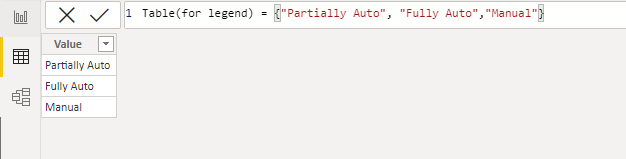
Then use the following formula to create measures:
1. For stacked bar chart:
count by date and type =
VAR _t =
    ADDCOLUMNS (
        DISTINCT (
            SELECTCOLUMNS ( 'Data', "date", 'Data'[Date], "id", 'Data'[Marg ID] )
        ),
        "Type", [Measure]
    )
RETURN
    COUNTX ( FILTER ( _t, [Type] = MAX ( 'Table(for legend)'[Value] ) ), [date] )
2. For table:
count = CALCULATE(DISTINCTCOUNT(Data[Date]),FILTER('Data',[Measure]=MAXX('Data',[Measure])))The final output is shown below:
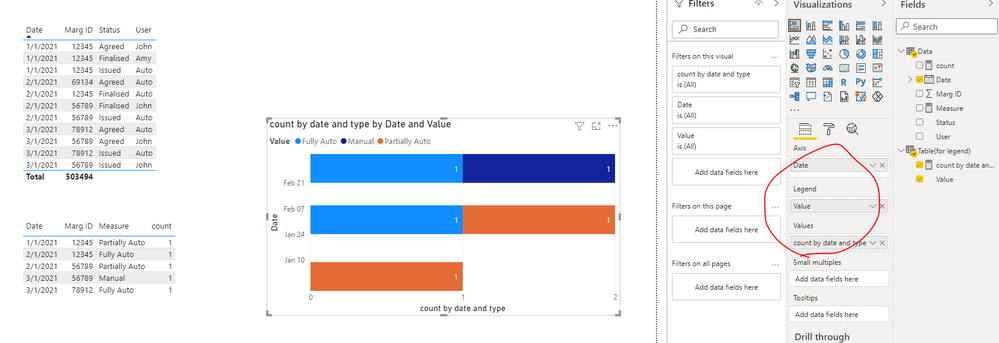
Best Regards,
Eyelyn Qin
If this post helps, then please consider Accept it as the solution to help the other members find it more quickly.
- Mark as New
- Bookmark
- Subscribe
- Mute
- Subscribe to RSS Feed
- Permalink
- Report Inappropriate Content
Hi @Anonymous ,
Based on my test, I suggest you create a new table like this:
Then use the following formula to create measures:
1. For stacked bar chart:
count by date and type =
VAR _t =
    ADDCOLUMNS (
        DISTINCT (
            SELECTCOLUMNS ( 'Data', "date", 'Data'[Date], "id", 'Data'[Marg ID] )
        ),
        "Type", [Measure]
    )
RETURN
    COUNTX ( FILTER ( _t, [Type] = MAX ( 'Table(for legend)'[Value] ) ), [date] )
2. For table:
count = CALCULATE(DISTINCTCOUNT(Data[Date]),FILTER('Data',[Measure]=MAXX('Data',[Measure])))The final output is shown below:
Best Regards,
Eyelyn Qin
If this post helps, then please consider Accept it as the solution to help the other members find it more quickly.


- Mark as New
- Bookmark
- Subscribe
- Mute
- Subscribe to RSS Feed
- Permalink
- Report Inappropriate Content
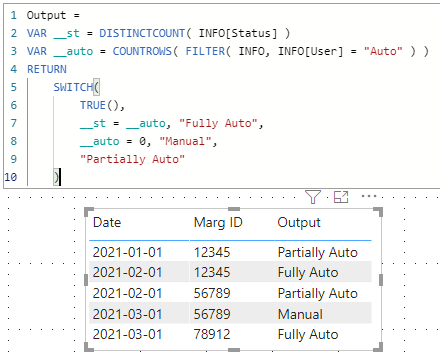
Output =
VAR __st = DISTINCTCOUNT( INFO[Status] )
VAR __auto = COUNTROWS( FILTER( INFO, INFO[User] = "Auto" ) )
RETURN
    SWITCH(
        TRUE(),
        __st = __auto, "Fully Auto",
        __auto = 0, "Manual",
        "Partially Auto"
    )
| Thanks to the great efforts by MS engineers to simplify syntax of DAX! Most beginners are SUCCESSFULLY MISLED to think that they could easily master DAX; but it turns out that the intricacy of the most frequently used RANKX() is still way beyond their comprehension! |
DAX is simple, but NOT EASY! |


- Mark as New
- Bookmark
- Subscribe
- Mute
- Subscribe to RSS Feed
- Permalink
- Report Inappropriate Content
Hi,
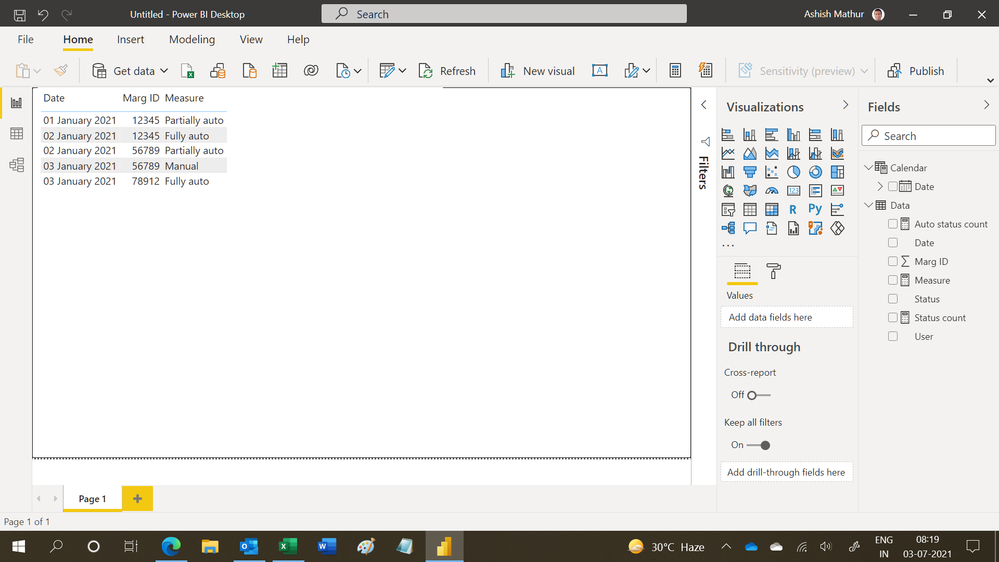
You may download my PBI file from here.
Hope this helps.
Regards,
Ashish Mathur
http://www.ashishmathur.com
https://www.linkedin.com/in/excelenthusiasts/
- Mark as New
- Bookmark
- Subscribe
- Mute
- Subscribe to RSS Feed
- Permalink
- Report Inappropriate Content
Thanks for your suggestions
Is it possible to then graph it as a stacked bar chart ..
So per day, can I get a count of Partially Auto, Fully Auto and Manual
Sorry I'm quite new so your help is very much appreciated
- Mark as New
- Bookmark
- Subscribe
- Mute
- Subscribe to RSS Feed
- Permalink
- Report Inappropriate Content
Hi,
For that, we will have to write a calculated column formula (not a measure). Calculated column formulas do not respond to change in slicers.
Regards,
Ashish Mathur
http://www.ashishmathur.com
https://www.linkedin.com/in/excelenthusiasts/
- Mark as New
- Bookmark
- Subscribe
- Mute
- Subscribe to RSS Feed
- Permalink
- Report Inappropriate Content
I need to eventually get to this to be able to graph it as a stacked bar chart
| Date | Auto/Manual | Count |
| 1/01/2021 | Partially Auto | 1 |
| 2/01/2021 | Partially Auto | 1 |
| 2/02/2021 | Fully Auto | 1 |
| 3/01/2021 | Manual | 1 |
| 3/01/2021 | Fully Auto | 1 |
- Mark as New
- Bookmark
- Subscribe
- Mute
- Subscribe to RSS Feed
- Permalink
- Report Inappropriate Content
ok thanks, so do i just create a calculated column instead of a measure, is it the same formula?
- Mark as New
- Bookmark
- Subscribe
- Mute
- Subscribe to RSS Feed
- Permalink
- Report Inappropriate Content
Thank you, I also realised I need to filter only on where Status is Issued, Agreed or Finalised. There seems to be another 2 statuses that are appearing in the data that need to be filtered out. Are you able to account for this requirement as well?


- Mark as New
- Bookmark
- Subscribe
- Mute
- Subscribe to RSS Feed
- Permalink
- Report Inappropriate Content
@Anonymous You can add a Visual filter on the Whole page and select on these status if you want
- Mark as New
- Bookmark
- Subscribe
- Mute
- Subscribe to RSS Feed
- Permalink
- Report Inappropriate Content
of course, thank you!
- Mark as New
- Bookmark
- Subscribe
- Mute
- Subscribe to RSS Feed
- Permalink
- Report Inappropriate Content
I do not understand the question.
Regards,
Ashish Mathur
http://www.ashishmathur.com
https://www.linkedin.com/in/excelenthusiasts/
Helpful resources

FabCon & SQLCon – Barcelona 2026
Join us in Barcelona for FabCon and SQLCon, the Fabric, Power BI, SQL, and AI community event. Save €200 with code FABCMTY200.

Data Days 2026
Join Data Days 2026: 60 days of free live/on-demand sessions, challenges, study groups, and certification opportunities.

Power BI DataViz World Championships - June 2026
A new Power BI DataViz World Championship is coming this June! Don't miss out on submitting your entry.

| User | Count |
|---|---|
| 29 | |
| 23 | |
| 18 | |
| 18 | |
| 15 |


| User | Count |
|---|---|
| 51 | |
| 44 | |
| 43 | |
| 39 | |
| 32 |


