cancel
Showing results for 
Search instead for 
Did you mean: 

Learn from the best! Meet the four finalists headed to the FINALS of the Power BI Dataviz World Championships! Register now

Reply
Vamshi_PBI
Frequent Visitor

Help with DAX Formula.!

Hi Team,


I need some help with writing dax formula. PFB details.


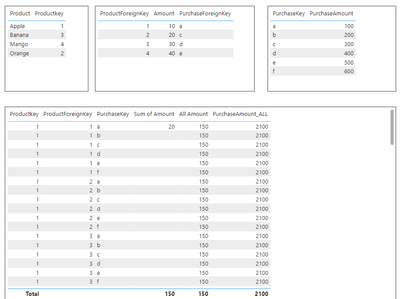
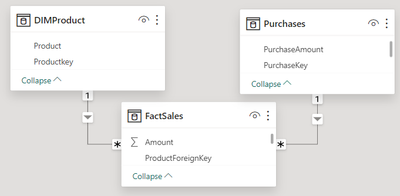
My data model is having 3 tables and the data modelling as below . So i would like to take product key, product foreign key into table visual and dispaly the total sum of amount (150) againist each row by using ALL function as below.


All Amount = CALCULATE(SUM(FactSales[Amount]),ALLSELECTED(FactSales))
 
But as soon as I include ALL or ALLSelected a Cross Join is happening between productkey and productforeign key.
 
In the same way, I would need total PurchaseAmount also into the same table visual and i'm writing formula as below.
 
PurchaseAmount_ALL = CALCULATE(CALCULATE(SUM(Purchases[PurchaseAmount]), CROSSFILTER(FactSales[PurchaseForeignKey],Purchases[PurchaseKey],Both),CROSSFILTER(DIMProduct[Productkey],FactSales[ProductForeignKey],Both)),ALLSELECTED(FactSales))
 
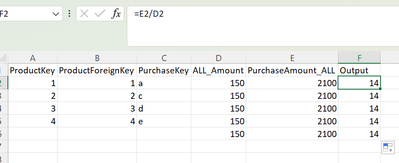
So basically, I want to do PurchaseAmount_ALL/All Amount, so that i can display the result againist each row. I attached a screenshot how the output should be. (2100/150 = 14 againist each row)


So, Two scenarios are same, i would like to alter context by using ALL or ALLSelected, but cross joining is happening.


Vamshi_PBI_3-1707311044958.png


Vamshi_PBI_1-1707310039750.png


Vamshi_PBI_2-1707310797532.png


Please help with this, any help is very much appreciated.


Thanks.


2 REPLIES 2
Anonymous
Not applicable

Hi @Vamshi_PBI ,

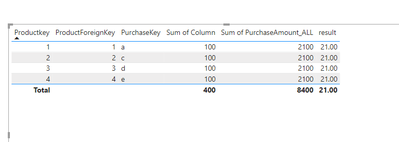
Please try to use columns.

vrongtiepmsft_0-1707360022370.png


How to Get Your Question Answered Quickly 


If it does not help, please provide more details with your desired output and pbix file without privacy information (or some sample data) .


Best Regards
Community Support Team _ Rongtie

If this post helps, then please consider Accept it as the solution to help the other members find it more quickly.


Hi @Anonymous ,


Thank you for the support, This solution is working but when i select any of the productkey or foreign key only the sum of that should reflect but it is not right now. for example if i select product 1 and 2, then only 200 should reflect for all rows but it is showing 400 only, the filter is not working. Moreover we have combination of direct query and live model, so calculated columns would result performance issue.


Thanks.

Helpful resources

Announcements
Join our Fabric User Panel

Join our Fabric User Panel

Share feedback directly with Fabric product managers, participate in targeted research studies and influence the Fabric roadmap.

February Power BI Update Carousel

Power BI Monthly Update - February 2026

Check out the February 2026 Power BI update to learn about new features.

FabCon Atlanta 2026 carousel

FabCon Atlanta 2026

Join us at FabCon Atlanta, March 16-20, for the ultimate Fabric, Power BI, AI and SQL community-led event. Save $200 with code FABCOMM.