Join us at FabCon Atlanta from March 16 - 20, 2026, for the ultimate Fabric, Power BI, AI and SQL community-led event. Save $200 with code FABCOMM.
Register now!The Power BI Data Visualization World Championships is back! Get ahead of the game and start preparing now! Learn more
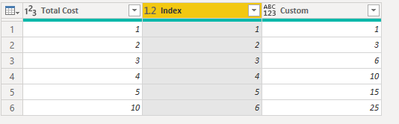
I have a set of data for which I am trying to get a running total from a calculated column, but I keep getting an error. My code is below
Running Total = List.Sum(List.Range(#"Added Index"[Total Cost],0,[Index]))
And this is the error I keep getting:
Expression.Error: 4 arguments were passed to function which expects between 2 and 3.
Details:
Pattern=
Arguments=[List]
The formula works fine when I use it with the column from which my calculated column (Total Cost)is generated, so I am thinking its the calculated column which is the issue, but this column works fine? any Idea's as this is driving me nuts. (btw - I will be creating a running percentage off this column later as well to develop a pareto analysis, and this is a million miles easier in excel!)
The data will also be grouped later using another text column, and will be filtered using a splitter on the raised date (I do NOT want to use this in the cummulative value column, as it is largely irrelevant to this sum)
Hi @hyperbob0811 ,
I made a test in my sample and it works properly.
You could provide your codes and sample here to make the problem clearer.
I managed to get it to work, but had to basically take my data out and add in a column which had precalculated each row total cost, as without this - even a measure or a calculated column the thing simply refused to work!
@hyperbob0811 what is the expression of [Total Cost]?
Subscribe to the @PowerBIHowTo YT channel for an upcoming video on List and Record functions in Power Query!!
Learn Power BI and Fabric - subscribe to our YT channel - Click here: @PowerBIHowTo
If my solution proved useful, I'd be delighted to receive Kudos. When you put effort into asking a question, it's equally thoughtful to acknowledge and give Kudos to the individual who helped you solve the problem. It's a small gesture that shows appreciation and encouragement! ❤
Did I answer your question? Mark my post as a solution. Proud to be a Super User! Appreciate your Kudos 🙂
Feel free to email me with any of your BI needs.
The Power BI Data Visualization World Championships is back! Get ahead of the game and start preparing now!
| User | Count |
|---|---|
| 40 | |
| 37 | |
| 35 | |
| 34 | |
| 28 |
| User | Count |
|---|---|
| 136 | |
| 99 | |
| 73 | |
| 66 | |
| 65 |