cancel
Showing results for 
Search instead for 
Did you mean: 

Learn from the best! Meet the four finalists headed to the FINALS of the Power BI Dataviz World Championships! Register now

Reply
Meraptan
Regular Visitor

Help with Custom Column Lookup

Hello - I'm trying to create a custom column to do a few things, but can't figure out a formula to accomplish it.  The data is from a Tasks table in Project Online, so the rows are 'Tasks'.  I'm trying to end up with a 'My Date' custom column that has values like this:

Task TypeParent IDTask IDStart DateMy Date
1ABCD5/1/2019 
2ABGH6/1/2019 
3IJAB7/1/20195/1/2019
2BBHH6/1/2019 
3KKBB4/1/20193/1/2019
1BBDD3/1/2019 


The Logic I'm trying to use is something like this:  My Date= For all rows that are Task Type = 3, return the Start Date of the Task Type = 1 row that has the same Parent ID as the Task ID of the Task Type = 3 row, otherwise Blank

These are actual parent/child relationships and I was looking for Path and Lookup functions that can match columns, etc., but no success.  As you can guess, all Task Type = 3 rows are the Parent tasks of the others. I need someone smarter than me to tackle it please.   I know - kind of weird, but it does have a purpose.   Thanks a million.

1 ACCEPTED SOLUTION
v-xuding-msft
Community Support
Community Support

Hi @Meraptan ,

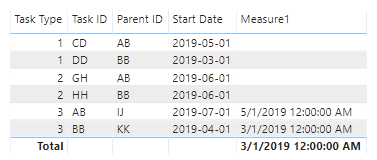
I created a measure that you can have a try.

Measure1 = var d=CALCULATE(MAX('Table'[Task ID]),FILTER('Table','Table'[Task Type]=3))
return
IF(MAX('Table'[Task Type])=3,CALCULATE(MAX('Table'[Start Date]),FILTER(ALLSELECTED('Table'),'Table'[Task Type]=1&&'Table'[Parent ID]=d)),BLANK())

2.PNG

Best Regards,

Xue Ding

If this post helps, then please consider Accept it as the solution to help the other members find it more quickly.

Best Regards,
Xue Ding
If this post helps, then please consider Accept it as the solution to help the other members find it more quickly.

View solution in original post

1 REPLY 1
v-xuding-msft
Community Support
Community Support

Hi @Meraptan ,

I created a measure that you can have a try.

Measure1 = var d=CALCULATE(MAX('Table'[Task ID]),FILTER('Table','Table'[Task Type]=3))
return
IF(MAX('Table'[Task Type])=3,CALCULATE(MAX('Table'[Start Date]),FILTER(ALLSELECTED('Table'),'Table'[Task Type]=1&&'Table'[Parent ID]=d)),BLANK())

2.PNG

Best Regards,

Xue Ding

If this post helps, then please consider Accept it as the solution to help the other members find it more quickly.

Best Regards,
Xue Ding
If this post helps, then please consider Accept it as the solution to help the other members find it more quickly.

Helpful resources

Announcements
Power BI DataViz World Championships carousel

Power BI DataViz World Championships - June 2026

A new Power BI DataViz World Championship is coming this June! Don't miss out on submitting your entry.

Join our Fabric User Panel

Join our Fabric User Panel

Share feedback directly with Fabric product managers, participate in targeted research studies and influence the Fabric roadmap.

March Power BI Update Carousel

Power BI Community Update - March 2026

Check out the March 2026 Power BI update to learn about new features.