Don't miss your chance to take the Fabric Data Engineer (DP-600) exam for FREE! Find out how by attending the DP-600 session on April 23rd (pacific time), live or on-demand.
Learn moreNext up in the FabCon + SQLCon recap series: The roadmap for Microsoft SQL and Maximizing Developer experiences in Fabric. All sessions are available on-demand after the live show. Register now
Hey guys,
I'm trying something in my Power BI and i aint getting any success.
I'll try explain my issue:
I have 2 tables
On table A, i have the Orders and Line of these Orders
for example:
| Orders | Line |
| 12345 | 1 |
| 12345 | 2 |
| 56789 | 1 |
| 98766 | 1 |
| 43213 | 1 |
| 43213 | 2 |
| 43213 | 3 |
The value Orders + Line (123451, for example) is unique in the table.
Now in my table B i have the details of these orders
For exemple:
| Order | Line | Qty |
| 12345 | 1 | 0 |
| 12345 | 1 | 2 |
| 12345 | 1 | 3 |
| 12345 | 2 | 1 |
| 12345 | 2 | 2 |
| 12345 | 2 | 3 |
| 12345 | 2 | 4 |
| 56789 | 1 | 10 |
You can notice that values Order + Line repeat on this table
Now what i need is, with tha table A, get the sum of QTY from table B
For example
| Order | Line | Qty |
| 12345 | 1 | 5 |
| 12345 | 2 | 10 |
| 56789 | 1 | 10 |
I tryied to connect both tables with relationships but i only can make a Many-To-Many relationships and when i try to sum the Qty I only get the value from 1 row and not all of them.
For example
| Order | Line | Qty |
| 12345 | 1 | 2 |
| 12345 | 2 | 1 |
| 56789 | 1 | 10 |
So, thats what im struggling with.
I dont know if i was clear in my explantion, maybe its a relationship issue or i dont even need do a relationship and i dont know what im doing haha...
Please, somebody could help me? 😞
Solved! Go to Solution.
Hi, @Anonymous
Please correct me if I wrongly understood your question.
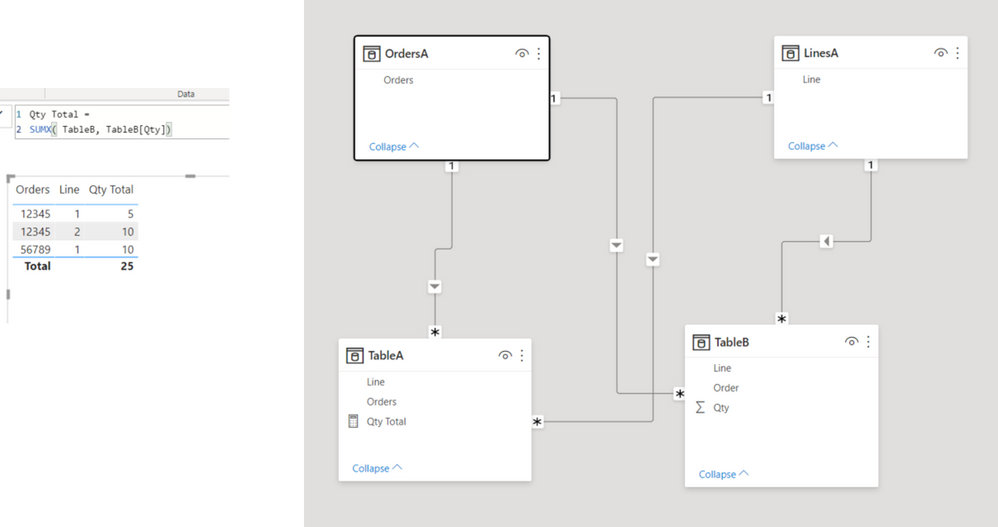
Please check the below picture and the sample pbix file's link down below.
I think the relationship between TableA and TableB has to be something like below.
https://www.dropbox.com/s/dnsdejjh2xrrgfc/henriquemalone.pbix?dl=0
Hi, My name is Jihwan Kim.
If this post helps, then please consider accept it as the solution to help other members find it faster, and give a big thumbs up.
Linkedin: linkedin.com/in/jihwankim1975/
Twitter: twitter.com/Jihwan_JHKIM
Hi, @Anonymous
Please correct me if I wrongly understood your question.
Please check the below picture and the sample pbix file's link down below.
I think the relationship between TableA and TableB has to be something like below.
https://www.dropbox.com/s/dnsdejjh2xrrgfc/henriquemalone.pbix?dl=0
Hi, My name is Jihwan Kim.
If this post helps, then please consider accept it as the solution to help other members find it faster, and give a big thumbs up.
Linkedin: linkedin.com/in/jihwankim1975/
Twitter: twitter.com/Jihwan_JHKIM
If you have recently started exploring Fabric, we'd love to hear how it's going. Your feedback can help with product improvements.
A new Power BI DataViz World Championship is coming this June! Don't miss out on submitting your entry.
| User | Count |
|---|---|
| 47 | |
| 44 | |
| 39 | |
| 20 | |
| 15 |
| User | Count |
|---|---|
| 70 | |
| 68 | |
| 32 | |
| 27 | |
| 25 |