cancel
Showing results for 
Search instead for 
Did you mean: 

The Power BI Data Visualization World Championships is back! Get ahead of the game and start preparing now! Learn more

Reply
Blinding1
Regular Visitor

Help on writing measure for CountX or SumX or Calculate on Groups

Hi all, first post for me. I hope it's explained clearly enough. 


I am having trouble writing a measure which will give me the number of times a person was quicker than another at a task.


Scenario: Three people had four attempts each at a task. The time taken for the tasks are recorded. The 'results' table is as follows:


AttemptPersonTime in Seconds
1Person A60
1Person B61
1Person C62
2Person A50
2Person B49
2Person C48
3Person A40
3Person B40
3Person C40
4Person A31
4Person B33
4Person C32


I am trying to summarise the number of times a person was faster than another and get an output table like the following:


CombinationsNo. of Times Left Person Beat Right Person
Person A : Person B2
Person A : Person C2
Person B : Person A1
Person B : Person C1
Person C : Person A1
Person C : Person B2


I have no problem constructing in powerquery (if need be) a single column lookup table of attempt numbers (1 to 4), or a table with the combinations such as below. 


ConcatPerson on LeftPerson on Right
Person A : Person BPerson APerson B
Person A : Person CPerson APerson C
Person B : Person APerson BPerson A
Person B : Person CPerson BPerson C
Person C : Person APerson CPerson A
Person C : Person BPerson CPerson B


I was trying to countx through the attempts to add up when "person on left" was quicker than "person on right" but I just could not get it to work. I also tried a Sumx on a "if quicker then 1 else 0" but couldnt get that to work either.


Thanks all.

1 ACCEPTED SOLUTION
LivioLanzo
Solution Sage
Solution Sage

Hello @Blinding1 


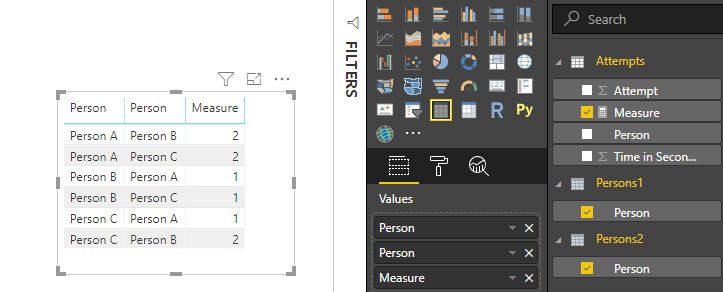
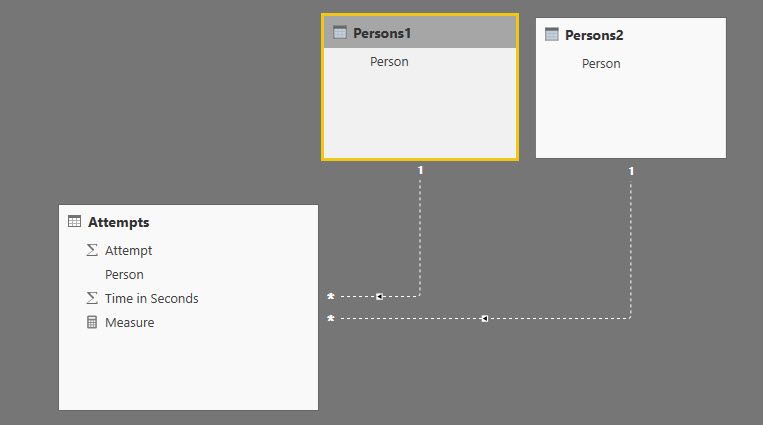
you can build the below model (inactive relationships) and add this measure in a 'Table Visual'


Measure = 
IF(
    HASONEVALUE( Persons1[Person] ) && HASONEVALUE( Persons2[Person] ),
    IF( 
        VALUES( Persons1[Person] ) <> VALUES( Persons2[Person] ),
        SUMX(
            VALUES( Attempts[Attempt] ),
            IF( 
                CALCULATE( 
                    VALUES( Attempts[Time in Seconds] ), 
                    USERELATIONSHIP( Attempts[Person], Persons1[Person] )
                ) < 
                CALCULATE( 
                    VALUES( Attempts[Time in Seconds] ), 
                    USERELATIONSHIP( Attempts[Person], Persons2[Person] )
                ), 
                1, 0
            )
        )
    )
)


2019-03-11_14-58-36.jpg2019-03-11_14-58-20.jpg


Did I answer your question correctly? Mark my answer as a solution!


Proud to be a Datanaut!  

View solution in original post

2 REPLIES 2
LivioLanzo
Solution Sage
Solution Sage

Hello @Blinding1 


you can build the below model (inactive relationships) and add this measure in a 'Table Visual'


Measure = 
IF(
    HASONEVALUE( Persons1[Person] ) && HASONEVALUE( Persons2[Person] ),
    IF( 
        VALUES( Persons1[Person] ) <> VALUES( Persons2[Person] ),
        SUMX(
            VALUES( Attempts[Attempt] ),
            IF( 
                CALCULATE( 
                    VALUES( Attempts[Time in Seconds] ), 
                    USERELATIONSHIP( Attempts[Person], Persons1[Person] )
                ) < 
                CALCULATE( 
                    VALUES( Attempts[Time in Seconds] ), 
                    USERELATIONSHIP( Attempts[Person], Persons2[Person] )
                ), 
                1, 0
            )
        )
    )
)


2019-03-11_14-58-36.jpg2019-03-11_14-58-20.jpg


Did I answer your question correctly? Mark my answer as a solution!


Proud to be a Datanaut!  

Thanks for this solution. It's amazing, and the measure is clean and straightforwardly written. Thanks so much.


So cool


Helpful resources

Announcements
November Power BI Update Carousel

Power BI Monthly Update - November 2025

Check out the November 2025 Power BI update to learn about new features.

Fabric Data Days Carousel

Fabric Data Days

Advance your Data & AI career with 50 days of live learning, contests, hands-on challenges, study groups & certifications and more!

FabCon Atlanta 2026 carousel

FabCon Atlanta 2026

Join us at FabCon Atlanta, March 16-20, for the ultimate Fabric, Power BI, AI and SQL community-led event. Save $200 with code FABCOMM.

Top Solution Authors
Top Kudoed Authors