Don't miss your chance to take the Fabric Data Engineer (DP-600) exam for FREE! Find out how by watching the DP-600 session on-demand now through April 28th.
Learn moreJoin the FabCon + SQLCon recap series. Up next: Power BI, Real-Time Intelligence, IQ and AI, and Data Factory take center stage. All sessions are available on-demand after the live show. Register now
I need some help with SAMEPERIODLASTYEAR. I have a simple report that displays a date, Job Code Group, Count of terminations, and count of terminations for the same period of the prior year. The definitions of the termination measures is as follows:
Terminations = SUM ( TERMS_fact_PSEmployee[Termed] )
PriorYearTerms = CALCULATE(sum(agg_PSEmployee[Termed]),SAMEPERIODLASTYEAR(dim_Time[PeriodDate]))
This all seems to work as expected as shown below:
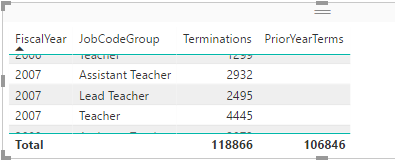
I run in to problems when I try to display the data in a different time frame, such as fiscal year. The totals show up fine, but the detail fro PriorYearTerms are missing:
I assume this is caused by the use of SAMEPERIODLASTYEAR? Is there some sort of workaround for this? What am I missing here?
A little background information, we are using direct query and the dates come from a time (date) dimension table. This is actaully a simplified version of the problem I am trying to solve. I didn't want to muddy the waters with more complex measures.
Thanks in advance for any assistance.
Hi @SGT,
Could you please post a sample in text mode? (pbix file will be better).
1. Why are there two tables while you compare the same field? TERMS_fact_PSEmployee and agg_PSEmployee.
2. Are the "PeriodDate" and "FiscalYear" from the same table dim_Time?
3. What are the relationships?
Best Regards!
Dale
Um, the detail is missing from the first image as well?
I would assume that what is going on is that there is some kind of context issue going on here. For some reason, putting FiscalYear into the table/matrix is causing your PeriodDate column to get filtered down to nothing or something that is not correct. You might be able to correct it by adding something like an ALL or ALLEXCEPT clause to your calculation but I'd have to see your data to really try to figure out what is going wrong.
Check out the April 2026 Power BI update to learn about new features.
If you have recently started exploring Fabric, we'd love to hear how it's going. Your feedback can help with product improvements.
A new Power BI DataViz World Championship is coming this June! Don't miss out on submitting your entry.
| User | Count |
|---|---|
| 48 | |
| 40 | |
| 38 | |
| 20 | |
| 17 |
| User | Count |
|---|---|
| 68 | |
| 65 | |
| 30 | |
| 26 | |
| 25 |