Join us at FabCon Atlanta from March 16 - 20, 2026, for the ultimate Fabric, Power BI, AI and SQL community-led event. Save $200 with code FABCOMM.
Register now!Get Fabric certified for FREE! Don't miss your chance! Learn more
Hi,
Goal: Get previous month value and put it into a card visual. I also need to get previous quartervalues because I will make a QoQ moving average later on.
Questions:
1. From below image, why is getting the blank value? The card visual should be getting $3.444,386 as the previous month value
2. Why did previous quarter price sum? I only need to pick last quarter value because my end goal is to create a QoQ moving average
Formula Used:
Previous Month:
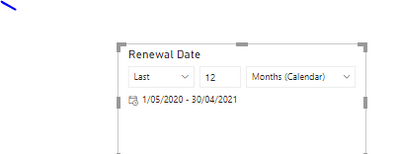
Note: I cannot use dateadd function in the 1st question because I have a slicer for the renewal date. I need a dynamic measure for the previous month price depending on the filter for renewal date:
Solved! Go to Solution.
@Anonymous , I think PREVIOUSQUARTER, PREVIOUSMONTH take the first date. so the basis are 01/05/2020, for both. Before it. If you need based on 30/04/2021 you need use datesqtd, datesmtd.
Also use date table, not the date column from your table
example
QTD Sales = CALCULATE(sum('b2b_datalab_cvm_pp_result JJ_Mobility_Trading_Ranges'[ARPU]),DATESQTD(('Date'[Date])))
Last QTD Sales = CALCULATE(sum('b2b_datalab_cvm_pp_result JJ_Mobility_Trading_Ranges'[ARPU]),DATESQTD(dateadd('Date'[Date],-1,QUARTER)))
Qtr Sales = CALCULATE(sum('b2b_datalab_cvm_pp_result JJ_Mobility_Trading_Ranges'[ARPU]),DATESQTD(ENDOFQUARTER('Date'[Date])))
Last QUARTER Sales = CALCULATE(sum('b2b_datalab_cvm_pp_result JJ_Mobility_Trading_Ranges'[ARPU]),DATESQTD( ENDOFQUARTER(dateadd('Date'[Date],-1,QUARTER))))
MTD Sales = CALCULATE(sum('b2b_datalab_cvm_pp_result JJ_Mobility_Trading_Ranges'[ARPU]),DATESMTD('Date'[Date]))
last MTD Sales = CALCULATE(sum('b2b_datalab_cvm_pp_result JJ_Mobility_Trading_Ranges'[ARPU]),DATESMTD(dateadd('Date'[Date],-1,MONTH)))
this month = CALCULATE(sum('b2b_datalab_cvm_pp_result JJ_Mobility_Trading_Ranges'[ARPU]),DATESMTD(ENDOFMONTH('Date'[Date])))
@Anonymous , I think PREVIOUSQUARTER, PREVIOUSMONTH take the first date. so the basis are 01/05/2020, for both. Before it. If you need based on 30/04/2021 you need use datesqtd, datesmtd.
Also use date table, not the date column from your table
example
QTD Sales = CALCULATE(sum('b2b_datalab_cvm_pp_result JJ_Mobility_Trading_Ranges'[ARPU]),DATESQTD(('Date'[Date])))
Last QTD Sales = CALCULATE(sum('b2b_datalab_cvm_pp_result JJ_Mobility_Trading_Ranges'[ARPU]),DATESQTD(dateadd('Date'[Date],-1,QUARTER)))
Qtr Sales = CALCULATE(sum('b2b_datalab_cvm_pp_result JJ_Mobility_Trading_Ranges'[ARPU]),DATESQTD(ENDOFQUARTER('Date'[Date])))
Last QUARTER Sales = CALCULATE(sum('b2b_datalab_cvm_pp_result JJ_Mobility_Trading_Ranges'[ARPU]),DATESQTD( ENDOFQUARTER(dateadd('Date'[Date],-1,QUARTER))))
MTD Sales = CALCULATE(sum('b2b_datalab_cvm_pp_result JJ_Mobility_Trading_Ranges'[ARPU]),DATESMTD('Date'[Date]))
last MTD Sales = CALCULATE(sum('b2b_datalab_cvm_pp_result JJ_Mobility_Trading_Ranges'[ARPU]),DATESMTD(dateadd('Date'[Date],-1,MONTH)))
this month = CALCULATE(sum('b2b_datalab_cvm_pp_result JJ_Mobility_Trading_Ranges'[ARPU]),DATESMTD(ENDOFMONTH('Date'[Date])))
Hi,
Thanks for the reply.
How do you do the Date'[Date]'?
What I did was calendarauto
@Anonymous , Calender or calendar Auto
Creating Financial Calendar - From Any Month
https://community.powerbi.com/t5/Community-Blog/Creating-Financial-Calendar-Decoding-Date-and-Calendar-1-5-Power/ba-p/1187441
various other link to create a calendar
To get the best of the time intelligence function. Make sure you have a date calendar and it has been marked as the date in model view. Also, join it with the date column of your fact/s. Refer :radacad sqlbi My Video Series Appreciate your Kudos.
Share feedback directly with Fabric product managers, participate in targeted research studies and influence the Fabric roadmap.
Check out the January 2026 Power BI update to learn about new features.
| User | Count |
|---|---|
| 68 | |
| 59 | |
| 44 | |
| 20 | |
| 15 |
| User | Count |
|---|---|
| 104 | |
| 102 | |
| 37 | |
| 26 | |
| 26 |