Join us at FabCon Atlanta from March 16 - 20, 2026, for the ultimate Fabric, Power BI, AI and SQL community-led event. Save $200 with code FABCOMM.
Register now!Get Fabric certified for FREE! Don't miss your chance! Learn more
Hi. I'm Max from Italy and my english isn't very good. I try to explain my problem. In power bi I want to manage a table to have a graphic with bars where I can see the data grouped by seller, year with the total amount of selling. In excel it's simple but in power bi I don't find the way. I see other posts where it is used DAX (?) to programming. It is the only way or there is a leadnig way for dummies? Thank you.
Max.![]()
Solved! Go to Solution.
Hi @jeoosma,
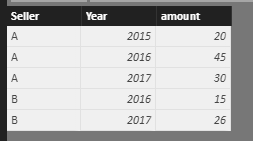
Based on my understanding, I create the following sample table.
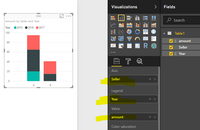
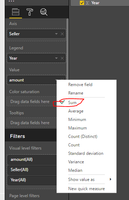
Then create a stacked column chart, select the seller as X-Axis, the Year as Legend, amount as value, we choose sum aggregated function. I get a chart group by sellers, and year with total amount.
Please check and review, if this is not what you want, please share your sample table, and post the graphic in excel, so that we can share solution which is close to your requirement.
Best Regards,
Angelia
Hi @jeoosma,
Based on my understanding, I create the following sample table.
Then create a stacked column chart, select the seller as X-Axis, the Year as Legend, amount as value, we choose sum aggregated function. I get a chart group by sellers, and year with total amount.
Please check and review, if this is not what you want, please share your sample table, and post the graphic in excel, so that we can share solution which is close to your requirement.
Best Regards,
Angelia
Share feedback directly with Fabric product managers, participate in targeted research studies and influence the Fabric roadmap.
Check out the January 2026 Power BI update to learn about new features.
| User | Count |
|---|---|
| 68 | |
| 59 | |
| 44 | |
| 20 | |
| 15 |
| User | Count |
|---|---|
| 104 | |
| 102 | |
| 37 | |
| 26 | |
| 26 |