Get certified for free when you join Fabric Data Days 2026 and dive into Fabric, Power BI, SQL, AI, and other essential data skills.
Join nowTry your skills in the Power BI Dataviz World Championship! Round one ends June 26. Join now
Hi, Everyone
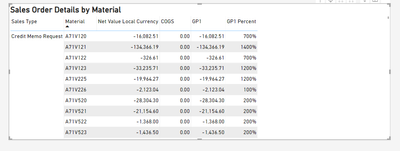
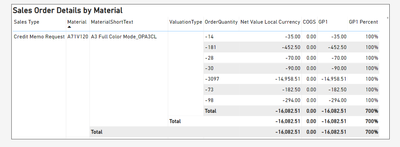
I want to add Field Material, MaterialShortText, and ValuationType. But the problem with the After picture is that I don't want the total amount. I want the result in the Before picture, Please tell me how to format your visual.
Thankyou.
Before
After
Solved! Go to Solution.
If you don't need any subtotals, Go to Format Visual > Row Subtotals > and turn Off the whole thing.
if you still need some sub-totals, turn on Per row Level and then select the Row Level > Rows and turn off Show subtotal
If you don't need any subtotals, Go to Format Visual > Row Subtotals > and turn Off the whole thing.
if you still need some sub-totals, turn on Per row Level and then select the Row Level > Rows and turn off Show subtotal
I can do it now. Thank you for your help.
Don't miss out on Data Days, June 15 through August 7. Learn Fabric, Power BI, SQL, AI and more.
Check out the May 2026 Power BI update to learn about new features.
| User | Count |
|---|---|
| 22 | |
| 22 | |
| 21 | |
| 20 | |
| 12 |
| User | Count |
|---|---|
| 58 | |
| 55 | |
| 41 | |
| 36 | |
| 34 |