Don't miss your chance to take the Fabric Data Engineer (DP-700) exam on us!
Learn moreWe've captured the moments from FabCon & SQLCon that everyone is talking about, and we are bringing them to the community, live and on-demand. Starts on April 14th. Register now
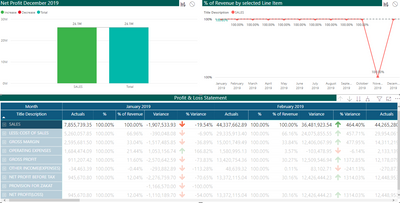
The above waterfall chart is interactive but i don't want to apply any filter to this chart while selecting a row from the matrix. Filtering should be activated whenever i select the column header such as January 2019, February 2019 etc... Is it possible?
At present the following is the result while selecting a row from the matrix.
Solved! Go to Solution.
Hi, @hari127
Yes, as of now ,PowerBI does not support conditional edit Interactions. For your requirement , you can add it as an idea on Power BI Ideas forum. https://ideas.powerbi.com/ideas/
Has your confusion been cleared up?
If yes, please add your reply as Answered or accepted helpful replies to close this thread.
If you still need help, please share more details to us.
Best Regards,
Community Support Team _ Eason
@hari127 Currently, you can't have selective interactions between visuals. You can enable interactions or disbale completly.
However, I would suggest you to use bookmarks which can help you in this case. You can put some shapes and then use bookmarks for selective selection. I hope this helps you.
Proud to be a Super User!
Bookmarks will not help because end users will select year-month for filter from matrix(currently it works fine) but i don't want row level filter applied to the waterfallchart. I understood from your post that is not possible.
Thanks you very much for your support.
Hi, @hari127
Yes, as of now ,PowerBI does not support conditional edit Interactions. For your requirement , you can add it as an idea on Power BI Ideas forum. https://ideas.powerbi.com/ideas/
Has your confusion been cleared up?
If yes, please add your reply as Answered or accepted helpful replies to close this thread.
If you still need help, please share more details to us.
Best Regards,
Community Support Team _ Eason
If you have recently started exploring Fabric, we'd love to hear how it's going. Your feedback can help with product improvements.
A new Power BI DataViz World Championship is coming this June! Don't miss out on submitting your entry.
Share feedback directly with Fabric product managers, participate in targeted research studies and influence the Fabric roadmap.
| User | Count |
|---|---|
| 51 | |
| 37 | |
| 35 | |
| 19 | |
| 17 |
| User | Count |
|---|---|
| 70 | |
| 64 | |
| 39 | |
| 33 | |
| 23 |