Join us at FabCon Atlanta from March 16 - 20, 2026, for the ultimate Fabric, Power BI, AI and SQL community-led event. Save $200 with code FABCOMM.
Register now!The Power BI Data Visualization World Championships is back! Get ahead of the game and start preparing now! Learn more
Hi all,
I've been basically trying to create what can be done with a Pivot table in Excel, into a bar graph in PBI.
I've been able to match numbers when i create a matrix, screen shot below, but when i convert to a bar graph my %'s do not match. I drop the values in the Late column where i'm looking to get % of "Not Late", and the only option i see is to change to "% of grand total", which is not the number i'm trying to get. I'm trying to get the % of value total by months in one graph, and then by hierarchy in another graph using tier 3 (to drill down to tier 1 if possible) column in sample data i've attached.
I'm attaching also the graphs i created that do not match
https://drive.google.com/file/d/1tulcsuSLafcmObyYo_A0Y5lcutKMedQA/view?usp=sharing
https://drive.google.com/file/d/17YJaXB7d-eTq6j0s6un2LMKsMRJXhYmw/view?usp=sharing
https://drive.google.com/file/d/1RRnxYNpdhQIzUmub2M9lVYxFy6Iarq5C/view?usp=sharing
Solved! Go to Solution.
Hi Antonio195754,
You could try below suggestions to see whether it works or not.
Create two measures
based on leader =
SUM ( 'Table'[Worker Owner ATTUID] )
/ CALCULATE (
SUM ( 'Table'[Worker Owner ATTUID] ),
FILTER (
ALL ( 'Table' ),
'Table'[Month] = MIN ( 'Table'[Month] )
&& 'Table'[Tier 3] = MIN ( 'Table'[Tier 3] )
)
)
based on month =
SUM ( 'Table'[Worker Owner ATTUID] )
/ CALCULATE (
SUM ( 'Table'[Worker Owner ATTUID] ),
FILTER ( ALL ( 'Table' ), 'Table'[Month] = MIN ( 'Table'[Month] ) )
)
Then ceate a measure like below
Measure 2 = IF ( ISINSCOPE ( 'Table'[Tier 3] ), [based on leader], [based on month] )
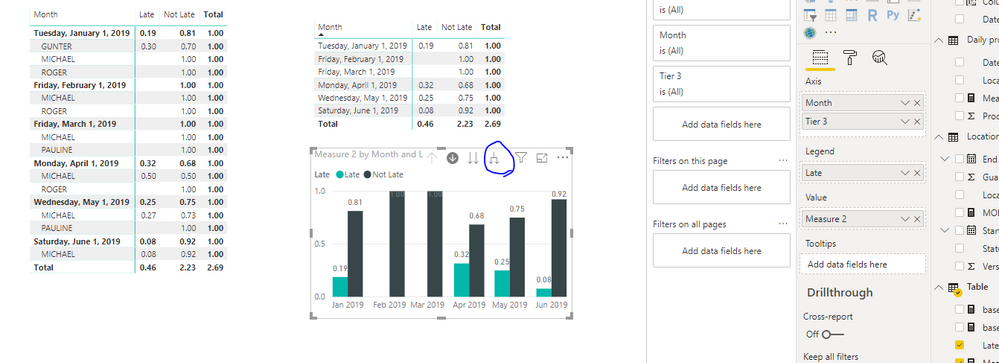
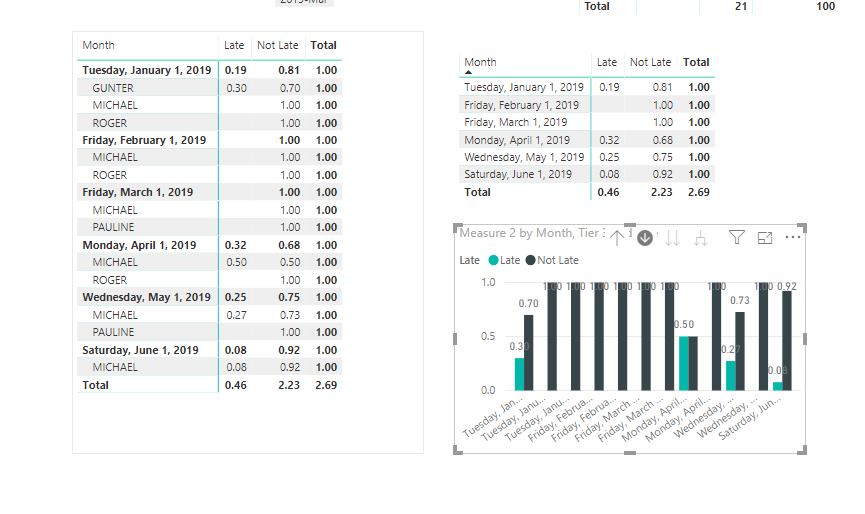
You could create chart like below and click on button in blue circle or double click on bar, it will show like below
Best Regards,
Zoe Zhi
If this post helps, then please consider Accept it as the solution to help the other members find it more quickly.
Hi Antonio195754,
You could try below suggestions to see whether it works or not.
Create two measures
based on leader =
SUM ( 'Table'[Worker Owner ATTUID] )
/ CALCULATE (
SUM ( 'Table'[Worker Owner ATTUID] ),
FILTER (
ALL ( 'Table' ),
'Table'[Month] = MIN ( 'Table'[Month] )
&& 'Table'[Tier 3] = MIN ( 'Table'[Tier 3] )
)
)
based on month =
SUM ( 'Table'[Worker Owner ATTUID] )
/ CALCULATE (
SUM ( 'Table'[Worker Owner ATTUID] ),
FILTER ( ALL ( 'Table' ), 'Table'[Month] = MIN ( 'Table'[Month] ) )
)
Then ceate a measure like below
Measure 2 = IF ( ISINSCOPE ( 'Table'[Tier 3] ), [based on leader], [based on month] )
You could create chart like below and click on button in blue circle or double click on bar, it will show like below
Best Regards,
Zoe Zhi
If this post helps, then please consider Accept it as the solution to help the other members find it more quickly.
Check out the November 2025 Power BI update to learn about new features.
Advance your Data & AI career with 50 days of live learning, contests, hands-on challenges, study groups & certifications and more!