cancel
Showing results for 
Search instead for 
Did you mean: 

The Power BI Data Visualization World Championships is back! Get ahead of the game and start preparing now! Learn more

Reply
SPowell42
New Member

Help connecting Power BI Desktop to SQL server on Linux

Hi all,


I'm trying to experiment with Power BI desktop and SQL server, and having issues connecting. Here's the details:


1. I'm running SQL Server on a Linux VM on my laptop

2. On the Linux VM, I'm able to run "sqlcmd" and connect to the database with no issues

3. From my laptop "host" laptop, I have no issues connecting to SQL server using SSMS. I choose the IP address of the host, use "SQL Server Authentication", and can log in fine using the "SA" account / password


From Power BI desktop, however, I'm not able to connect. When I choose "Get Data" and "SQL Server" as the source, the options I have to connect are "Use my current credentials" which obviosly won't work, (SQL Server on Linux won't know anything about my windows credentials), or "Use alternate credentials".


I've tried "Use alternate credentials", and it doesn't like the username / password for either:

1. The linux account

2. The "SA" SQL server account / password


I really wanted to play with getting up to speed with SQL server, analysis services tabular and Power BI, but if I'm not going to be able to connect to the SQL server on the VM I'm stuck. Any ideas?


Thanks in advance!

Scott


1 ACCEPTED SOLUTION
thomasronn
Resolver I
Resolver I

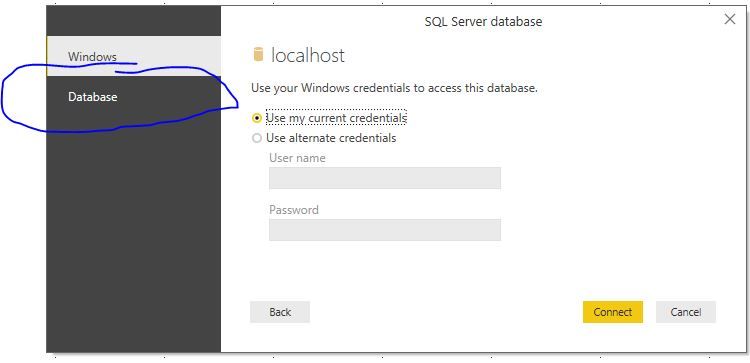
Don't you have the database login option?

Login.JPG

Thats where you login in with sql server authentication

View solution in original post

3 REPLIES 3
thomasronn
Resolver I
Resolver I

Don't you have the database login option?

Login.JPG

Thats where you login in with sql server authentication

Thomas, maybe you can help me as well. I able to get to the screen you show, but then get a user name password error. When I try to Get data again trying to connect to same portal, it bypasses the user name password screen and just fails for wrong user name password. I have shut down and restarted and it still bypasses the user name password screen. How do I clear this to change the user name etc

Thank you!!! Other BI tools don't spread logins over multiple tabs, I never even realized that was related to the authentication method (in all fairness, all of the other Microsoft tools seem to have a simple dropdown to select Windows vs. Server authentication). I really appreciate the help - I never would have found that!


Thanks!!

Scott

Helpful resources

Announcements
Power BI DataViz World Championships

Power BI Dataviz World Championships

The Power BI Data Visualization World Championships is back! Get ahead of the game and start preparing now!

December 2025 Power BI Update Carousel

Power BI Monthly Update - December 2025

Check out the December 2025 Power BI Holiday Recap!

FabCon Atlanta 2026 carousel

FabCon Atlanta 2026

Join us at FabCon Atlanta, March 16-20, for the ultimate Fabric, Power BI, AI and SQL community-led event. Save $200 with code FABCOMM.