cancel
Showing results for 
Search instead for 
Did you mean: 

Join the FabCon + SQLCon recap series. Up next: Power BI, Real-Time Intelligence, IQ and AI, and Data Factory take center stage. All sessions are available on-demand after the live show. Register now

Reply
Anonymous
Not applicable

Help adding a DISTINCT function within a calculated table

Hi,


I am having issues where the row size of a calculated table is over the 1m rows limit. I would like to try and use the distinct function within the calculated table statement to just show distinct values of a column to try and get around the 1m row limit. The original function is below:

Missing From CMDB =
SELECTCOLUMNS (
    CALCULATETABLE(
        IT_Current,
        EXCEPT ( VALUES ( it_current[ip_address_rapid7] ), VALUES ( CMDB_Active[IP_Address] ) )
    ),
    "IP_Address_Rapid7", IT_Current[IP_ADDRESS_RAPID7],
    "Host_Name", it_current[host_name_rapid7],
     "operating_system", it_current[os_description]
)

Again, I would like to add the DISTINCT function within the above statement to just show distinct values for "IT_Current[IP_ADDRESS_RAPID7]"
1 ACCEPTED SOLUTION
Anonymous
Not applicable

Hi @Anonymous ,

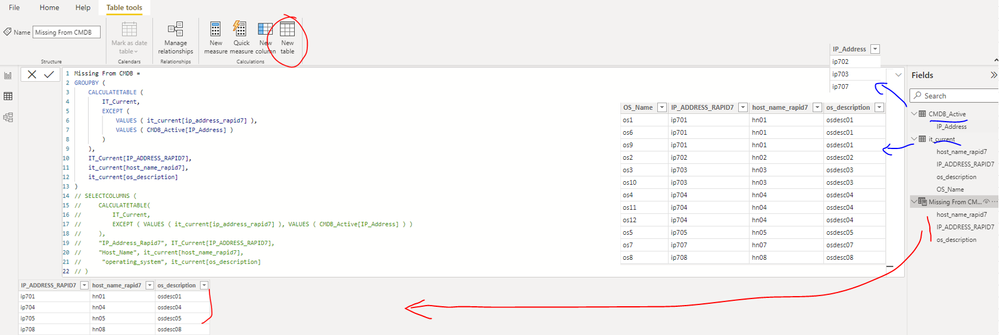
Please update the formula of the calculated table [Missing From CMDB] as below and check if it can return the expected result. Please find the details in the attachment.

Missing From CMDB =
GROUPBY (
    CALCULATETABLE (
        IT_Current,
        EXCEPT (
            VALUES ( it_current[ip_address_rapid7] ),
            VALUES ( CMDB_Active[IP_Address] )
        )
    ),
    IT_Current[IP_ADDRESS_RAPID7],
    it_current[host_name_rapid7],
    it_current[os_description]
)

yingyinr_0-1664440992100.png

If the above one can't help you get the desired result, please provide some sample data in your tables 'IT_Current' and 'CMDB_Active' (exclude sensitive data) with Text format and your expected result with backend logic and special examples. It is better if you can share a simplified pbix file. You can refer the following link to upload the file to the community. Thank you.

How to upload PBI in Community

Best Regards

View solution in original post

1 REPLY 1
Anonymous
Not applicable

Hi @Anonymous ,

Please update the formula of the calculated table [Missing From CMDB] as below and check if it can return the expected result. Please find the details in the attachment.

Missing From CMDB =
GROUPBY (
    CALCULATETABLE (
        IT_Current,
        EXCEPT (
            VALUES ( it_current[ip_address_rapid7] ),
            VALUES ( CMDB_Active[IP_Address] )
        )
    ),
    IT_Current[IP_ADDRESS_RAPID7],
    it_current[host_name_rapid7],
    it_current[os_description]
)

yingyinr_0-1664440992100.png

If the above one can't help you get the desired result, please provide some sample data in your tables 'IT_Current' and 'CMDB_Active' (exclude sensitive data) with Text format and your expected result with backend logic and special examples. It is better if you can share a simplified pbix file. You can refer the following link to upload the file to the community. Thank you.

How to upload PBI in Community

Best Regards

Helpful resources

Announcements
April Power BI Update Carousel

Power BI Monthly Update - April 2026

Check out the April 2026 Power BI update to learn about new features.

New to Fabric survey Carousel

New to Fabric Survey

If you have recently started exploring Fabric, we'd love to hear how it's going. Your feedback can help with product improvements.

Power BI DataViz World Championships carousel

Power BI DataViz World Championships - June 2026

A new Power BI DataViz World Championship is coming this June! Don't miss out on submitting your entry.

FabCon and SQLCon Highlights Carousel

FabCon &SQLCon Highlights

Experience the highlights from FabCon & SQLCon, available live and on-demand starting April 14th.