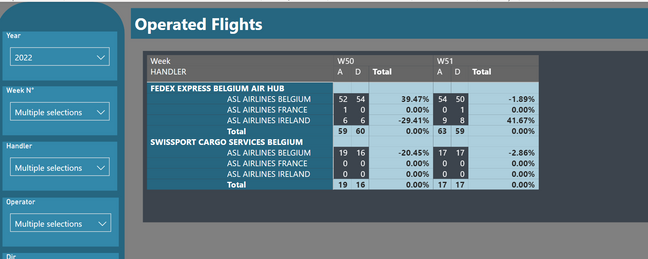
@paololito , For that we need to check the measure please share.
Please see my Rank column method can help
Have these new columns in Date Table, Week Rank is Important in Date/Week Table
Week Rank = RANKX(all('Date'),'Date'[Week Start date],,ASC,Dense)
OR
Week Rank = RANKX(all('Date'),'Date'[Year Week],,ASC,Dense) //YYYYWW format
These measures can help
This Week = CALCULATE(sum('Table'[Qty]), FILTER(ALL('Date'),'Date'[Week Rank]=max('Date'[Week Rank])))
Last Week = CALCULATE(sum('Table'[Qty]), FILTER(ALL('Date'),'Date'[Week Rank]=max('Date'[Week Rank])-1))
Time Intelligence, DATESMTD, DATESQTD, DATESYTD, Week On Week, Week Till Date, Custom Period on Period,
Custom Period till date: https://youtu.be/aU2aKbnHuWs&t=145s
Power BI — Week on Week and WTD
https://medium.com/@amitchandak.1978/power-bi-wtd-questions-time-intelligence-4-5-98c30fab69d3
https://community.powerbi.com/t5/Community-Blog/Week-Is-Not-So-Weak-WTD-Last-WTD-and-This-Week-vs-La...
https://www.youtube.com/watch?v=pnAesWxYgJ8
Power BI Offset Compare Categories, Time Intelligence MOM, QOQ, and YOY: https://youtu.be/5YMlkDNGr0U
Share with Power BI Enthusiasts: Full Power BI Video (20 Hours)
YouTube Microsoft Fabric Series 60+ Videos
YouTube Microsoft Fabric Hindi End to End
YouTube