Get Fabric or SQL Certified for Free.
Get certified for free when you join Fabric Data Days 2026 and dive into Fabric, Power BI, SQL, AI, and other essential data skills.
Join now- Power BI forums
- Get Help with Power BI
- Desktop
- Service
- Report Server
- Power Query
- Mobile Apps
- Developer
- DAX Commands and Tips
- Custom Visuals Development Discussion
- Health and Life Sciences
- Power BI Spanish forums
- Translated Spanish Desktop
- Training and Consulting
- Instructor Led Training
- Dashboard in a Day for Women, by Women
- Galleries
- Data Stories Gallery
- Themes Gallery
- Contests Gallery
- QuickViz Gallery
- Quick Measures Gallery
- Visual Calculations Gallery
- Notebook Gallery
- Translytical Task Flow Gallery
- TMDL Gallery
- R Script Showcase
- Webinars and Video Gallery
- Ideas
- Custom Visuals Ideas (read-only)
- Issues
- Issues
- Events
- Upcoming Events
Try your skills in the Power BI Dataviz World Championship! Round one ends June 26. Join now
- Power BI forums
- Forums
- Get Help with Power BI
- Desktop
- Help With Grouping By Multiple Columns
- Subscribe to RSS Feed
- Mark Topic as New
- Mark Topic as Read
- Float this Topic for Current User
- Bookmark
- Subscribe
- Printer Friendly Page


- Mark as New
- Bookmark
- Subscribe
- Mute
- Subscribe to RSS Feed
- Permalink
- Report Inappropriate Content
Help With Grouping By Multiple Columns
I need to establish what percentage of a group of staff have a particular software title installed. I have all the required data and have related it in PowerBI but I just cant work out how to group / chop it up correctly to get percentage values.
Initially my data was 4 tables, but I have merged the Hostname table with the staff table and removed staff rows for which I didn't know the hostname.
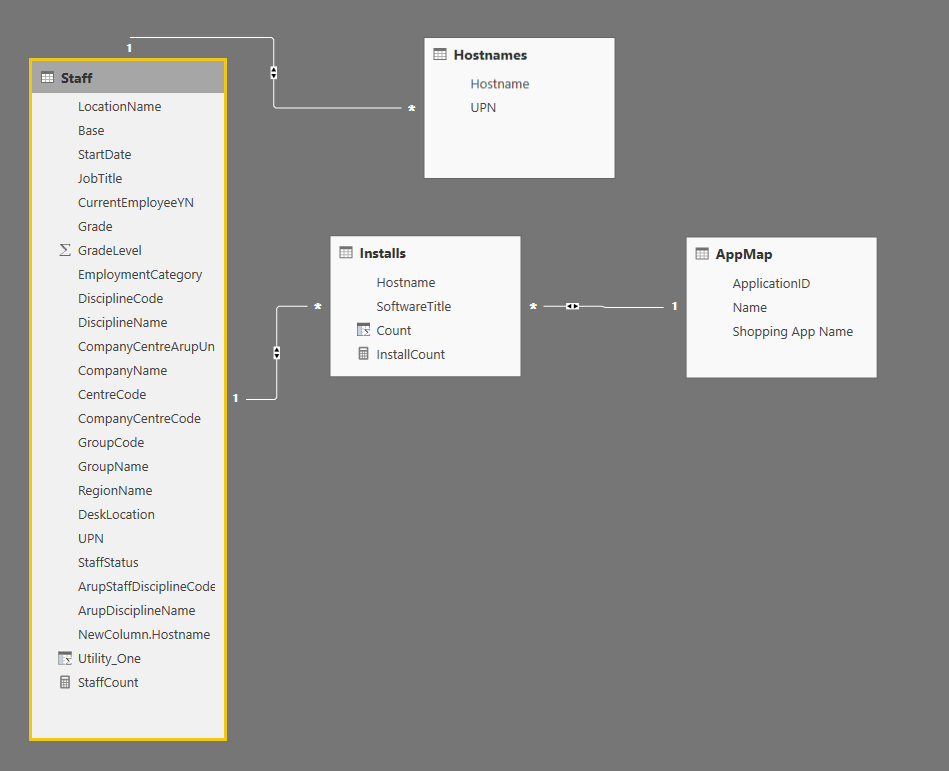
The AppMap table contains the "Shopping App Name" column, which is main title i want to use - this table maps the varying Software Titles in the Installs table to common application titles.
I want to create a table, which has the columns : Staff[DisciplineName], AppMap[Shopping App Name], Installation Count and Installation %
The Install Data is in the following format :
Hostname, SoftwareTitle
I have managed to get a table with the total installs per discipline, but I cannot work out how to do the percentage column?
Solved! Go to Solution.


- Mark as New
- Bookmark
- Subscribe
- Mute
- Subscribe to RSS Feed
- Permalink
- Report Inappropriate Content
In this scenario, you can create several calculated columns in the Installs table. Please refer to following steps:
- Create a calculated column to store the Discipline name.
Discipline =
RELATED ( Staff[DisciplineName] )
- Create a calculated column to store the total installs per application per discipline.
Total_Installs_PerApp_PerDiscipline = CALCULATE ( COUNTROWS ( Installs ), FILTER ( Installs, Installs[Discipline] = EARLIER ( Installs[Discipline] ) && Installs[SoftwareTitle] = EARLIER ( Installs[SoftwareTitle] ) ) ) - Create a calculated column to store the total installs per application in all disciplines.
Total_Installs_Per_App = CALCULATE ( COUNTROWS ( Installs ), ALLEXCEPT ( Installs, Installs[SoftwareTitle] ) ) - Create a calculated column to store the percent of install per staff discipline.
Percentage_PerApp_PerDiscipline =
Installs[Total_Installs_PerApp_PerDiscipline]
/ Installs[Total_Installs_Per_App]
- Drag the Table chart into your canvas as below.
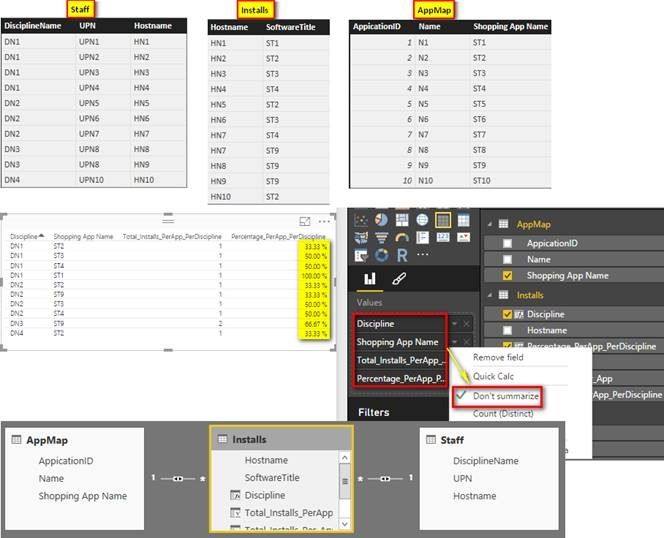
Regards,
- Mark as New
- Bookmark
- Subscribe
- Mute
- Subscribe to RSS Feed
- Permalink
- Report Inappropriate Content
In this scenario, you can create several calculated columns in the Installs table. Please refer to following steps:
- Create a calculated column to store the Discipline name.
Discipline =
RELATED ( Staff[DisciplineName] )
- Create a calculated column to store the total installs per application per discipline.
Total_Installs_PerApp_PerDiscipline = CALCULATE ( COUNTROWS ( Installs ), FILTER ( Installs, Installs[Discipline] = EARLIER ( Installs[Discipline] ) && Installs[SoftwareTitle] = EARLIER ( Installs[SoftwareTitle] ) ) ) - Create a calculated column to store the total installs per application in all disciplines.
Total_Installs_Per_App = CALCULATE ( COUNTROWS ( Installs ), ALLEXCEPT ( Installs, Installs[SoftwareTitle] ) ) - Create a calculated column to store the percent of install per staff discipline.
Percentage_PerApp_PerDiscipline =
Installs[Total_Installs_PerApp_PerDiscipline]
/ Installs[Total_Installs_Per_App]
- Drag the Table chart into your canvas as below.
Regards,
- Mark as New
- Bookmark
- Subscribe
- Mute
- Subscribe to RSS Feed
- Permalink
- Report Inappropriate Content
@v-sihou-msft Many thanks for your detailed an accurate response. It was exactly what i needed.

- Mark as New
- Bookmark
- Subscribe
- Mute
- Subscribe to RSS Feed
- Permalink
- Report Inappropriate Content
Is this percentage of the Grand Total or the Column Total that you want?
- Mark as New
- Bookmark
- Subscribe
- Mute
- Subscribe to RSS Feed
- Permalink
- Report Inappropriate Content
Its the percentage of column total I think i want. I tried grand total, and it was giving me the % installs of all staff and I want the % of install per staff discipline (a column in the Staff table).
- Mark as New
- Bookmark
- Subscribe
- Mute
- Subscribe to RSS Feed
- Permalink
- Report Inappropriate Content
A Sum divided by a Calculated Sum filtering the "Row" Dimension should work.
SUM([Value])/CALCULATE(SUM([Value]),ALLSELECTED(RowDimension))


- Mark as New
- Bookmark
- Subscribe
- Mute
- Subscribe to RSS Feed
- Permalink
- Report Inappropriate Content
@leinad13 try clicking on dropdown for the Value section -> Quick Calc -> Percentage of grand total. That will display values in percentage.


Helpful resources

Data Days 2026
Don't miss out on Data Days, June 15 through August 7. Learn Fabric, Power BI, SQL, AI and more.

Power BI DataViz World Championships - June 2026
A new Power BI DataViz World Championship is coming this June! Don't miss out on submitting your entry.

| User | Count |
|---|---|
| 23 | |
| 21 | |
| 20 | |
| 20 | |
| 11 |


| User | Count |
|---|---|
| 62 | |
| 55 | |
| 47 | |
| 45 | |
| 37 |


