Don't miss your chance to take the Fabric Data Engineer (DP-600) exam for FREE! Find out how by attending the DP-600 session on April 23rd (pacific time), live or on-demand.
Learn moreNext up in the FabCon + SQLCon recap series: The roadmap for Microsoft SQL and Maximizing Developer experiences in Fabric. All sessions are available on-demand after the live show. Register now
Hello,
I was hoping to get some help regarding changing data type for one of my columns in PowerBI to a date data type. I am using the Data view to do this. As you can see in the screen caps below, the data type before changing the column is "Whole number" and I tried changing to "Date" data type with the format as "yyyy-mm" since that is what is on the column. However, when I do this, the date changes completely and I do not know where this new date is even coming from. I tried seeing if there was a solution online but I am not sure exactly how to phrase the question without screenshots and could not find a solution which is why I created my own post. I apologize in advance if this was already posted in the past.
Before changing data type
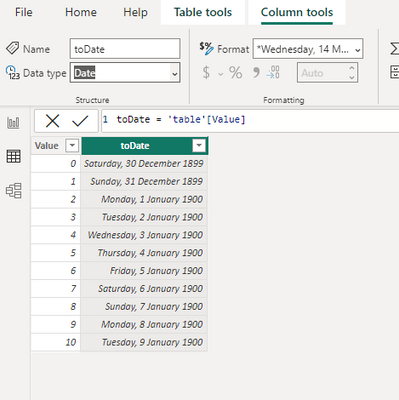
the reason that's not working is because the dates in PowerBI can't be converted in the way that you have done it. For example, if you convert the whole number 0, the date is 30/12/1899. so when you convert 202301 to a date, you're getting the date 202301 days after 1899. The formatting just changes the way the data is displayed, but it doesn't change the underlying data.
To fix this, I suggest two things - the first is to go back to the source of the raw data and provide a proper date there. PowerBI should be able to handle the date conversion if provided a data in a normal date format. If this isn't possible, you can try to convert your column using a DAX calculated column.
We'll need to extract the year and month, then convert both to dates. Something like the following should work:
Column =
var monthPart = RIGHT(FORMAT([month_date_yyyymm]), 2)
var yearPart = LEFT(FORMAT([month_date_yyyymm]), 4)
return DATE(yearPart, monthPart, 1)
this should return the 1st of each month as a date. Note: a date type requires a day, month and year. You can apply formatting to hide the date part in your actual visuals.
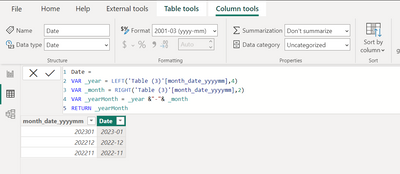
As far as based on my experience we cannot convert whole number into date but you can try the below formula in new calculated column and use it in modelling.
Date =
VAR _year = LEFT('Table (3)'[month_date_yyyymm],4)
VAR _month = RIGHT('Table (3)'[month_date_yyyymm],2)
VAR _yearMonth = _year &"-"& _month
RETURN _yearMonth
Thanks,
Arul
If you have recently started exploring Fabric, we'd love to hear how it's going. Your feedback can help with product improvements.
A new Power BI DataViz World Championship is coming this June! Don't miss out on submitting your entry.
| User | Count |
|---|---|
| 47 | |
| 44 | |
| 39 | |
| 20 | |
| 15 |
| User | Count |
|---|---|
| 69 | |
| 68 | |
| 32 | |
| 27 | |
| 25 |