This time we’re going bigger than ever. Fabric, Power BI, SQL, AI and more. We're covering it all. You won't want to miss it.
Learn moreDid you hear? There's a new SQL AI Developer certification (DP-800). Start preparing now and be one of the first to get certified. Register now
I have a data set that looks like this:
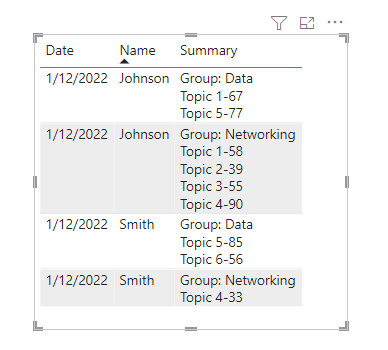
Looking to transform the data into this:
Thanks for helping!
Solved! Go to Solution.
Hi, @shaebert
Result:
M code:
let
Source = Table.FromRows(Json.Document(Binary.Decompress(Binary.FromText("i45WMtQ3NNI3MjAyUtJR8srPyCvOzwOyQvILMpMVDIEsUwsg4ZdaUp5flJ2Zl64Uq4NfD0jM2JI0PcYge0xJ02MCZFkakKYH5B8zcyDhkliSSFA1yEHmOFUH52aWZKCotTAlTq0ZyLdmxKkF+dLYGM2XsQA=", BinaryEncoding.Base64), Compression.Deflate)), let _t = ((type nullable text) meta [Serialized.Text = true]) in type table [#"Date " = _t, #" Name " = _t, Topic = _t, #"Topic Score" = _t, Group = _t]),
#"Changed Type" = Table.TransformColumnTypes(Source,{{"Date ", type date}, {" Name ", type text}, {"Topic", type text}, {"Topic Score", Int64.Type}, {"Group", type text}}),
#"Grouped Rows" = Table.Group(#"Changed Type", {"Date ", " Name ", "Group"}, {{"GroupTable", each Table.AddColumn(Table.SelectColumns(_,{"Topic","Topic Score"}),"Summary", each [Topic]&"-"&Text.From([Topic Score]))
}}
),
#"Added Custom" = Table.AddColumn(#"Grouped Rows", "Summary", each List.Accumulate([GroupTable][Summary],"Group: "&_[Group],(state, current) => state&"#(lf)"¤t)
),
#"Removed Columns" = Table.RemoveColumns(#"Added Custom",{"Group", "GroupTable"})
in
#"Removed Columns"
Please refer to the attachment below for details.
Hope this helps.
Best Regards,
Community Support Team _ Zeon Zheng
If this post helps, then please consider Accept it as the solution to help the other members find it more quickly.
Hi, @shaebert
Result:
M code:
let
Source = Table.FromRows(Json.Document(Binary.Decompress(Binary.FromText("i45WMtQ3NNI3MjAyUtJR8srPyCvOzwOyQvILMpMVDIEsUwsg4ZdaUp5flJ2Zl64Uq4NfD0jM2JI0PcYge0xJ02MCZFkakKYH5B8zcyDhkliSSFA1yEHmOFUH52aWZKCotTAlTq0ZyLdmxKkF+dLYGM2XsQA=", BinaryEncoding.Base64), Compression.Deflate)), let _t = ((type nullable text) meta [Serialized.Text = true]) in type table [#"Date " = _t, #" Name " = _t, Topic = _t, #"Topic Score" = _t, Group = _t]),
#"Changed Type" = Table.TransformColumnTypes(Source,{{"Date ", type date}, {" Name ", type text}, {"Topic", type text}, {"Topic Score", Int64.Type}, {"Group", type text}}),
#"Grouped Rows" = Table.Group(#"Changed Type", {"Date ", " Name ", "Group"}, {{"GroupTable", each Table.AddColumn(Table.SelectColumns(_,{"Topic","Topic Score"}),"Summary", each [Topic]&"-"&Text.From([Topic Score]))
}}
),
#"Added Custom" = Table.AddColumn(#"Grouped Rows", "Summary", each List.Accumulate([GroupTable][Summary],"Group: "&_[Group],(state, current) => state&"#(lf)"¤t)
),
#"Removed Columns" = Table.RemoveColumns(#"Added Custom",{"Group", "GroupTable"})
in
#"Removed Columns"
Please refer to the attachment below for details.
Hope this helps.
Best Regards,
Community Support Team _ Zeon Zheng
If this post helps, then please consider Accept it as the solution to help the other members find it more quickly.
@shaebert you have data that is properly laid out in a table that doesn't violate first normal form (no repeating values). And you want to break 1NF??? Why would you want to do that? Any manipulation you might need to do would become far more difficult than it needs to be.
What you could do instead - without transforming anything - is present the data in a matrix visual with values shown on rows.
Just a thought...
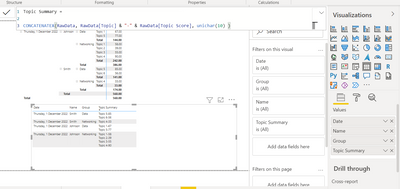
@shaebert is this close enough:
Copying DAX from this post? Click here for a hack to quickly replace it with your own table names
Has this post solved your problem? Please Accept as Solution so that others can find it quickly and to let the community know your problem has been solved.
If you found this post helpful, please give Kudos C
I work as a Microsoft trainer and consultant, specialising in Power BI and Power Query.
www.excelwithallison.com
Check out the April 2026 Power BI update to learn about new features.
Sign up to receive a private message when registration opens and key events begin.
If you have recently started exploring Fabric, we'd love to hear how it's going. Your feedback can help with product improvements.
| User | Count |
|---|---|
| 34 | |
| 31 | |
| 30 | |
| 21 | |
| 16 |
| User | Count |
|---|---|
| 62 | |
| 51 | |
| 31 | |
| 23 | |
| 23 |