
Join us at FabCon Atlanta from March 16 - 20, 2026, for the ultimate Fabric, Power BI, AI and SQL community-led event. Save $200 with code FABCOMM.
Register now!The Power BI Data Visualization World Championships is back! Get ahead of the game and start preparing now! Learn more
I'm working on building a report for a client and I need "N/A" to appear in blank columns. I tried putting a 0 there but my client was not a fan. I cannot seem to figure this out, "N/A" is text and the columns I have are full of mostly whole numbers. Is there anyway to do this?
I cannot change the numbers to text, there is some conditional formatting/ a heatmap for the numbers. Changing this to text ruins the heatmap.
I'll give it a go, thank you friend.
@TheBlackCrown No worries at all! More than happy to help
Appreciate your Kudos!
Please accept the solution if it answers your question 🙂
Hey @TheBlackCrown !
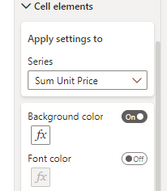
This seems to work for me: would you want to try something similar to this?
Appreciate your Kudos!
Please accept the solution if it answers your question 🙂
It works! But how do I get N/A to appear in the column I'm working on rather than in its own column. Currently it recreated the column I'm working on.
Hey @TheBlackCrown
Would you be abe to give me an example with an image. Stuggling to get my head around this one 😊
I'll try my best once you post a copy 👨🏭
Appreciate your Kudos!
Please accept the solution if it answers your question 🙂
The Power BI Data Visualization World Championships is back! Get ahead of the game and start preparing now!
Check out the November 2025 Power BI update to learn about new features.
| User | Count |
|---|---|
| 59 | |
| 43 | |
| 42 | |
| 23 | |
| 17 |
| User | Count |
|---|---|
| 190 | |
| 122 | |
| 96 | |
| 66 | |
| 47 |