cancel
Showing results for 
Search instead for 
Did you mean: 

The Power BI Data Visualization World Championships is back! Get ahead of the game and start preparing now! Learn more

Reply
jyeager
Helper I
Helper I

Help Needed! Data Aggregation / Summing Two Measures

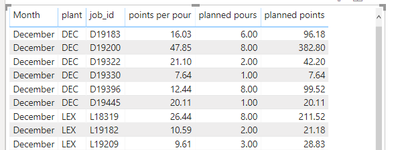
Hello All! I am having some trouble with a measure I've named "planned points". The measure is simply multiplying [points per pour] and [planned pours]. It actually works as written. In "Screenshot 1" below you see that the measure is taking [points per pour] * [planned pours] to get [planned points]. Similarly in Screenshot 2 it is doing the same.


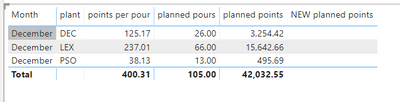
This issue I am having is that when I remove the [job_id] field from the visual I want to show total [planned points] by plant (i.e. a sum of the [planned points] by [job_id]) NOT total [points per pour] times total [planned pours]. Are there any dax functions that would help me aggregate the data in my [planned points] measure how I have described? Any help is appreeciated! Thank you!


Screenshot 1:

capture1.PNG


Screenshot 2:

Notice that the measure is working correctly to multiply [points per pour] and [planned pours]. However, I want to show the sum of the [planned points] per [job_id]. 

6 REPLIES 6
zoloturu
Memorable Member
Memorable Member

Hi @jyeager ,


If job_id is a grain of data then you can simply use SUMX:


= SUMX( 'YourTable', [points per hour] * [planned hours])

 
Regards,
Ruslan Zolotukhin (zoloturu)
BI Engineer at Akvelon Inc. / Kharkiv Power BI User Group Leader / DAX & Power BI Trainer
-------------------------------------------------------------------
Did I answer your question? Mark my post as a solution!
It was useful? Press Thumbs Up!

You are from Ukraine? If yes then welcome to Power BI User Group - KhPUG website. Other country? Check and find proper one - Power BI User Groups

Hi @zoloturu 


Thanks for the quick response! SUMX did not work. Its worth noting that the [points per pour] and [planned pours] fields are measure themselves:

  • [points per pour] = CALCULATE(SUM('database-pbi'[value]),'datbase-pbi'[category]="points per pour")
  • [planned pours] = CALCULATE(SUM('database-pbi'[value]),'datbase-pbi'[category]="planned pours")


Here is the result when I tried SUMX (measure was titled "NEW planned points":

capture3.PNG


Any other thoughts/suggestions? Thanks again!


JY

Hi @jyeager ,


You can still calculate it in a measure. I did similar many times:

new planned points = 
VAR __CurrentRowMonth = MAX('Date'[Month])
VAR __CurrentRowPlant = MAX('...'[plant])
VAR __TempTable = SUMMARIZE('database-pbi','Date'[Month],'...'[plant],"planned points",[points per hour]*[planned pours])
VAR __TempTable2 = FILTER(__TempTable,[Month] = __CurrentRowMonth, [plant] = __CurrentRowPlant)

RETURN
    SUMX(__TempTable2, [planned points])

Just correct table names in quotes.


Regards,
Ruslan Zolotukhin (zoloturu)
BI Engineer at Akvelon Inc. / Kharkiv Power BI User Group Leader / DAX & Power BI Trainer
-------------------------------------------------------------------
Did I answer your question? Mark my post as a solution!
It was useful? Press Thumbs Up!

You are from Ukraine? If yes then welcome to Power BI User Group - KhPUG website. Other country? Check and find proper one - Power BI User Groups

Thanks @amitchandak  and @zoloturu 


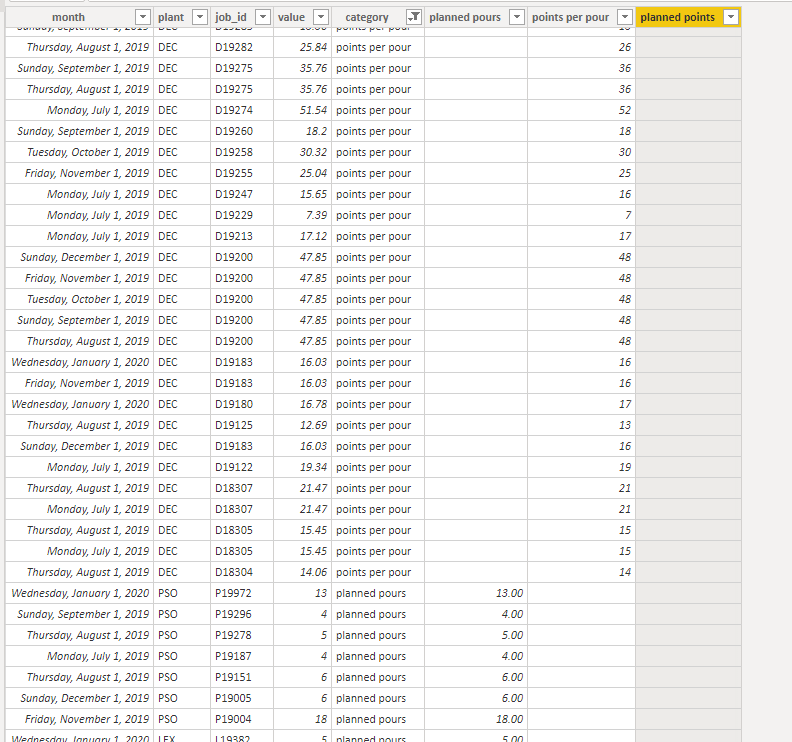
I am getting blanks in the created column [planned points] and I think it is becuase the way the table is set-up. Below you will see that I a values column and a category column. It makes sense that when I just try to multiple the two created columns ([planned pours] and [points per pour]) I get a blank for my result ([planned points]). Any other thoughts here? It's like I need to place filters on the sum statements so that it is multiplying [month]&[job_id] of [planned pours] and [month]&[job_id] of [points per pour].... I think that can only be done in a measure though.


capture4.PNG

@jyeager ,


Did you tried a measure which I advised you earlier? (Don't create it as a column, it should be a measure).


Regards,
Ruslan Zolotukhin (zoloturu)
BI Engineer at Akvelon Inc. / Kharkiv Power BI User Group Leader / DAX & Power BI Trainer
-------------------------------------------------------------------
Did I answer your question? Mark my post as a solution!
It was useful? Press Thumbs Up!

You are from Ukraine? If yes then welcome to Power BI User Group - KhPUG website. Other country? Check and find proper one - Power BI User Groups

First create two columns in table

table column 1 = if(datbase-pbi'[category]="planned pours" ,'database-pbi'[value]),blank)

table column 2= if(datbase-pbi'[category]="points per pour" ,'database-pbi'[value]),blank)


You can multiple in 3rd column or use sumx.


Share with Power BI Enthusiasts: Full Power BI Video (20 Hours) YouTube
Microsoft Fabric Series 60+ Videos YouTube
Microsoft Fabric Hindi End to End YouTube

Helpful resources

Announcements
Power BI DataViz World Championships

Power BI Dataviz World Championships

The Power BI Data Visualization World Championships is back! Get ahead of the game and start preparing now!

December 2025 Power BI Update Carousel

Power BI Monthly Update - December 2025

Check out the December 2025 Power BI Holiday Recap!

FabCon Atlanta 2026 carousel

FabCon Atlanta 2026

Join us at FabCon Atlanta, March 16-20, for the ultimate Fabric, Power BI, AI and SQL community-led event. Save $200 with code FABCOMM.