Get Fabric or SQL Certified for Free.
Get certified for free when you join Fabric Data Days 2026 and dive into Fabric, Power BI, SQL, AI, and other essential data skills.
Join now- Power BI forums
- Get Help with Power BI
- Desktop
- Service
- Report Server
- Power Query
- Mobile Apps
- Developer
- DAX Commands and Tips
- Custom Visuals Development Discussion
- Health and Life Sciences
- Power BI Spanish forums
- Translated Spanish Desktop
- Training and Consulting
- Instructor Led Training
- Dashboard in a Day for Women, by Women
- Galleries
- Data Stories Gallery
- Themes Gallery
- Contests Gallery
- QuickViz Gallery
- Quick Measures Gallery
- Visual Calculations Gallery
- Notebook Gallery
- Translytical Task Flow Gallery
- TMDL Gallery
- R Script Showcase
- Webinars and Video Gallery
- Ideas
- Custom Visuals Ideas (read-only)
- Issues
- Issues
- Events
- Upcoming Events
Try your skills in the Power BI Dataviz World Championship! Round one ends June 26. Join now
- Power BI forums
- Forums
- Get Help with Power BI
- Desktop
- Re: Help Needed! Data Aggregation / Summing Two Me...
- Subscribe to RSS Feed
- Mark Topic as New
- Mark Topic as Read
- Float this Topic for Current User
- Bookmark
- Subscribe
- Printer Friendly Page


- Mark as New
- Bookmark
- Subscribe
- Mute
- Subscribe to RSS Feed
- Permalink
- Report Inappropriate Content
Help Needed! Data Aggregation / Summing Two Measures
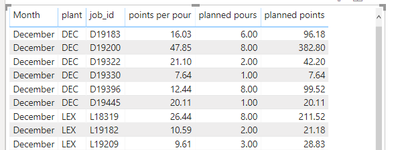
Hello All! I am having some trouble with a measure I've named "planned points". The measure is simply multiplying [points per pour] and [planned pours]. It actually works as written. In "Screenshot 1" below you see that the measure is taking [points per pour] * [planned pours] to get [planned points]. Similarly in Screenshot 2 it is doing the same.
This issue I am having is that when I remove the [job_id] field from the visual I want to show total [planned points] by plant (i.e. a sum of the [planned points] by [job_id]) NOT total [points per pour] times total [planned pours]. Are there any dax functions that would help me aggregate the data in my [planned points] measure how I have described? Any help is appreeciated! Thank you!
Screenshot 1:
Screenshot 2:
Notice that the measure is working correctly to multiply [points per pour] and [planned pours]. However, I want to show the sum of the [planned points] per [job_id].


- Mark as New
- Bookmark
- Subscribe
- Mute
- Subscribe to RSS Feed
- Permalink
- Report Inappropriate Content
Hi @jyeager ,
If job_id is a grain of data then you can simply use SUMX:
= SUMX( 'YourTable', [points per hour] * [planned hours])
Regards,
Ruslan Zolotukhin (zoloturu)
BI Engineer at Akvelon Inc. / Kharkiv Power BI User Group Leader / DAX & Power BI Trainer
-------------------------------------------------------------------
Did I answer your question? Mark my post as a solution!
It was useful? Press Thumbs Up!
You are from Ukraine? If yes then welcome to Power BI User Group - KhPUG website. Other country? Check and find proper one - Power BI User Groups
- Mark as New
- Bookmark
- Subscribe
- Mute
- Subscribe to RSS Feed
- Permalink
- Report Inappropriate Content
Hi @zoloturu
Thanks for the quick response! SUMX did not work. Its worth noting that the [points per pour] and [planned pours] fields are measure themselves:
- [points per pour] = CALCULATE(SUM('database-pbi'[value]),'datbase-pbi'[category]="points per pour")
- [planned pours] = CALCULATE(SUM('database-pbi'[value]),'datbase-pbi'[category]="planned pours")
Here is the result when I tried SUMX (measure was titled "NEW planned points":
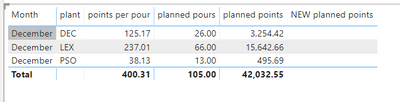
Any other thoughts/suggestions? Thanks again!
JY
- Mark as New
- Bookmark
- Subscribe
- Mute
- Subscribe to RSS Feed
- Permalink
- Report Inappropriate Content
Hi @jyeager ,
You can still calculate it in a measure. I did similar many times:
new planned points =
VAR __CurrentRowMonth = MAX('Date'[Month])
VAR __CurrentRowPlant = MAX('...'[plant])
VAR __TempTable = SUMMARIZE('database-pbi','Date'[Month],'...'[plant],"planned points",[points per hour]*[planned pours])
VAR __TempTable2 = FILTER(__TempTable,[Month] = __CurrentRowMonth, [plant] = __CurrentRowPlant)

RETURN
    SUMX(__TempTable2, [planned points])
Just correct table names in quotes.
Regards,
Ruslan Zolotukhin (zoloturu)
BI Engineer at Akvelon Inc. / Kharkiv Power BI User Group Leader / DAX & Power BI Trainer
-------------------------------------------------------------------
Did I answer your question? Mark my post as a solution!
It was useful? Press Thumbs Up!
You are from Ukraine? If yes then welcome to Power BI User Group - KhPUG website. Other country? Check and find proper one - Power BI User Groups
- Mark as New
- Bookmark
- Subscribe
- Mute
- Subscribe to RSS Feed
- Permalink
- Report Inappropriate Content
Thanks @amitchandak and @zoloturu
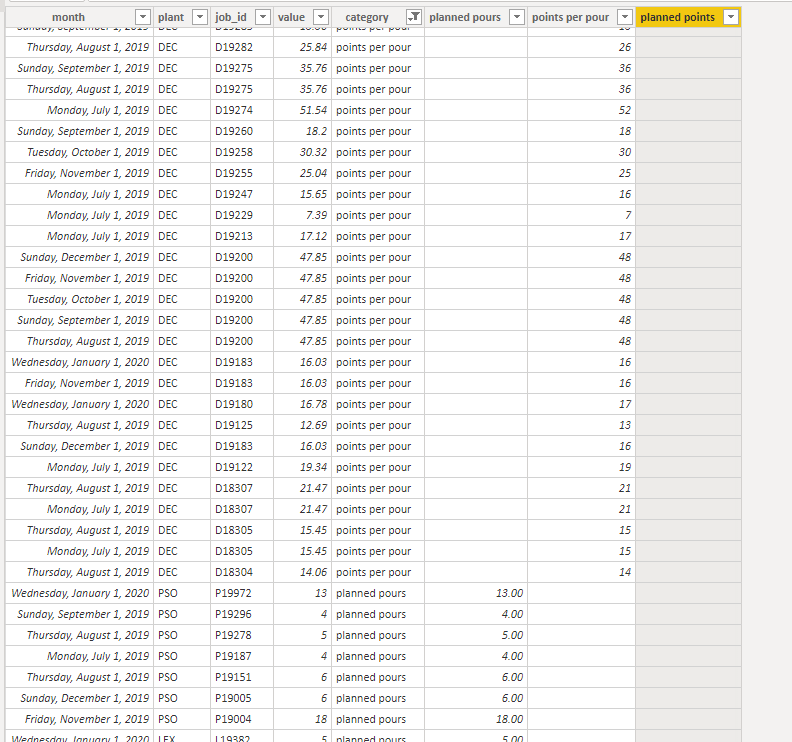
I am getting blanks in the created column [planned points] and I think it is becuase the way the table is set-up. Below you will see that I a values column and a category column. It makes sense that when I just try to multiple the two created columns ([planned pours] and [points per pour]) I get a blank for my result ([planned points]). Any other thoughts here? It's like I need to place filters on the sum statements so that it is multiplying [month]&[job_id] of [planned pours] and [month]&[job_id] of [points per pour].... I think that can only be done in a measure though.
- Mark as New
- Bookmark
- Subscribe
- Mute
- Subscribe to RSS Feed
- Permalink
- Report Inappropriate Content
@jyeager ,
Did you tried a measure which I advised you earlier? (Don't create it as a column, it should be a measure).
Regards,
Ruslan Zolotukhin (zoloturu)
BI Engineer at Akvelon Inc. / Kharkiv Power BI User Group Leader / DAX & Power BI Trainer
-------------------------------------------------------------------
Did I answer your question? Mark my post as a solution!
It was useful? Press Thumbs Up!
You are from Ukraine? If yes then welcome to Power BI User Group - KhPUG website. Other country? Check and find proper one - Power BI User Groups


- Mark as New
- Bookmark
- Subscribe
- Mute
- Subscribe to RSS Feed
- Permalink
- Report Inappropriate Content
First create two columns in table
table column 1 = if(datbase-pbi'[category]="planned pours" ,'database-pbi'[value]),blank)
table column 2= if(datbase-pbi'[category]="points per pour" ,'database-pbi'[value]),blank)
You can multiple in 3rd column or use sumx.

Helpful resources

Fabric Data Days 2026
Don't miss out on Data Days, June 15 through August 7. Learn Fabric, Power BI, SQL, AI and more.

Power BI DataViz World Championships - June 2026
A new Power BI DataViz World Championship is coming this June! Don't miss out on submitting your entry.

| User | Count |
|---|---|
| 23 | |
| 22 | |
| 21 | |
| 17 | |
| 11 |


| User | Count |
|---|---|
| 58 | |
| 55 | |
| 43 | |
| 36 | |
| 35 |


