FabCon is coming to Atlanta
Join us at FabCon Atlanta from March 16 - 20, 2026, for the ultimate Fabric, Power BI, AI and SQL community-led event. Save $200 with code FABCOMM.
Register now!- Power BI forums
- Get Help with Power BI
- Desktop
- Service
- Report Server
- Power Query
- Mobile Apps
- Developer
- DAX Commands and Tips
- Custom Visuals Development Discussion
- Health and Life Sciences
- Power BI Spanish forums
- Translated Spanish Desktop
- Training and Consulting
- Instructor Led Training
- Dashboard in a Day for Women, by Women
- Galleries
- Data Stories Gallery
- Themes Gallery
- Contests Gallery
- QuickViz Gallery
- Quick Measures Gallery
- Visual Calculations Gallery
- Notebook Gallery
- Translytical Task Flow Gallery
- TMDL Gallery
- R Script Showcase
- Webinars and Video Gallery
- Ideas
- Custom Visuals Ideas (read-only)
- Issues
- Issues
- Events
- Upcoming Events
The Power BI Data Visualization World Championships is back! It's time to submit your entry. Live now!
- Power BI forums
- Forums
- Get Help with Power BI
- Desktop
- Help Me count
- Subscribe to RSS Feed
- Mark Topic as New
- Mark Topic as Read
- Float this Topic for Current User
- Bookmark
- Subscribe
- Printer Friendly Page

- Mark as New
- Bookmark
- Subscribe
- Mute
- Subscribe to RSS Feed
- Permalink
- Report Inappropriate Content
Help Me count
Hello guys,
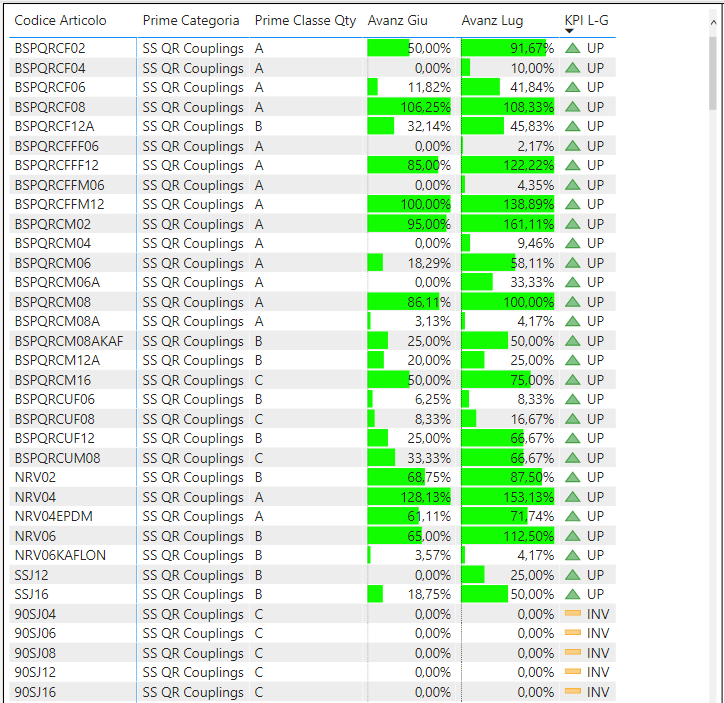
i have a problem with my file, i can't make a count.
Specifically I should count how many items are of category "A" and "UP" from the table.
The fields where the "UP" state originates is the following:
KPI L-G = IF ([DIFF L-G] <0, "DWN", IF ([DIFF L-G]> 0, "UP", "INV"))
DIFF L-G = [Adv Jul] - [Adv Down]
Adv Down = CALCULATE (SUM ('SM-ABC Analysis' [Adv.]), 'SM-ABC Analysis' [Month] = "6")
Adv Jul = CALCULATE (SUM ('SM-ABC Analysis' [Adv.]), 'SM-ABC Analysis' [Month] = "7")
Thank you all
Solved! Go to Solution.
- Mark as New
- Bookmark
- Subscribe
- Mute
- Subscribe to RSS Feed
- Permalink
- Report Inappropriate Content
Hi @GoodMan85
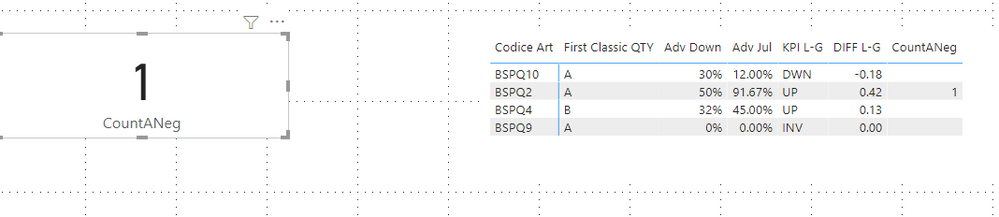
I build a sample to have a test.

Try this measure.
CountANeg =
CALCULATE (
    DISTINCTCOUNT ( 'SM-ABC Analysis'[Codice Art] ),
    FILTER (
        'SM-ABC Analysis',
        'SM-ABC Analysis'[Classic QTY] = "A"
            && CALCULATE (
                [DIFF L-G],
                ALLEXCEPT (
                    'SM-ABC Analysis',
                    'SM-ABC Analysis'[Codice Art],
                    'SM-ABC Analysis'[Classic QTY]
                )
            ) > 0
    )
)
Result is as below.
Best Regards,
Rico Zhou
If this post helps, then please consider Accept it as the solution to help the other members find it more quickly.


- Mark as New
- Bookmark
- Subscribe
- Mute
- Subscribe to RSS Feed
- Permalink
- Report Inappropriate Content
@GoodMan85 Try using COUNTX(FILTER(...),...)
Follow on LinkedIn
@ me in replies or I'll lose your thread!!!
Instead of a Kudo, please vote for this idea
Become an expert!: Enterprise DNA
External Tools: MSHGQM
YouTube Channel!: Microsoft Hates Greg
Latest book!: DAX For Humans
DAX is easy, CALCULATE makes DAX hard...
- Mark as New
- Bookmark
- Subscribe
- Mute
- Subscribe to RSS Feed
- Permalink
- Report Inappropriate Content
Hi @GoodMan85
I build a sample to have a test.
Try this measure.
CountANeg =
CALCULATE (
    DISTINCTCOUNT ( 'SM-ABC Analysis'[Codice Art] ),
    FILTER (
        'SM-ABC Analysis',
        'SM-ABC Analysis'[Classic QTY] = "A"
            && CALCULATE (
                [DIFF L-G],
                ALLEXCEPT (
                    'SM-ABC Analysis',
                    'SM-ABC Analysis'[Codice Art],
                    'SM-ABC Analysis'[Classic QTY]
                )
            ) > 0
    )
)
Result is as below.
Best Regards,
Rico Zhou
If this post helps, then please consider Accept it as the solution to help the other members find it more quickly.
- Mark as New
- Bookmark
- Subscribe
- Mute
- Subscribe to RSS Feed
- Permalink
- Report Inappropriate Content
Thank you so much @Anonymous !
Great, working good.
- Mark as New
- Bookmark
- Subscribe
- Mute
- Subscribe to RSS Feed
- Permalink
- Report Inappropriate Content
I tried to do as you suggested, I have no errors in the formula but it does not allow me to view any results.
Do you have any suggestions?
- Mark as New
- Bookmark
- Subscribe
- Mute
- Subscribe to RSS Feed
- Permalink
- Report Inappropriate Content
@GoodMan85 I'd need some sample data to test with, I don't want to hand type in a bunch of data.
Follow on LinkedIn
@ me in replies or I'll lose your thread!!!
Instead of a Kudo, please vote for this idea
Become an expert!: Enterprise DNA
External Tools: MSHGQM
YouTube Channel!: Microsoft Hates Greg
Latest book!: DAX For Humans
DAX is easy, CALCULATE makes DAX hard...

Helpful resources


| User | Count |
|---|---|
| 53 | |
| 37 | |
| 31 | |
| 21 | |
| 19 |


| User | Count |
|---|---|
| 138 | |
| 102 | |
| 59 | |
| 36 | |
| 35 |


