cancel
Showing results for 
Search instead for 
Did you mean: 

Get Fabric certified for FREE! Don't miss your chance! Learn more

Reply
Google5ive
Frequent Visitor

Help Correcting a Converted Formula

Help!!! I need some assistance and it might be advance I'm trying to convert a statement that was written in somewhat a SQL format to DAX.
Not sure if this is the correct location to post this.
 
For example
 

= Sum(Fields.ADDTL_INST + Fields.ADDTL_REF + Fields.EXCISE_TAX + Fields.NON_STANDARD_FEES + Fields.RECORDING_FEES + Fields.EXC_ENT + Fields.UCC_FEES + Fields.UAP_FEES) - Sum(Fields.UCC_FEES) - Sum(Fields.EXCISE_TAX) - Sum(Fields.NON_STANDARD_FEES) - SUM(iif((Fields.ADDTL_INST > 0 Or Fields.ADDTL_REF > 0 Or Fields.EXCISE_TAX > 0 Or Fields.RECORDING_FEES > 0 Or Fields.NON_STANDARD_FEES > 0) AND Fields.DT_DESC = "D - T", (Fields.ADDTL_INST + Fields.ADDTL_REF + Fields.EXCISE_TAX + Fields.NON_STANDARD_FEES + Fields.RECORDING_FEES + Fields.EXC_ENT), 0.00)) - COUNT(iif((Fields.ADDTL_INST > 0 Or Fields.ADDTL_REF > 0 Or Fields.EXCISE_TAX > 0 Or Fields.RECORDING_FEES > 0 Or Fields.NON_STANDARD_FEES > 0 Or Fields.UCC_FEES > 0) AND (Fields.DT_DESC = "DEED" OR Fields.DT_DESC = "EASMT" OR Fields.DT_DESC = "SEE INSTRUMENT"), 1, null)) * 6.2

 
So Far this is what I have
 
Fee =
(
SUM ( 'Query1'[ADDTL_INST] ) + SUM ( 'Query1'[ADDTL_REF] )
+ SUM ( 'Query1'[EXCISE_TAX] )
+ SUM ( 'Query1'[NON_STANDARD_FEES] )
+ SUM ( 'Query1'[RECORDING_FEES] )
+ SUM ( 'Query1'[EXC_ENT] )
+ SUM ( 'Query1'[UCC_FEES] )
+ SUM ( 'Query1'[UAP_FEES] )
)
- SUM ( 'Query1'[UCC_FEES] )
- SUM ( 'Query1'[EXCISE_TAX] )
- SUM ( 'Query1'[NON_STANDARD_FEES] )
- (
CALCULATE (
SUM ( 'Query1'[ADDTL_INST] ),
'Query1'[ADDTL_INST] > 0,
Query1[DT_DESC] = "D - T"
)
+ CALCULATE (
SUM ( 'Query1'[ADDTL_REF] ),
'Query1'[ADDTL_REF] > 0,
Query1[DT_DESC] = "D - T"
)
+ CALCULATE (
SUM ( 'Query1'[EXCISE_TAX] ),
'Query1'[EXCISE_TAX] > 0,
Query1[DT_DESC] = "D - T"
)
+ CALCULATE (
SUM ( 'Query1'[RECORDING_FEES] ),
'Query1'[RECORDING_FEES] > 0,
Query1[DT_DESC] = "D - T"
)
+ CALCULATE (
SUM ( 'Query1'[NON_STANDARD_FEES] ),
'Query1'[NON_STANDARD_FEES] > 0,
Query1[DT_DESC] = "D - T"
)
+ (
SUM ( 'Query1'[ADDTL_INST] ) + SUM ( 'Query1'[ADDTL_REF] )
+ SUM ( 'Query1'[EXCISE_TAX] )
+ SUM ( 'Query1'[NON_STANDARD_FEES] )
+ SUM ( 'Query1'[RECORDING_FEES] )
+ SUM ( 'Query1'[EXC_ENT] )
)
+ (
CALCULATE (
COUNTA ( 'Query1'[ADDTL_INST] ),
'Query1'[ADDTL_INST] > 0,
'Query1'[DT_DESC] = "DEED",
'Query1'[DT_DESC] = "EASMT",
'Query1'[DT_DESC] = "SEE INSTRUMENT"
) * 6.2
+ CALCULATE (
COUNTA ( 'Query1'[ADDTL_REF] ),
'Query1'[ADDTL_REF] > 0,
'Query1'[DT_DESC] = "DEED",
'Query1'[DT_DESC] = "EASMT",
'Query1'[DT_DESC] = "SEE INSTRUMENT"
) * 6.2
+ CALCULATE (
COUNTA ( 'Query1'[EXCISE_TAX] ),
'Query1'[EXCISE_TAX] > 0,
'Query1'[DT_DESC] = "DEED",
'Query1'[DT_DESC] = "EASMT",
'Query1'[DT_DESC] = "SEE INSTRUMENT"
) * 6.2
+ CALCULATE (
COUNTA ( 'Query1'[RECORDING_FEES] ),
'Query1'[RECORDING_FEES] > 0,
'Query1'[DT_DESC] = "DEED",
'Query1'[DT_DESC] = "EASMT",
'Query1'[DT_DESC] = "SEE INSTRUMENT"
) * 6.2
+ CALCULATE (
COUNTA ( 'Query1'[NON_STANDARD_FEES] ),
'Query1'[NON_STANDARD_FEES] > 0,
'Query1'[DT_DESC] = "DEED",
'Query1'[DT_DESC] = "EASMT",
'Query1'[DT_DESC] = "SEE INSTRUMENT"
) * 6.2
+ CALCULATE (
COUNTA ( 'Query1'[UCC_FEES] ),
'Query1'[UCC_FEES] > 0,
'Query1'[DT_DESC] = "DEED",
'Query1'[DT_DESC] = "EASMT",
'Query1'[DT_DESC] = "SEE INSTRUMENT"
) * 6.2
)
)
2 REPLIES 2
bcdobbs
Community Champion
Community Champion

Your original query was using a lot of OR statements. Try replacing statements like:

CALCULATE (
COUNTA ( 'Query1'[ADDTL_INST] ),
'Query1'[ADDTL_INST] > 0,
'Query1'[DT_DESC] = "DEED",
'Query1'[DT_DESC] = "EASMT",
'Query1'[DT_DESC] = "SEE INSTRUMENT"
)
 
with
 
CALCULATE (
COUNTA ( 'Query1'[ADDTL_INST] ),
'Query1'[ADDTL_INST] > 0,
'Query1'[DT_DESC] IN { "DEED""EASMT" "SEE INSTRUMENT" }
)


Ben Dobbs

LinkedIn | Twitter | Blog

Did I answer your question? Mark my post as a solution! This will help others on the forum!
Appreciate your Kudos!!
jdbuchanan71
Super User
Super User

@Google5ive 

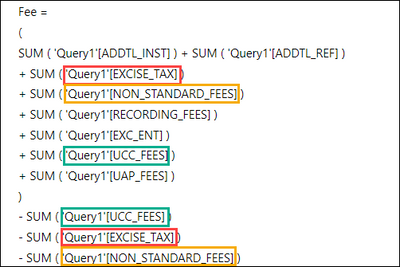
I would split the sub CALCULATATES into their own measures, the write the Fee measure to add the sub measures together.
Also, in the first part of the query it looks like three of the fields you are adding together you are taking back out right afterwards.

jdbuchanan71_0-1660226979542.png

Can you just leave those 3 out of the first sum?

For the last 6 steps, the ones that multipl a count by 6.2, looking at the sql I think you can just do that this way.

6.2 measure = 
CALCULATE(
    COUNTROWS(Query1),
    KEEPFILTERS(Query1[DT_DESC] IN {"DEED","EASMT","SEE INSTRUMENT"}),
    (Query1[ADDTL_INST] > 0 || Query1[ADDTL_REF] > 0 || Query1[EXCISE_TAX] > 0 || Query1[RECORDING_FEES] > 0 || Query1[NON_STANDARD_FEES] > 0 || Query1[UCC_FEES] > 0)
) * 6.2

Helpful resources

Announcements
Join our Fabric User Panel

Join our Fabric User Panel

Share feedback directly with Fabric product managers, participate in targeted research studies and influence the Fabric roadmap.

Sticker Challenge 2026 Carousel

Join our Community Sticker Challenge 2026

If you love stickers, then you will definitely want to check out our Community Sticker Challenge!

January Power BI Update Carousel

Power BI Monthly Update - January 2026

Check out the January 2026 Power BI update to learn about new features.

FabCon Atlanta 2026 carousel

FabCon Atlanta 2026

Join us at FabCon Atlanta, March 16-20, for the ultimate Fabric, Power BI, AI and SQL community-led event. Save $200 with code FABCOMM.