cancel
Showing results for 
Search instead for 
Did you mean: 

Level up your Power BI skills this month - build one visual each week and tell better stories with data! Get started

Reply
Anonymous
Not applicable

Help - Cohort Analysis (Customer Retention) not displaying correct values

Hi,

I want to have a cohort analysis of my customers which I patterned to this: https://www.youtube.com/watch?v=vbg4Je1tuis


However, I am not getting the right numbers. 


Formula Used: 


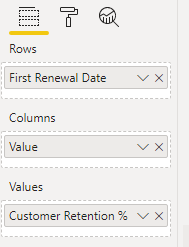
First Renewal Date = var CurrentCustomer = 'Main Table'[CIDN] RETURN CALCULATE(EOMONTH(MIN('Date'[Date]),0), FILTER('Main Table', 'Main Table'[CIDN] = CurrentCustomer))
 
Months After (Value) = GENERATESERIES(0,12,1)
 
Customer Retention % = VAR CurrentMonthAfter = SELECTEDVALUE('Months After'[Value]) VAR CurrentFirstRenewalMonth = SELECTEDVALUE('Main Table'[First Renewal Date]) return CALCULATE(DISTINCTCOUNT('Main Table'[CIDN]), FILTER('Main Table', EOMONTH('Main Table'[Renewal Date],0) = EOMONTH(CurrentFirstRenewalMonth, CurrentMonthAfter) ))
 
Output: The numbers 1-12 are not appearing. 
 
jdalfonso_0-1623328163131.png jdalfonso_1-1623328208802.png


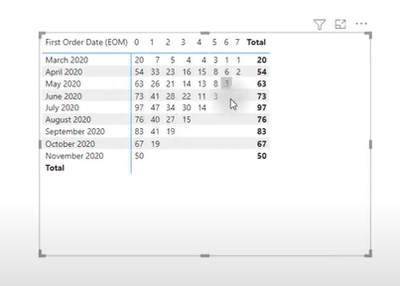
How can I achieve this?:

jdalfonso_2-1623328330848.png


Note: I have a date table. 


2 ACCEPTED SOLUTIONS
amitchandak
Super User
Super User

@Anonymous , I have discussed very similar stuff

here

Period Of Stay – Cohort Analysis: https://community.powerbi.com/t5/Community-Blog/Customer-Retention-Part-3-Period-Of-Stay-Cohort-Anal...


and here https://www.youtube.com/watch?v=Q1vPWmfI25o

Share with Power BI Enthusiasts: Full Power BI Video (20 Hours) YouTube
Microsoft Fabric Series 60+ Videos YouTube
Microsoft Fabric Hindi End to End YouTube

View solution in original post

Anonymous
Not applicable

Thanks! This works! 

View solution in original post

3 REPLIES 3
Hariharan_R
Solution Sage
Solution Sage

Hi 

   The method explained in the video works fine. You need to have proper data otherwise it will show only 1 column. if you want to try then use Amit's PBIX data and use the approach and test it.


Thanks

Hari

amitchandak
Super User
Super User

@Anonymous , I have discussed very similar stuff

here

Period Of Stay – Cohort Analysis: https://community.powerbi.com/t5/Community-Blog/Customer-Retention-Part-3-Period-Of-Stay-Cohort-Anal...


and here https://www.youtube.com/watch?v=Q1vPWmfI25o

Share with Power BI Enthusiasts: Full Power BI Video (20 Hours) YouTube
Microsoft Fabric Series 60+ Videos YouTube
Microsoft Fabric Hindi End to End YouTube
Anonymous
Not applicable

Thanks! This works! 

Helpful resources

Announcements
April Power BI Update Carousel

Power BI Monthly Update - April 2026

Check out the April 2026 Power BI update to learn about new features.

Fabric SQL PBI Data Days

Data Days 2026 coming soon!

Sign up to receive a private message when registration opens and key events begin.

New to Fabric survey Carousel

New to Fabric Survey

If you have recently started exploring Fabric, we'd love to hear how it's going. Your feedback can help with product improvements.

Power BI DataViz World Championships carousel

Power BI DataViz World Championships - June 2026

A new Power BI DataViz World Championship is coming this June! Don't miss out on submitting your entry.