cancel
Showing results for 
Search instead for 
Did you mean: 

The Power BI Data Visualization World Championships is back! Get ahead of the game and start preparing now! Learn more

Reply
sh856531
Regular Visitor

Help Avoiding A Circular Dependency

Hi all,

I am having an issue understanding how to get out of a circular dependency in 4 simple tables. Currently I get the error saying that I cant make a particular relationship active because it would introduce ambuguity. I think this is because if you look at the small model I have, enabling the highlighted relationship would make the whole thing circular.
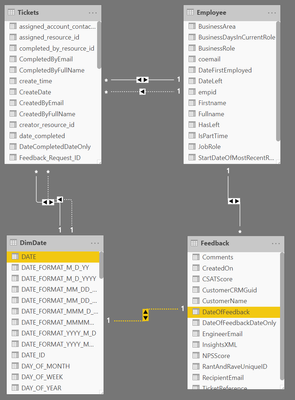
Circular ReferencesCircular References


My issue is essentially that I have an Employee table and I want to be able to associate those employees with various things, specifically Support Tickets, Feedback, Qualifications and so on. So employee needs a relationship to all of those tables. However I also want to be able limit the analysis of these tables by a common date table, so that I can say "# Ticket, Qualifications, Feedback received in the past 90 days" etc.  So I am trying to link the Date table to all these things as well. As soon as I try to do that I get my "ambiguity" problem


Given that what I'm doing is fairly straightforrward there must be a simple way that this is avoided or I am misunderstanding how to use relationships properly.


Can anyone advise?


Thanks in advance

1 ACCEPTED SOLUTION

@sh856531 ,


About how to avoid circular dependency in power bi, I would suggest you to read article below:

https://www.sqlbi.com/articles/avoiding-circular-dependency-errors-in-dax/


Community Support Team _ Jimmy Tao

If this post helps, then please consider Accept it as the solution to help the other members find it more quickly.

View solution in original post

2 REPLIES 2
sh856531
Regular Visitor

In case it helps you can see roughly what I'm after. The employee has various aggregate values calculated but at the moment they are not being managed by a common date. So the Reopen Rate column for example is showing the reopen rate for all time, not say the past 30/90/180 days.PowerBI Issue.PNG


@sh856531 ,


About how to avoid circular dependency in power bi, I would suggest you to read article below:

https://www.sqlbi.com/articles/avoiding-circular-dependency-errors-in-dax/


Community Support Team _ Jimmy Tao

If this post helps, then please consider Accept it as the solution to help the other members find it more quickly.

Helpful resources

Announcements
November Power BI Update Carousel

Power BI Monthly Update - November 2025

Check out the November 2025 Power BI update to learn about new features.

Fabric Data Days Carousel

Fabric Data Days

Advance your Data & AI career with 50 days of live learning, contests, hands-on challenges, study groups & certifications and more!

FabCon Atlanta 2026 carousel

FabCon Atlanta 2026

Join us at FabCon Atlanta, March 16-20, for the ultimate Fabric, Power BI, AI and SQL community-led event. Save $200 with code FABCOMM.

Top Solution Authors
Top Kudoed Authors
