cancel
Showing results for 
Search instead for 
Did you mean: 

July 7 - July 17 | Round 2 of the Power BI Dataviz World Championships. Don't miss your chance! Learn more

Reply
arinyc
Helper I
Helper I

Heat Map not loading properly

Hi,


I created a heat map some time ago based on long-lat coordinates and it was working well. Now, my heat mao suddenly doesn't show up properly - I mean the map is pretty flat without borders, roads, water surface and other visual elements on the map. I checked map settings and everything is turned on (Renderer = contour, Map elements - everything is turned on). I tried the heat map from the marketplace and from Office store, but with no difference. Does anyone know what goes wrong here? Has the Heat Map been changed or something else happens here?

Capture.JPG

Thank you!

6 REPLIES 6
vanessafvg
Community Champion
Community Champion

have you refreshed your data since it was working? has something changed in the data. Best way to see what is going on with your data is to change the visual to a matrix (or make a copy ) and look in a table if you data is populating properly.

also you dont say what has changed, is the heat map smaller. It is highligting something, is it just less than before, or how has it changed?


If I took the time to answer your question and I came up with a solution, please mark my post as a solution and /or give kudos freely for the effort 🙂 Thank you!

Proud to be a Super User!


Let me answer what has been changed. At the previous map (covers NYC), I could clearly see the roads, rivers, borders between neighbourhoods. The current map is flat without all of these elements. 
Data set has been refreshed on regular basis keeping the same table structure, data format, etc. (no changes). 

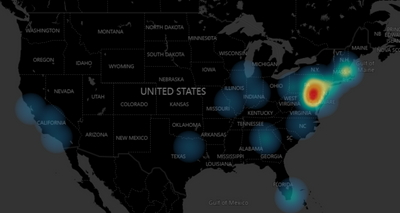
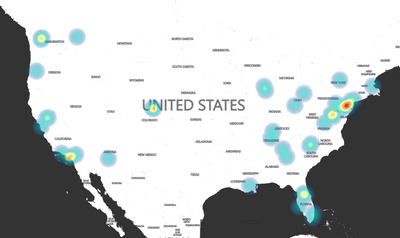
I will add that recently I am also seeing the same. All land is blown-out white. Changing the type under Map Control does not change this. Existing files with maps that used to look like below (type = Dark) now look like the second image below.


Original:

cwalt11_0-1602694036005.png


Now:

cwalt11_1-1602694066767.png


Changing to Dark only makes the oceans darker.  Something is definitely wrong.

@cwalt11  and @arinyc 


sounds like its  bug.   Maybe contact microsoft support?


https://powerbi.microsoft.com/en-us/support/


If I took the time to answer your question and I came up with a solution, please mark my post as a solution and /or give kudos freely for the effort 🙂 Thank you!

Proud to be a Super User!


@vanessafvg @cwalt11 I just submitted to the Microsoft support: link.

Anonymous
Not applicable

I am experiencing the same issue with the Flow Map.  Did you find a solution?

Helpful resources

Announcements
FabCon and SQLCon Barcelona 2026

FabCon & SQLCon – Barcelona 2026

Join us in Barcelona for FabCon and SQLCon, the Fabric, Power BI, SQL, and AI community event. Save €200 with code FABCMTY200.

60 days of Data Days Carousel

Data Days 2026

Join Data Days 2026: 60 days of free live/on-demand sessions, challenges, study groups, and certification opportunities.

Power BI DataViz World Championships carousel

Power BI DataViz World Championships - June 2026

A new Power BI DataViz World Championship is coming this June! Don't miss out on submitting your entry.

Top Solution Authors