Join us at FabCon Atlanta from March 16 - 20, 2026, for the ultimate Fabric, Power BI, AI and SQL community-led event. Save $200 with code FABCOMM.
Register now!The Power BI Data Visualization World Championships is back! Get ahead of the game and start preparing now! Learn more
Hi All,
I am creating a Health Check report on Power BI. I have various sections and each section has different guidelines and thresholds to be classified as "Healthy" or "Unhealthy". Now I am creating some custom measures in each section which gives a value of 0 or 1 based on the threshold being breached. Based on that I am highlighting the cells using conditional formatting to
I am looking to create a measure that shows the overall status of a section. Now I have used conditional formatting to highlight a cell in red if it breaches threshold but I wanted a measure which should show the overall status as well.
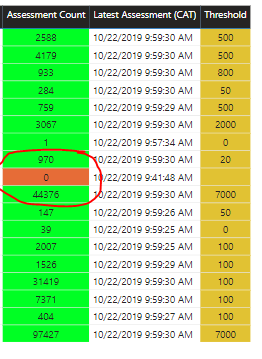
For e.g. In below image if you see one cell is red cause because the threshold is breached, so I want a overall status card to show as “Unhealthy” if any cell is red.
Solved! Go to Solution.
Hi @Anonymous ,
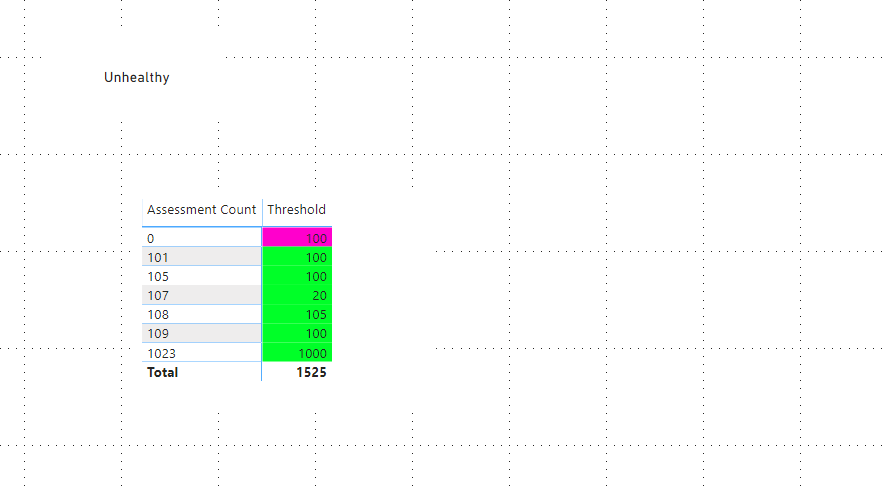
If any cell is red then show as “Unhealthy” means that if one line in the measure has a value of 0 or 1 then show as “Unhealthy”.
So I created a measure like the following:
Measure 2 =
var _table=ADDCOLUMNS('Table',"value",[Measure])
return IF(COUNTROWS(_table)=SUMX(_table,[Measure]),"Healthy","Unhealthy")Here is a demo, please try it:
Best Regards,
Community Support Team _ Joey
If this post helps, then please consider Accept it as the solution to help the other members find it more quickly.
Hi @Anonymous ,
If any cell is red then show as “Unhealthy” means that if one line in the measure has a value of 0 or 1 then show as “Unhealthy”.
So I created a measure like the following:
Measure 2 =
var _table=ADDCOLUMNS('Table',"value",[Measure])
return IF(COUNTROWS(_table)=SUMX(_table,[Measure]),"Healthy","Unhealthy")Here is a demo, please try it:
Best Regards,
Community Support Team _ Joey
If this post helps, then please consider Accept it as the solution to help the other members find it more quickly.
Thank you so much. This measure is what I was looking for.
The Power BI Data Visualization World Championships is back! Get ahead of the game and start preparing now!
| User | Count |
|---|---|
| 39 | |
| 37 | |
| 33 | |
| 32 | |
| 29 |
| User | Count |
|---|---|
| 133 | |
| 88 | |
| 85 | |
| 68 | |
| 64 |