Join us at FabCon Atlanta from March 16 - 20, 2026, for the ultimate Fabric, Power BI, AI and SQL community-led event. Save $200 with code FABCOMM.
Register now!The Power BI Data Visualization World Championships is back! It's time to submit your entry. Live now!
Hi All,
I am creating a Health Check report on Power BI. I have various sections and each section has different guidelines and thresholds to be classified as "Healthy" or "Unhealthy". Now I am creating some custom measures in each section which gives a value of 0 or 1 based on the threshold being breached. Based on that I am highlighting the cells using conditional formatting to
I am looking to create a measure that shows the overall status of a section. Now I have used conditional formatting to highlight a cell in red if it breaches threshold but I wanted a measure which should show the overall status as well.
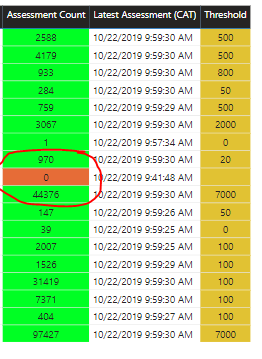
For e.g. In below image if you see one cell is red cause because the threshold is breached, so I want a overall status card to show as “Unhealthy” if any cell is red.
Solved! Go to Solution.
Hi @Anonymous ,
If any cell is red then show as “Unhealthy” means that if one line in the measure has a value of 0 or 1 then show as “Unhealthy”.
So I created a measure like the following:
Measure 2 =
var _table=ADDCOLUMNS('Table',"value",[Measure])
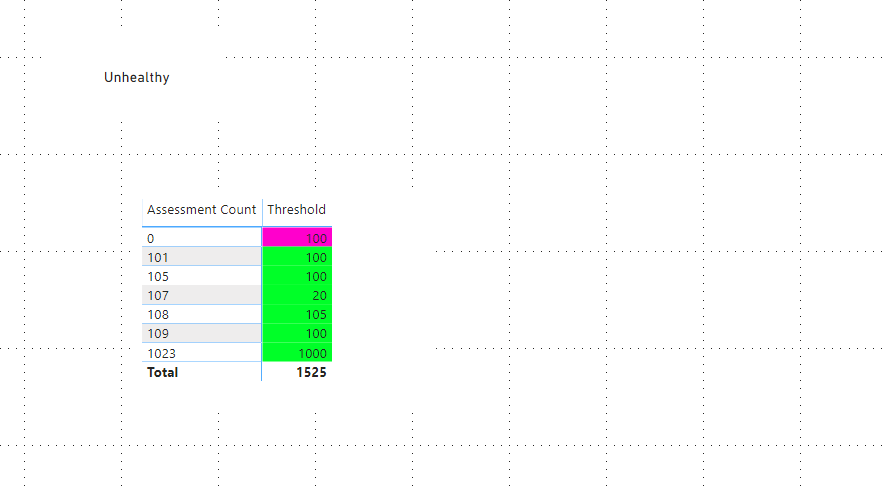
return IF(COUNTROWS(_table)=SUMX(_table,[Measure]),"Healthy","Unhealthy")Here is a demo, please try it:
Best Regards,
Community Support Team _ Joey
If this post helps, then please consider Accept it as the solution to help the other members find it more quickly.
Hi @Anonymous ,
If any cell is red then show as “Unhealthy” means that if one line in the measure has a value of 0 or 1 then show as “Unhealthy”.
So I created a measure like the following:
Measure 2 =
var _table=ADDCOLUMNS('Table',"value",[Measure])
return IF(COUNTROWS(_table)=SUMX(_table,[Measure]),"Healthy","Unhealthy")Here is a demo, please try it:
Best Regards,
Community Support Team _ Joey
If this post helps, then please consider Accept it as the solution to help the other members find it more quickly.
Thank you so much. This measure is what I was looking for.
The Power BI Data Visualization World Championships is back! It's time to submit your entry.
Check out the January 2026 Power BI update to learn about new features.
| User | Count |
|---|---|
| 60 | |
| 47 | |
| 30 | |
| 25 | |
| 23 |
| User | Count |
|---|---|
| 140 | |
| 111 | |
| 63 | |
| 38 | |
| 32 |