

Join us at FabCon Atlanta from March 16 - 20, 2026, for the ultimate Fabric, Power BI, AI and SQL community-led event. Save $200 with code FABCOMM.
Register now!The Power BI Data Visualization World Championships is back! Get ahead of the game and start preparing now! Learn more
Hi Everyone,
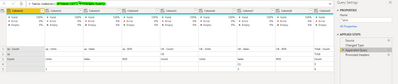
I recieve files each week with a double header Row
First row as country (but a merged cell) Second row is a list of units etc
| sp | UK | Total | |||||||||
| Count | Units | Sales | ROS | Count | Units | Sales | ROS | Count | Units | Sales | ROS |
| (1) | 0 | 0 | (1) | 0 | |||||||
| 1 | 2 | 0 | 0 | 3 | 0 |
Until recently I could use the second row and rename, however new countries have been added.
Would anyone be able to help with either
1)how to filter all columns after 'Name' (which is column 2) and 'Total' (which is columnd 20 and later 24)
2) Or how to dynamically rename the headers based on the column name to the left (if the current column -1 = total, "Total Count")
Any help or suggestions would be appreciated.
Thanks
Solved! Go to Solution.
Hi @StuBee ,
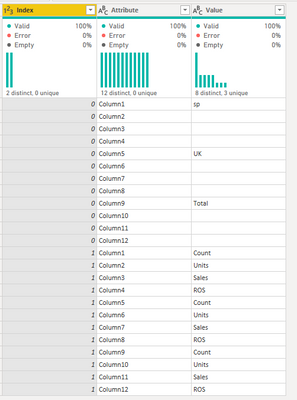
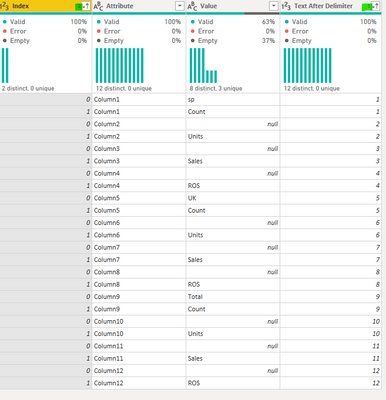
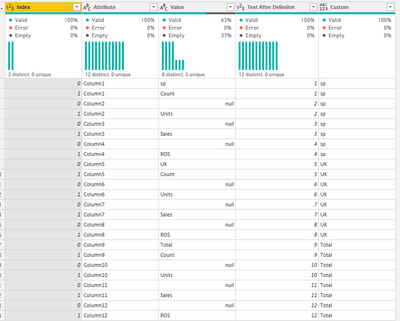
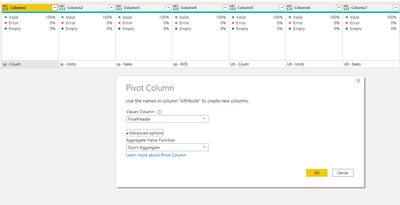
For this to be dinamic one of the options is:
Table 1
Table 2
if [Index] = 0 then [Value] else null
if [Value] = [Custom] then null else [Custom] &" - " & [Value]
Check PBIX file attach.
Regards
Miguel Félix
Proud to be a Super User!
Check out my blog: Power BI em PortuguêsThanks very much! This is better than what I was thinking, which was to just move the changed files into a different folder and join them
Thanks again
Hi @StuBee ,
For this to be dinamic one of the options is:
Table 1
Table 2
if [Index] = 0 then [Value] else null
if [Value] = [Custom] then null else [Custom] &" - " & [Value]
Check PBIX file attach.
Regards
Miguel Félix
Proud to be a Super User!
Check out my blog: Power BI em PortuguêsThe Power BI Data Visualization World Championships is back! Get ahead of the game and start preparing now!
| User | Count |
|---|---|
| 38 | |
| 37 | |
| 33 | |
| 32 | |
| 29 |
| User | Count |
|---|---|
| 132 | |
| 88 | |
| 82 | |
| 68 | |
| 64 |