
cancel
Showing results for 
Search instead for 
Did you mean: 

July 7 - July 17 | Round 2 of the Power BI Dataviz World Championships. Don't miss your chance! Learn more

Reply
pfernandez
New Member

Hasonevalue not working

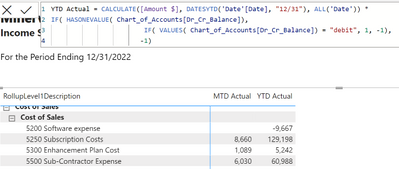
I have a field name called Dr_Cr_Balance, which only has one value in the Chart of Accounts table. In the following expression I am testing to see if Hasonevalue = "debit" or "credit". If "debit, I want to multiple the TOTALYTD by 1, and if the value in the Chart of Accounts is "credit" then multiply it by -1.  The expression works as long as there is a number in the MTD Actual column. If this is blank, then the YTD Actual has the wrong sign. Anyone have any ideas on how to fix this?

pfernandez_1-1675816095589.png


5 REPLIES 5
pfernandez
New Member

Can anyone help with the formula and the error message in my last message?

amitchandak
Super User
Super User

@pfernandez , It is better to have a measure like


Calculate(

calculate(1* [Amount $], filter(ChartofAccount, ChartofAccount[Dr_cr_flag]= "Dr")  +

calculate(-1* [Amount $], filter(ChartofAccount, ChartofAccount[Dr_cr_flag]= "Cr"),  Dateytd(Date[Date]) ) 


I do not think you all date , make sure date table is marked as date table and used in visual if needed


Why Time Intelligence Fails - Powerbi 5 Savior Steps for TI :https://youtu.be/OBf0rjpp5Hw
https://amitchandak.medium.com/power-bi-5-key-points-to-make-time-intelligence-successful-bd52912a5b...

Share with Power BI Enthusiasts: Full Power BI Video (20 Hours) YouTube
Microsoft Fabric Series 60+ Videos YouTube
Microsoft Fabric Hindi End to End YouTube

Hi Amitchandak, I tried this and I probably have a mistake somewhere in the formula. Can you take a look and help me fix this?

pfernandez_0-1675822710171.png


It looks like i was missing a comma in the second CALCULATE function. I added the comma and now I have this:

YTD Actual = CALCULATE(1 * [Amount $], FILTER(Chart_of_Accounts, Chart_of_Accounts[Dr_Cr_Balance] - "debit") + CALCULATE (-1 * [Amount $], FILTER(Chart_of_Accounts, Chart_of_Accounts[Dr_Cr_Balance] = "credit", DATESYTD('Date'[Date], "12/31"), ALL('Date'))))
I am not getting a message saying "too many arguments were passed to the FILTER function. The maximum argument count for the function is 2."

I am still looking for a solution. Does anyone know how to fix the above DAX statement?

Helpful resources

Announcements
FabCon and SQLCon Barcelona 2026

FabCon & SQLCon – Barcelona 2026

Join us in Barcelona for FabCon and SQLCon, the Fabric, Power BI, SQL, and AI community event. Save €200 with code FABCMTY200.

60 days of Data Days Carousel

Data Days 2026

Join Data Days 2026: 60 days of free live/on-demand sessions, challenges, study groups, and certification opportunities.

Power BI DataViz World Championships carousel

Power BI DataViz World Championships - June 2026

A new Power BI DataViz World Championship is coming this June! Don't miss out on submitting your entry.

Top Solution Authors