cancel
Showing results for 
Search instead for 
Did you mean: 

The Power BI Data Visualization World Championships is back! Get ahead of the game and start preparing now! Learn more

Reply
RBear
Advocate I
Advocate I

Handling a one-off starting data point?

One frequently encounters situations where you start with a number and periodically increase and decrease it by certain other numbers. For example, population - increase by births, decrease by deaths; savings account - increase by interest, decrease by withdrawals, etc. In all those cases, though, there is a beginning data point - starting population, intial deposit, etc.


How do you coceptualize this starting data point? Let's take the savings account, for example, and say the intial deposit is 100, and I otherwise have this table:

image.png


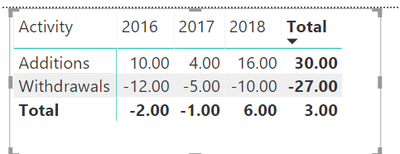
The report looks like this:


image.png 


Obviously, somewhere in here I need to show a year-end number which will take the previous year ending balance (or, for 2016, the initial desposit) and add to it the total Activity for the year. So, in the table - where to I fit the initial deposit? And what do I do with it in the report? Do I add a column between 2016 and Activity and a row between Withdrawals and Total and stick there the intial deposit figure? And, finally, if the initial deposit is reflected in the table and report, is there a way to keep a row for total Activity for the year and another row for ending balance for that year (by that I mean, for example, that the 2016 column will show the same 10, -12, -2, but also a 98)?


I'm sorry if this sounds somewhat jumbled, but I asking not just about the mechanics of doing that in PBI (although I'm definitely interested in that, too), but more about the right way to think about it.


Thanks.


4 REPLIES 4
v-frfei-msft
Community Support
Community Support

Hi @RBear,


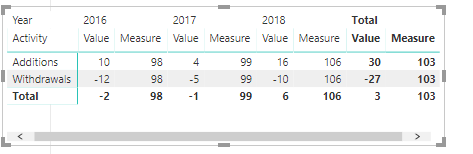
We can create a measure as below to achieve your goal.


Measure = 100+ CALCULATE(SUM(Table1[Value]),ALLEXCEPT(Table1,Table1[Year]))


Capture.PNG

For more details, please check the pbix as attached.


Regards,

Frank

Community Support Team _ Frank
If this post helps, then please consider Accept it as the solution to help the others find it more quickly.

And I just noticed that the measure itself doesn't work: the last column (Total Measure) should have the same values as the 2018 Measure column.

Now that I have tried your measure - close, but no cigar 😞


First, Measure appears in the report as a column - that won't work because (i) it presents the same information in all rows, which is superflous and (ii) it has to be presented as a row. The second issue can be resolved by going to the formatting options of a Matrix. Format > Values > Show on rows > On


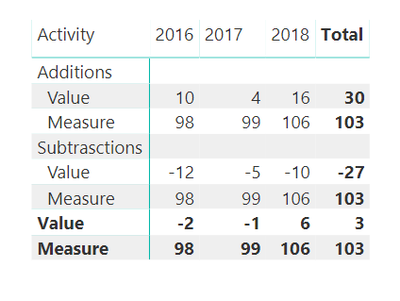
That options is better, but results in this:

image.png


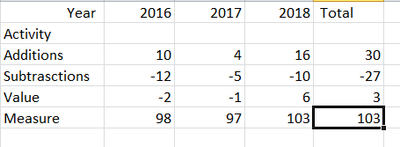
I don't know how to suppress the first two rows displaying Measure, such that only the bold, bottom row appears. The final version should look like this:

image.png


Thanks; I'll take a look at your solution, but in the interim - FYI: when I try to open your file I get an error message to the effect that the file is incompatible with my version of PBI Desktop. I have the most recent (Version: 2.63.3272.40461 64-bit (October 2018)).

Helpful resources

Announcements
Power BI DataViz World Championships

Power BI Dataviz World Championships

The Power BI Data Visualization World Championships is back! Get ahead of the game and start preparing now!

November Power BI Update Carousel

Power BI Monthly Update - November 2025

Check out the November 2025 Power BI update to learn about new features.

FabCon Atlanta 2026 carousel

FabCon Atlanta 2026

Join us at FabCon Atlanta, March 16-20, for the ultimate Fabric, Power BI, AI and SQL community-led event. Save $200 with code FABCOMM.