Get Fabric or SQL Certified for Free.
Get certified for free when you join Fabric Data Days 2026 and dive into Fabric, Power BI, SQL, AI, and other essential data skills.
Join now- Power BI forums
- Get Help with Power BI
- Desktop
- Service
- Report Server
- Power Query
- Mobile Apps
- Developer
- DAX Commands and Tips
- Custom Visuals Development Discussion
- Health and Life Sciences
- Power BI Spanish forums
- Translated Spanish Desktop
- Training and Consulting
- Instructor Led Training
- Dashboard in a Day for Women, by Women
- Galleries
- Data Stories Gallery
- Themes Gallery
- Contests Gallery
- QuickViz Gallery
- Quick Measures Gallery
- Visual Calculations Gallery
- Notebook Gallery
- Translytical Task Flow Gallery
- TMDL Gallery
- R Script Showcase
- Webinars and Video Gallery
- Ideas
- Custom Visuals Ideas (read-only)
- Issues
- Issues
- Events
- Upcoming Events
July 7 - July 17 | Round 2 of the Power BI Dataviz World Championships. Don't miss your chance! Learn more
- Power BI forums
- Forums
- Get Help with Power BI
- Desktop
- HTML bar chart with arrows
- Subscribe to RSS Feed
- Mark Topic as New
- Mark Topic as Read
- Float this Topic for Current User
- Bookmark
- Subscribe
- Printer Friendly Page


- Mark as New
- Bookmark
- Subscribe
- Mute
- Subscribe to RSS Feed
- Permalink
- Report Inappropriate Content
HTML bar chart with arrows
Hi
i have started creating a bar chart with connecting arrows that show the difference between two columns using the HTML visual for PBI. the visual works well but now i want to add a third column that shows the target values in a third column on the right of the actuals with connecting arrows showing the difference between target and actuals.
i have added below the code with the bars and arrows... does anyone have any idea how to add the third column.
i have tried a couple of things following the same logic but i don't seem to get the desired result
Solved! Go to Solution.


- Mark as New
- Bookmark
- Subscribe
- Mute
- Subscribe to RSS Feed
- Permalink
- Report Inappropriate Content
Hi , @ANTOS
According to your description, you want to show three columns and three arrows in your html code .
Thanks for your sample html code to us~And sorry for i have lack html work experience , i test it in my side .
And for your need , i modify some css html code , you can test in your side , i also update some var in it :
Comparison example =
VAR color_left = "#c7c7c7"
VAR color_right = "#0015b4"
VAR text_left = "Last Year"
VAR text_right = "Actuals"
VAR text_right2 = "Difference"
VAR value_left = 2021
VAR value_right = 2023
VAR value_right2 = "2021 vs 2023"
VAR relative_variance = FORMAT(DIVIDE(value_right,value_left,0)-1,"0%")
VAR height1 = IF(value_left > value_right, 160, ((value_left / value_right)*160 ))
VAR height2 = IF(value_right > value_left, 160, ((value_right / value_left)*160 ))
RETURN

"
<body>
    <style>
        :root{
            --font-size: 150%;
            --percent-font-size: 150%;
            --text1: '"&text_left&"';
            --text2: '"&text_right&"';
            --text3: '"&text_right2&"';
            --number1: '"&FORMAT(value_left, "#.#M")&"';
            --number2: '"&FORMAT(value_right, "#.#M")&"';
            --number3: '"&FORMAT(value_right2, "#.#M")&"';
            --height-bar1: "&value_left&"px;
            --height-bar2: "&value_right&"px;
            --color-bar1: "&color_left&";
            --color-bar2: "&color_right&";
        }
        .container,
        .container *{
            margin: 0;
            padding: 0;
            box-sizing: border-box;
        }

        .container{
            display: grid;
            align-items: end;
grid-template-rows: 500px 100px;
            grid-template-areas: 'myArea myArea myArea'      ;
            grid-gap: 10px;

            padding: 10px;
            font-family: 'Open Sans', sans-serif;
            font-size: var(--font-size:15px);
        }
        .container::after{
            content: '';
            width: 100%;
            height: 2px;
            background-color: black;
            position: absolute;
            left: 0;
            bottom: 0;
        }
        .container_arrows{
           width: 100%;
            grid-area: myArea

        }

        .container_arrows::after{
            content: '"&relative_variance&"';
            position: absolute;
            left: 50%;
            top: 15%;
           font-weight: 800;
            font-size: var(--percent-font-size);
            transform: translate(-50%,-100%);
        }

        .arrows{
            width: 100%;
            overflow: visible;
        }

        .bar{
            position: relative;

        }

        .bar1{
            background-color: var(--color-bar1);
            height: "&height1&"%;
        }
        .bar2{
            background-color: var(--color-bar2);
            height: "&height2&"%;
        }
         .bar3{
            background-color: var(--color-bar2);
            height: "&30&"%;
        }

        .bar::after{
            position: absolute;
            bottom: 0;
            left: 50%;
            transform: translate(-50%, 120%);
            font-weight: 800;
        }
        .bar1::after{
            content: var(--text1);
        }
        .bar2::after{
            content: var(--text2);
        }
         .bar3::after{
            content: var(--text3);
        }

        .bar::before{
            position: absolute;
            top: 0;
            left: 50%;
            transform: translate(-50%, -120%);
            font-weight: 700;
            font-size: 20px;
        }
        .bar1::before{
            content: var(--number1);
        }
        .bar2::before{
            content: var(--number2);
        }
        .bar3::before{
            content: var(--number3);
        }
    </style>

    <div class='container'>
        <div class='container_arrows'>
            <svg class='arrows' version='1.1' xmlns='http://www.w3.org/2000/svg' xmlns:xlink='http://www.w3.org/1999/xlink' viewBox='0 0 3000 1000' xml:space='preserve' preserveAspectRatio='xMaxYMax'>
                <defs>
                    <style>
                        .arrow{
                            transform: scale(0.2) rotate(90deg);
                        }
                        .arrow1{
                            transform: translate(440px,"&(((100 - height1) / 100) * 650) + 700&"px);
                        }
                        .arrow2{
                            transform: translate(1640px,"&(((100 - height2) / 100) * 650) + 700&"px);
                        }.arrow3{
                            transform: translate(2640px,"&(((100 - height2) / 100) * 650) + 700&"px);
                        }
                    </style>
                </defs>
                <g class='arrow1'>
                    <path class='arrow' d='M415.934,212.799L36.788,2.097C32.411-0.377,28.65-0.661,25.51,1.242c-3.14,1.902-4.708,5.328-4.708,10.276V431.78
                        c0,4.952,1.569,8.381,4.708,10.284c3.14,1.902,6.901,1.622,11.278-0.855l379.146-210.703c4.381-2.478,6.571-5.434,6.571-8.856
                        C422.505,218.224,420.314,215.274,415.934,212.799z'/>
                </g>
                <g class='arrow2'>
                    <path class='arrow' d='M415.934,212.799L36.788,2.097C32.411-0.377,28.65-0.661,25.51,1.242c-3.14,1.902-4.708,5.328-4.708,10.276V431.78
                        c0,4.952,1.569,8.381,4.708,10.284c3.14,1.902,6.901,1.622,11.278-0.855l379.146-210.703c4.381-2.478,6.571-5.434,6.571-8.856
                        C422.505,218.224,420.314,215.274,415.934,212.799z'/>
                </g>
                 <g class='arrow3'>
                    <path class='arrow' d='M415.934,212.799L36.788,2.097C32.411-0.377,28.65-0.661,25.51,1.242c-3.14,1.902-4.708,5.328-4.708,10.276V431.78
                        c0,4.952,1.569,8.381,4.708,10.284c3.14,1.902,6.901,1.622,11.278-0.855l379.146-210.703c4.381-2.478,6.571-5.434,6.571-8.856
                        C422.505,218.224,420.314,215.274,415.934,212.799z'/>
                </g>
                <polyline points='  400,"&(((100 - height1) / 100) * 650) + 700&" 400,200 1600,200 1600,"&(((100 - height2) / 100) * 650) + 700&" 1600,200 2600,200 2600,"&(((100 - height2) / 100) * 650) + 700&"    '
                fill='none' stroke='black' stroke-width='15' />
   <ellipse cx='1000' cy='200' rx='200' ry='150' fill='#fff' stroke='black' stroke-width='10px' />

            </svg>
        </div>
        <div class='bar bar1'></div>
        <div class='bar bar2'> </div>
        <div class='bar bar3'></div>
    </div>
</body>"
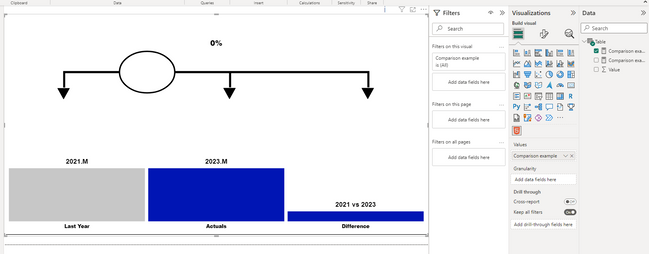
The result is as follows:
Thank you for your time and sharing, and thank you for your support and understanding of PowerBI!
Best Regards,
Aniya Zhang
If this post helps, then please consider Accept it as the solution to help the other members find it more quickly
- Mark as New
- Bookmark
- Subscribe
- Mute
- Subscribe to RSS Feed
- Permalink
- Report Inappropriate Content
Hi , @ANTOS
According to your description, you want to show three columns and three arrows in your html code .
Thanks for your sample html code to us~And sorry for i have lack html work experience , i test it in my side .
And for your need , i modify some css html code , you can test in your side , i also update some var in it :
Comparison example =
VAR color_left = "#c7c7c7"
VAR color_right = "#0015b4"
VAR text_left = "Last Year"
VAR text_right = "Actuals"
VAR text_right2 = "Difference"
VAR value_left = 2021
VAR value_right = 2023
VAR value_right2 = "2021 vs 2023"
VAR relative_variance = FORMAT(DIVIDE(value_right,value_left,0)-1,"0%")
VAR height1 = IF(value_left > value_right, 160, ((value_left / value_right)*160 ))
VAR height2 = IF(value_right > value_left, 160, ((value_right / value_left)*160 ))
RETURN

"
<body>
    <style>
        :root{
            --font-size: 150%;
            --percent-font-size: 150%;
            --text1: '"&text_left&"';
            --text2: '"&text_right&"';
            --text3: '"&text_right2&"';
            --number1: '"&FORMAT(value_left, "#.#M")&"';
            --number2: '"&FORMAT(value_right, "#.#M")&"';
            --number3: '"&FORMAT(value_right2, "#.#M")&"';
            --height-bar1: "&value_left&"px;
            --height-bar2: "&value_right&"px;
            --color-bar1: "&color_left&";
            --color-bar2: "&color_right&";
        }
        .container,
        .container *{
            margin: 0;
            padding: 0;
            box-sizing: border-box;
        }

        .container{
            display: grid;
            align-items: end;
grid-template-rows: 500px 100px;
            grid-template-areas: 'myArea myArea myArea'      ;
            grid-gap: 10px;

            padding: 10px;
            font-family: 'Open Sans', sans-serif;
            font-size: var(--font-size:15px);
        }
        .container::after{
            content: '';
            width: 100%;
            height: 2px;
            background-color: black;
            position: absolute;
            left: 0;
            bottom: 0;
        }
        .container_arrows{
           width: 100%;
            grid-area: myArea

        }

        .container_arrows::after{
            content: '"&relative_variance&"';
            position: absolute;
            left: 50%;
            top: 15%;
           font-weight: 800;
            font-size: var(--percent-font-size);
            transform: translate(-50%,-100%);
        }

        .arrows{
            width: 100%;
            overflow: visible;
        }

        .bar{
            position: relative;

        }

        .bar1{
            background-color: var(--color-bar1);
            height: "&height1&"%;
        }
        .bar2{
            background-color: var(--color-bar2);
            height: "&height2&"%;
        }
         .bar3{
            background-color: var(--color-bar2);
            height: "&30&"%;
        }

        .bar::after{
            position: absolute;
            bottom: 0;
            left: 50%;
            transform: translate(-50%, 120%);
            font-weight: 800;
        }
        .bar1::after{
            content: var(--text1);
        }
        .bar2::after{
            content: var(--text2);
        }
         .bar3::after{
            content: var(--text3);
        }

        .bar::before{
            position: absolute;
            top: 0;
            left: 50%;
            transform: translate(-50%, -120%);
            font-weight: 700;
            font-size: 20px;
        }
        .bar1::before{
            content: var(--number1);
        }
        .bar2::before{
            content: var(--number2);
        }
        .bar3::before{
            content: var(--number3);
        }
    </style>

    <div class='container'>
        <div class='container_arrows'>
            <svg class='arrows' version='1.1' xmlns='http://www.w3.org/2000/svg' xmlns:xlink='http://www.w3.org/1999/xlink' viewBox='0 0 3000 1000' xml:space='preserve' preserveAspectRatio='xMaxYMax'>
                <defs>
                    <style>
                        .arrow{
                            transform: scale(0.2) rotate(90deg);
                        }
                        .arrow1{
                            transform: translate(440px,"&(((100 - height1) / 100) * 650) + 700&"px);
                        }
                        .arrow2{
                            transform: translate(1640px,"&(((100 - height2) / 100) * 650) + 700&"px);
                        }.arrow3{
                            transform: translate(2640px,"&(((100 - height2) / 100) * 650) + 700&"px);
                        }
                    </style>
                </defs>
                <g class='arrow1'>
                    <path class='arrow' d='M415.934,212.799L36.788,2.097C32.411-0.377,28.65-0.661,25.51,1.242c-3.14,1.902-4.708,5.328-4.708,10.276V431.78
                        c0,4.952,1.569,8.381,4.708,10.284c3.14,1.902,6.901,1.622,11.278-0.855l379.146-210.703c4.381-2.478,6.571-5.434,6.571-8.856
                        C422.505,218.224,420.314,215.274,415.934,212.799z'/>
                </g>
                <g class='arrow2'>
                    <path class='arrow' d='M415.934,212.799L36.788,2.097C32.411-0.377,28.65-0.661,25.51,1.242c-3.14,1.902-4.708,5.328-4.708,10.276V431.78
                        c0,4.952,1.569,8.381,4.708,10.284c3.14,1.902,6.901,1.622,11.278-0.855l379.146-210.703c4.381-2.478,6.571-5.434,6.571-8.856
                        C422.505,218.224,420.314,215.274,415.934,212.799z'/>
                </g>
                 <g class='arrow3'>
                    <path class='arrow' d='M415.934,212.799L36.788,2.097C32.411-0.377,28.65-0.661,25.51,1.242c-3.14,1.902-4.708,5.328-4.708,10.276V431.78
                        c0,4.952,1.569,8.381,4.708,10.284c3.14,1.902,6.901,1.622,11.278-0.855l379.146-210.703c4.381-2.478,6.571-5.434,6.571-8.856
                        C422.505,218.224,420.314,215.274,415.934,212.799z'/>
                </g>
                <polyline points='  400,"&(((100 - height1) / 100) * 650) + 700&" 400,200 1600,200 1600,"&(((100 - height2) / 100) * 650) + 700&" 1600,200 2600,200 2600,"&(((100 - height2) / 100) * 650) + 700&"    '
                fill='none' stroke='black' stroke-width='15' />
   <ellipse cx='1000' cy='200' rx='200' ry='150' fill='#fff' stroke='black' stroke-width='10px' />

            </svg>
        </div>
        <div class='bar bar1'></div>
        <div class='bar bar2'> </div>
        <div class='bar bar3'></div>
    </div>
</body>"
The result is as follows:
Thank you for your time and sharing, and thank you for your support and understanding of PowerBI!
Best Regards,
Aniya Zhang
If this post helps, then please consider Accept it as the solution to help the other members find it more quickly

Helpful resources

FabCon & SQLCon – Barcelona 2026
Join us in Barcelona for FabCon and SQLCon, the Fabric, Power BI, SQL, and AI community event. Save €200 with code FABCMTY200.

Data Days 2026
Join Fabric Data Days 2026: 60 days of free live/on-demand sessions, challenges, study groups, and certification opportunities.

Power BI DataViz World Championships - June 2026
A new Power BI DataViz World Championship is coming this June! Don't miss out on submitting your entry.


| User | Count |
|---|---|
| 66 | |
| 41 | |
| 39 | |
| 39 | |
| 39 |


