Join us at FabCon Atlanta from March 16 - 20, 2026, for the ultimate Fabric, Power BI, AI and SQL community-led event. Save $200 with code FABCOMM.
Register now!The Power BI Data Visualization World Championships is back! Get ahead of the game and start preparing now! Learn more
I have a table in which one column has data in the form of HTML. I am making a table visual that shows all the columns. The issue is I am not able to render the HTML data accordgin to the tags. For example: If the HTML has <table> tag, then I am not able to show the data in table format.
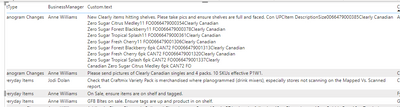
Below ss shows the data that I have got by making a custom column (Html.Table([Alert] , {{"text",":root"}}))
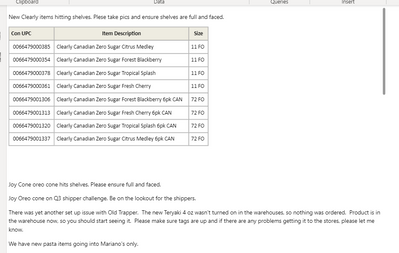
But this is not what I want. I want similiar to the below ss. I made this visual using HTML Content. But the problem is I can't add other columns in this visual.
Just to brief you, I want a table in which I can shows columns along with the column that has HTML data according to the tags present in it. So instead of custom.text (present in 1st ss), I want the column in 2nd ss to be there.
Hi @Anonymous
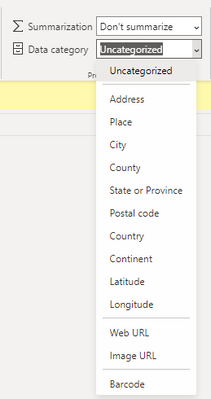
I'm afraid the built-in table visual doesn't support that. It only supports data types listed in Data types in Power BI Desktop - Power BI | Microsoft Learn. And it can only specify the data category for a Text type column with the following options. It cannot render a HTML content. Data categorization in Power BI Desktop - Power BI | Microsoft Learn
Best Regards,
Community Support Team _ Jing
If this post helps, please Accept it as Solution to help other members find it.
Is there any other visual by which I can show the HTML column data along with other columns data?
The Power BI Data Visualization World Championships is back! Get ahead of the game and start preparing now!
| User | Count |
|---|---|
| 38 | |
| 37 | |
| 34 | |
| 31 | |
| 27 |
| User | Count |
|---|---|
| 136 | |
| 99 | |
| 73 | |
| 66 | |
| 65 |