Join us at FabCon Atlanta from March 16 - 20, 2026, for the ultimate Fabric, Power BI, AI and SQL community-led event. Save $200 with code FABCOMM.
Register now!Learn from the best! Meet the four finalists headed to the FINALS of the Power BI Dataviz World Championships! Register now
Good afternoon,
I previously posted for employee status requesting to fill a bucket for employee status:
https://community.powerbi.com/t5/Desktop/HR-Employee-Status-CountRows/m-p/594999#M282523
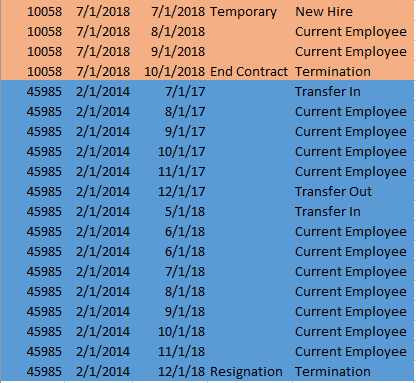
However, the dynamics of the request has changed and it seems to be a bit more complicated now. I am receiving data for 2019 to determine the status of an employee. The new rules are as followed:
1. If your hire date is empty but it's your first entry in the data set and you're not on the new hire dataset then you're a "Transfer In"
2. If your hire date is before first date in dataset (1/1/2017) and it's your first entry in the dataset and you're not on the new hire dataset then you're a "Transfer In"
3. If your hire date is equal to YearMonth then your status is "New Hire"
4. if it's your last entry and you do not have any comments then you're a "Transfer Out"
5. If it's your last entry and you have a comment that contains "resign" or "termination" then you're "Termination"
6. You're a "Current Employee" if YearMonth is consecutive up until today's date
*NOTE: I do know that there might be other rules to this but the below sample should hopefully be a clear idea on what I am looking for.
Any help would be appreciated!
Solved! Go to Solution.
Hi @hnguyen76
You may add an index column first. And then create Sort1,Sort2 columns as attached file.Then you will get the status column.
Status =
VAR FirstDay =
CALCULATE (
FIRSTDATE ( Table2[YearMonth] ),
ALLEXCEPT ( Table2, Table2[Emp ID], Table2[Sort2] )
)
VAR LastDay =
CALCULATE (
LASTDATE ( Table2[YearMonth] ),
ALLEXCEPT ( Table2, Table2[Emp ID], Table2[Sort2] )
)
RETURN
IF (
Table2[Hire Date] = Table2[YearMonth],
"New Hire",
IF (
OR (
Table2[YearMonth] = FirstDay
&& Table2[Hire Date] = BLANK (),
Table2[YearMonth] = FirstDay
&& Table2[Hire Date] <= DATE ( 2017, 1, 1 )
),
"Transfer In",
IF (
Table2[YearMonth] = LastDay
&& LastDay = DATE ( 2019, 1, 1 ),
"Current Employee",
IF (
Table2[YearMonth] = LastDay
&& Table2[Comment] = BLANK (),
"Transfer Out",
IF (
Table2[Comment] IN { "End Contract", "Resignation" },
"Termination",
"Current Employee"
)
)
)
)
)
Regards,
Cherie
Hi @hnguyen76
You may add an index column first. And then create Sort1,Sort2 columns as attached file.Then you will get the status column.
Status =
VAR FirstDay =
CALCULATE (
FIRSTDATE ( Table2[YearMonth] ),
ALLEXCEPT ( Table2, Table2[Emp ID], Table2[Sort2] )
)
VAR LastDay =
CALCULATE (
LASTDATE ( Table2[YearMonth] ),
ALLEXCEPT ( Table2, Table2[Emp ID], Table2[Sort2] )
)
RETURN
IF (
Table2[Hire Date] = Table2[YearMonth],
"New Hire",
IF (
OR (
Table2[YearMonth] = FirstDay
&& Table2[Hire Date] = BLANK (),
Table2[YearMonth] = FirstDay
&& Table2[Hire Date] <= DATE ( 2017, 1, 1 )
),
"Transfer In",
IF (
Table2[YearMonth] = LastDay
&& LastDay = DATE ( 2019, 1, 1 ),
"Current Employee",
IF (
Table2[YearMonth] = LastDay
&& Table2[Comment] = BLANK (),
"Transfer Out",
IF (
Table2[Comment] IN { "End Contract", "Resignation" },
"Termination",
"Current Employee"
)
)
)
)
)
Regards,
Cherie
Thanks, Cherie!
I took your concept and made it more dynamic but this was exactly what I was looking for! Thank you! You saved me countless hours of hair tearing stress!
Share feedback directly with Fabric product managers, participate in targeted research studies and influence the Fabric roadmap.
Check out the February 2026 Power BI update to learn about new features.
| User | Count |
|---|---|
| 53 | |
| 48 | |
| 33 | |
| 16 | |
| 15 |
| User | Count |
|---|---|
| 86 | |
| 71 | |
| 38 | |
| 28 | |
| 25 |