Don't miss your chance to take the Fabric Data Engineer (DP-700) exam on us!
Learn moreThe FabCon + SQLCon recap series starts April 14th at 8am Pacific. If you’re tracking where AI is going inside Fabric, this first session is a can't miss. Register now
I currently have a column titled PlayedTime which has seconds converted to show as HH:MM:SS - this appears to be ok
I have a quick measure titled TotalPlayedTime which uses this formula: TotalPlayedTime = CALCULATE(SUM('1'[PlayedTime]))
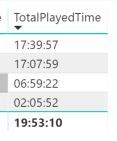
If you see the total below, obviously the total does not add up correctly, am i doing something wrong here?
Solved! Go to Solution.
Hi @Barrie2020 ,
Try use SUMX() function instead SUM().
https://docs.microsoft.com/en-us/dax/sumx-function-dax.
sumx(table,[TotalPlayedTime])
Best Regards,
Jay
Community Support Team _ Jay Wang
If this post helps, then please consider Accept it as the solution to help the other members find it more quickly.
Hi @Barrie2020 ,
Can't see your sample data.
But you can check the following steps and see if the result achieve your expectation.
1# Refer to the below topic to convert your PlayedTime to hh:mm:ss.
https://community.powerbi.com/t5/Desktop/How-to-convert-seconds-to-hh-mm-ss/td-p/310219.
2# Use your formula above to create a measure.
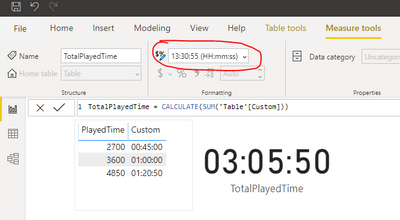
3# convert the measure to hh:mm:ss format.
Result would be shown as below.
Best Regards,
Jay
Community Support Team _ Jay Wang
If this post helps, then please consider Accept it as the solution to help the other members find it more quickly.
Hello
Apologies for the delay
I have redone the formula following the steps in the above link as advised, i now have a Custom Column titled TIME which is a Data Type of TIME
TotalPlayedTime in the image below is a MEASURE based n this formula:
That gives me the result below
I have tried to create a duration measure based on this which does not work
Hi @Barrie2020 ,
Try use SUMX() function instead SUM().
https://docs.microsoft.com/en-us/dax/sumx-function-dax.
sumx(table,[TotalPlayedTime])
Best Regards,
Jay
Community Support Team _ Jay Wang
If this post helps, then please consider Accept it as the solution to help the other members find it more quickly.
Hi @Barrie2020
Try
Measure = MAX( '1'[PlayedTime] ) - MIN( '1'[PlayedTime] )
If you have recently started exploring Fabric, we'd love to hear how it's going. Your feedback can help with product improvements.
A new Power BI DataViz World Championship is coming this June! Don't miss out on submitting your entry.
Share feedback directly with Fabric product managers, participate in targeted research studies and influence the Fabric roadmap.
| User | Count |
|---|---|
| 53 | |
| 40 | |
| 37 | |
| 19 | |
| 18 |
| User | Count |
|---|---|
| 69 | |
| 68 | |
| 34 | |
| 33 | |
| 30 |