Join us at FabCon Atlanta from March 16 - 20, 2026, for the ultimate Fabric, Power BI, AI and SQL community-led event. Save $200 with code FABCOMM.
Register now!The Power BI Data Visualization World Championships is back! It's time to submit your entry. Live now!
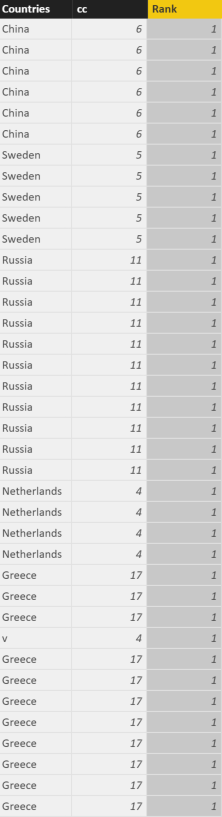
So I have a table that shows countries. Now I want to get the top 3 countries that are most common in the column.
So I decided to play around with RANKX, seen multiple threads. Most 'helpful' one is http://community.powerbi.com/t5/Desktop/Ranking-Subjects/m-p/21663#M6731 this one. However, as you can see in the table, all it shows is rank number one.
What I've done in cc is COUNTA column. But in the rank column is this:
Measure: Measure = COUNT(Table1[Countries])
Rank Column: Rank = RANKX(ALLSELECTED(Table1), [Measure])
Any help is appreciated!
Solved! Go to Solution.
You can use this two measures for the ranking of the countries:
Total Rows:=COUNTROWS(Table1)
Top Countries := RANKX(ALL(Table1),[Total Rows],,,Dense)
You can use this two measures for the ranking of the countries:
Total Rows:=COUNTROWS(Table1)
Top Countries := RANKX(ALL(Table1),[Total Rows],,,Dense)
Yep, added the measure to the visual filter. Worked like charm. Sorting works great too! Thanks for the help
The Power BI Data Visualization World Championships is back! It's time to submit your entry.
| User | Count |
|---|---|
| 50 | |
| 43 | |
| 36 | |
| 33 | |
| 30 |
| User | Count |
|---|---|
| 138 | |
| 126 | |
| 60 | |
| 59 | |
| 56 |