cancel
Showing results for 
Search instead for 
Did you mean: 

The Power BI Data Visualization World Championships is back! Get ahead of the game and start preparing now! Learn more

Reply
PradeepDive
Helper II
Helper II

HASONFILTER doesn't work with Slicer

Hi All,


I am creating a drillthrough button in my report and for which I am using HASONEFILTER to see if a filter is applied or not.

I also have a slicer (dropdown) in my page. Basically what the formula does is checks if user selects a value from the slicer and if selected it give me a page name. The page name is used as a navigation to drillthrough page. Below is my DAX


MyDrillthrough Navigation =

        Var _isValueSelected = HASONEFILTER('Project List'[ORG])

Return

        IF(_isValueSelected ,"Details Page","")


 I one slicer dropdown for 'Project List'[ORG]) and another visual of a small metrix table as 'Project List'[ORG]) and Cost


🤔So now the strange part, when I select ORG from dropdown the drillthrough button doesn't work. BUT if I select ORG from the metrix visual then the drillthrough button works...


I am sure dropdown is the issue ? Does HASONEFILTER doesn't work with slicers ?


Please help. 

3 REPLIES 3
amitchandak
Super User
Super User

@PradeepDive , Try isfiltered


IF(isfiltered('Project List'[ORG]) ,"Details Page","")


refer this for difference https://powerpivotpro.com/2013/03/hasonevalue-vs-isfiltered-vs-hasonefilter/

Share with Power BI Enthusiasts: Full Power BI Video (20 Hours) YouTube
Microsoft Fabric Series 60+ Videos YouTube
Microsoft Fabric Hindi End to End YouTube

Thanks Amit,


I have tried  ISFILTERED as well as HASONEFILTER but both are not working with drill through button if I select is through slicer (dropdown OR list). 


Wried thing is if I add it as a simple table or matrix table and select it works...

Hi @PradeepDive ,


If you want to drill through to the detail page when you select in a slicer, Power BI cannot support to jump to detail page.

Drill Through will appear when you right-click the filed on Visual.


You can refer to the following documents.

https://docs.microsoft.com/en-us/power-bi/create-reports/desktop-drill-through-buttons

https://docs.microsoft.com/en-us/power-bi/create-reports/desktop-drillthrough


HASONEFILTER1.jpg


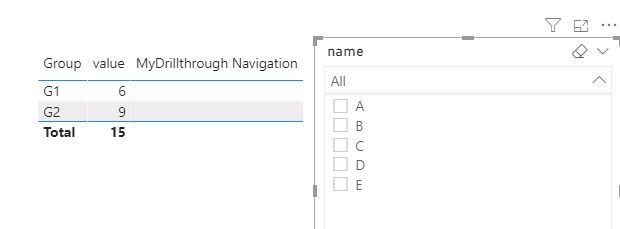
The function of the MyDrillthrough Navigation measure is that when ORG is selected, the corresponding row will display the Details Page, and the remaining rows will be empty, and there is no jump function.
 

HASONEFILTER2.jpg


HASONEFILTER3.jpg


If it doesn’t meet your requirement, could you please provide a mockup sample based on fake data?

It will be helpful if you can show us the exact expected result based on the tables.


Please upload your files to OneDrive For Business and share the link here. Please don't contain any Confidential Information or Real data in your reply.


Best regards,


Community Support Team _ zhenbw

If this post helps, then please consider Accept it as the solution to help the other members find it more quickly.

Helpful resources

Announcements
Power BI DataViz World Championships

Power BI Dataviz World Championships

The Power BI Data Visualization World Championships is back! Get ahead of the game and start preparing now!

December 2025 Power BI Update Carousel

Power BI Monthly Update - December 2025

Check out the December 2025 Power BI Holiday Recap!

FabCon Atlanta 2026 carousel

FabCon Atlanta 2026

Join us at FabCon Atlanta, March 16-20, for the ultimate Fabric, Power BI, AI and SQL community-led event. Save $200 with code FABCOMM.