Join us at FabCon Atlanta from March 16 - 20, 2026, for the ultimate Fabric, Power BI, AI and SQL community-led event. Save $200 with code FABCOMM.
Register now!The Power BI Data Visualization World Championships is back! It's time to submit your entry. Live now!
I have a table of purchases.
Each row is a purchase with an unique ID and a ClientID.
Each client can have multiple purchases.
I want to group based on how much each client spent.
Lets say I want 5 groups:
0-100€
100-200€
200-500€
500-1000€
> 1000 €
Any help on the correct approach?
Solved! Go to Solution.
Hi @PDRTXRA ,
According to your description, here's my solution.
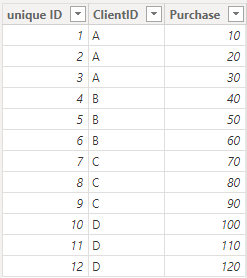
Sample:
Create a measure:
Measure =
VAR _SUM =
SUM ( 'Table'[Purchase] )
RETURN
SWITCH (
TRUE,
_SUM > 0
&& _SUM <= 100, "0-100€",
_SUM > 100
&& _SUM <= 200, "100-200€",
_SUM > 200
&& _SUM <= 500, "200-500€",
_SUM > 500
&& _SUM <= 1000, "500-1000€",
_SUM > 1000, ">1000€"
)
Get the correct result:
I attach my sample below for your reference.
Best regards,
Community Support Team_yanjiang
If this post helps, then please consider Accept it as the solution to help the other members find it more quickly.
Hi @PDRTXRA ,
According to your description, here's my solution.
Sample:
Create a measure:
Measure =
VAR _SUM =
SUM ( 'Table'[Purchase] )
RETURN
SWITCH (
TRUE,
_SUM > 0
&& _SUM <= 100, "0-100€",
_SUM > 100
&& _SUM <= 200, "100-200€",
_SUM > 200
&& _SUM <= 500, "200-500€",
_SUM > 500
&& _SUM <= 1000, "500-1000€",
_SUM > 1000, ">1000€"
)
Get the correct result:
I attach my sample below for your reference.
Best regards,
Community Support Team_yanjiang
If this post helps, then please consider Accept it as the solution to help the other members find it more quickly.
| User | Count |
|---|---|
| 53 | |
| 40 | |
| 35 | |
| 24 | |
| 22 |
| User | Count |
|---|---|
| 136 | |
| 111 | |
| 58 | |
| 43 | |
| 38 |