Get certified for free when you join Fabric Data Days 2026 and dive into Fabric, Power BI, SQL, AI, and other essential data skills.
Join nowData Days is here! Join us now for 60+ days of learning, challenges, and connection. Learn more
Hello everyone.
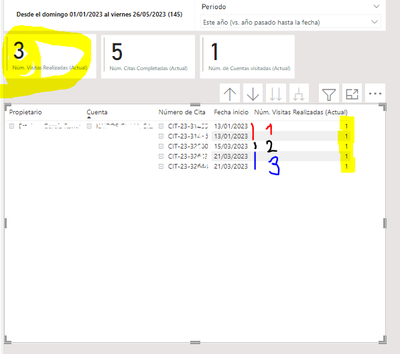
I have the following data:
As you can see it is the same client, who has been visited on 3 different days, and on some of those days there has been more than one meeting
What I have is the data of the count of meetings I have had with that client (5), but what I am also looking for is the number of visits per client (3), regardless of how many meetings I have had.
That is, I seek to group by date: I have visited the Contoso client on (3) different dates, in this year (chosen period)
I have tried with this formula, but I do not achieve the desired result
CALCULATE(COUNT(Appointments[Client]),FILTER(Appointments,DISTINCT(Appointments[Meeting Date])),USERELATIONSHIP('Chosen Period'[Date],Appointments[Meeting Date]))
Thanks for the help
Thank you very much for the reply.
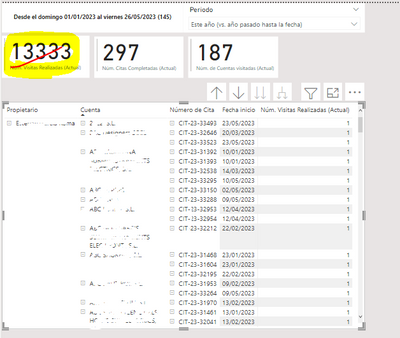
Although the solution you propose only works if the data is filtered by a single client (1): meetings (5) and visits (3)
But when I want to see the visits of all customers, then the data is not correct (it should be a number between 187 and 297)
Try this!
Visits to Client = sumx(VALUES(Appointment[Meeting Date]),DISTINCTCOUNT(Appointment[Client]))
Don't miss out on Data Days, June 15 through August 7. Learn Fabric, Power BI, SQL, AI and more.
Check out the May 2026 Power BI update to learn about new features.
| User | Count |
|---|---|
| 23 | |
| 23 | |
| 21 | |
| 20 | |
| 15 |
| User | Count |
|---|---|
| 58 | |
| 54 | |
| 42 | |
| 30 | |
| 24 |