Learn from the best! Meet the four finalists headed to the FINALS of the Power BI Dataviz World Championships! Register now
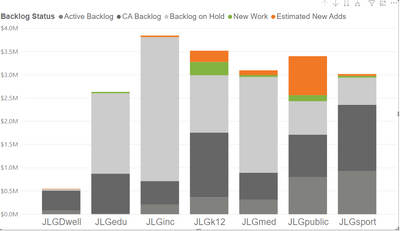
Hello - I need to group three of the segments in this graphic as one, and then the others remain.
So I need the sum of JLGdwell + JLGinc + JLGpublic = JLGcommunity.
On the visual it would read... JLGcommunity, JLGk12, JLGsport, JLGedu, JLGmed. 5 columns instead of 7.
Any help is appreciated!
Solved! Go to Solution.
@Anonymous the faster way to add a new column in your table and then use that on the x-axis
New Group Column =
IF ( Table[Current Column] IN { "JLGdwell", "JLGinc", "JLGpublic", "JLGcommunity", Table[Current column] )
Check my latest blog post Improve UX: Show Year in Legend When Using Time Intelligence Measures | PeryTUS IT Solutions I would ❤ Kudos if my solution helped. 👉 If you can spend time posting the question, you can also make efforts to give Kudos to whoever helped to solve your problem. It is a token of appreciation!
⚡Visit us at https://perytus.com, your one-stop-shop for Power BI-related projects/training/consultancy.⚡
Subscribe to the @PowerBIHowTo YT channel for an upcoming video on List and Record functions in Power Query!!
Learn Power BI and Fabric - subscribe to our YT channel - Click here: @PowerBIHowTo
If my solution proved useful, I'd be delighted to receive Kudos. When you put effort into asking a question, it's equally thoughtful to acknowledge and give Kudos to the individual who helped you solve the problem. It's a small gesture that shows appreciation and encouragement! ❤
Did I answer your question? Mark my post as a solution. Proud to be a Super User! Appreciate your Kudos 🙂
Feel free to email me with any of your BI needs.

Hi, @Anonymous
Is your problem solved? You can create a new column with parry2k’s solution and then use it as the X axis to create your visual.
Best Regards,
Caiyun Zheng
Hi, @Anonymous
Is your problem solved? You can create a new column with parry2k’s solution and then use it as the X axis to create your visual.
Best Regards,
Caiyun Zheng
Yes! Thanks for checking. Parry2k this worked great!
@Anonymous the faster way to add a new column in your table and then use that on the x-axis
New Group Column =
IF ( Table[Current Column] IN { "JLGdwell", "JLGinc", "JLGpublic", "JLGcommunity", Table[Current column] )
Check my latest blog post Improve UX: Show Year in Legend When Using Time Intelligence Measures | PeryTUS IT Solutions I would ❤ Kudos if my solution helped. 👉 If you can spend time posting the question, you can also make efforts to give Kudos to whoever helped to solve your problem. It is a token of appreciation!
⚡Visit us at https://perytus.com, your one-stop-shop for Power BI-related projects/training/consultancy.⚡
Subscribe to the @PowerBIHowTo YT channel for an upcoming video on List and Record functions in Power Query!!
Learn Power BI and Fabric - subscribe to our YT channel - Click here: @PowerBIHowTo
If my solution proved useful, I'd be delighted to receive Kudos. When you put effort into asking a question, it's equally thoughtful to acknowledge and give Kudos to the individual who helped you solve the problem. It's a small gesture that shows appreciation and encouragement! ❤
Did I answer your question? Mark my post as a solution. Proud to be a Super User! Appreciate your Kudos 🙂
Feel free to email me with any of your BI needs.
| User | Count |
|---|---|
| 57 | |
| 44 | |
| 32 | |
| 16 | |
| 14 |
| User | Count |
|---|---|
| 82 | |
| 66 | |
| 42 | |
| 27 | |
| 25 |