Hi,
I've attempted various DAX statements in order to generate measures and columns that would create a summarised table visual, but I'm encountering difficulties in achieving the desired outcome.
My goal revolves around a table visual, labeled as Fig1, which employs four fields extracted from a table named "Allocations." Presently, this table contains 240 rows, although this count can fluctuate throughout the month.
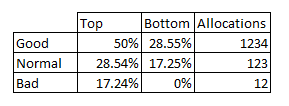
My objective entails evenly distributing the RankT values into three distinct groups: Good, Normal, and Bad. Subsequently, I aim to identify the highest and lowest Conversion Percentages within each of these groups.
Ultimately, my aim is to generate a table visual resembling the one depicted in Fig2 and it needs to work with a selected values from a slicer. Despite my efforts, I'm struggling to realise this vision using DAX statements.
Name - column
Allocations - calculated measure
Conversion - calculated measure
RankT - calculated measure
Fig1
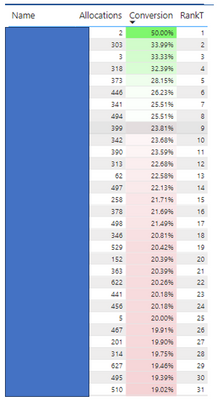
Fig2