Join us at FabCon Atlanta from March 16 - 20, 2026, for the ultimate Fabric, Power BI, AI and SQL community-led event. Save $200 with code FABCOMM.
Register now!The Power BI Data Visualization World Championships is back! Get ahead of the game and start preparing now! Learn more
Hi,
I have data that is something like this (dept, group, money coming in columns):
01234A, 2000, $3
01234A, 2060, $5
01236B, 2000, $4
01236B, 4000, $5.
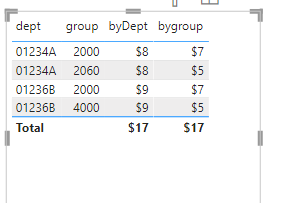
I want to group the totals for the depts and the groups, so I would have 01234A would be $8 (3 + 5), 01236B would be $9 (4+5) and then 2000 would be $7 (3 + 4) and 2060 and 4000 would be $5 each.
How can I do that in Power BI desktop?
Solved! Go to Solution.
@vnicholl you need two measures
byDept = CALCULATE(SUM('Table'[money]),ALLEXCEPT('Table','Table'[dept]))
bygroup = CALCULATE(SUM('Table'[money]),ALLEXCEPT('Table','Table'[group]))
Hi,
Depending upon which fields you drag to the visual, a SUM measure should work
Measure = sum(Data[Money])
Hope this helps.
@vnicholl you need two measures
byDept = CALCULATE(SUM('Table'[money]),ALLEXCEPT('Table','Table'[dept]))
bygroup = CALCULATE(SUM('Table'[money]),ALLEXCEPT('Table','Table'[group]))
Thanks! I am trying both of these.
@vnicholl did you try the above?
The Power BI Data Visualization World Championships is back! Get ahead of the game and start preparing now!
| User | Count |
|---|---|
| 40 | |
| 38 | |
| 36 | |
| 29 | |
| 28 |
| User | Count |
|---|---|
| 127 | |
| 88 | |
| 78 | |
| 66 | |
| 64 |