Join us at FabCon Atlanta from March 16 - 20, 2026, for the ultimate Fabric, Power BI, AI and SQL community-led event. Save $200 with code FABCOMM.
Register now!The Power BI Data Visualization World Championships is back! Get ahead of the game and start preparing now! Learn more
Hello,
I need to sum grouping data. For example:
- I have two months
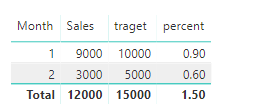
- 1st we have 9 000 sales and 10 000 target
- 2nd we have 3 000 sales and 6 000 target
wehn I count progression for months it is:
- 1st - 9 000/10 000 = 90%
- 2nd - 3 000/5 000 = 60%
When I look at year I have (9 000+3 000)/(10 000+ 5 000)= 80%, but for the contest i need to left monthly values (90% and 60%) but when I look on year i need to sum this score (0,9+0,6=1,5)
I know that i can use calculate for every single month and then just recived resoults - but it is too many measures to do it. I think about way to do it easier.
Anyone can halp me? I am very begginer in Power BI.
Solved! Go to Solution.
Hi @Lokisame,
Please try this measure:
percent =
SUMX (
VALUES ( TB1[Month] ),
CALCULATE ( SUM ( TB1[Sales] ) ) / CALCULATE ( SUM ( TB1[traget] ) )
)
Best regards,
Yuliana Gu
Hi @Lokisame,
Please try this measure:
percent =
SUMX (
VALUES ( TB1[Month] ),
CALCULATE ( SUM ( TB1[Sales] ) ) / CALCULATE ( SUM ( TB1[traget] ) )
)
Best regards,
Yuliana Gu
Thank you very much 🙂 It is very simple and useful.
The Power BI Data Visualization World Championships is back! Get ahead of the game and start preparing now!
| User | Count |
|---|---|
| 39 | |
| 38 | |
| 38 | |
| 28 | |
| 27 |
| User | Count |
|---|---|
| 124 | |
| 88 | |
| 73 | |
| 66 | |
| 65 |