Don't miss your chance to take exam DP-600 or DP-700 on us!
Request nowLearn from the best! Meet the four finalists headed to the FINALS of the Power BI Dataviz World Championships! Register now
Hello,
I need to sum grouping data. For example:
- I have two months
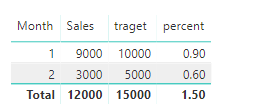
- 1st we have 9 000 sales and 10 000 target
- 2nd we have 3 000 sales and 6 000 target
wehn I count progression for months it is:
- 1st - 9 000/10 000 = 90%
- 2nd - 3 000/5 000 = 60%
When I look at year I have (9 000+3 000)/(10 000+ 5 000)= 80%, but for the contest i need to left monthly values (90% and 60%) but when I look on year i need to sum this score (0,9+0,6=1,5)
I know that i can use calculate for every single month and then just recived resoults - but it is too many measures to do it. I think about way to do it easier.
Anyone can halp me? I am very begginer in Power BI.
Solved! Go to Solution.
Hi @Lokisame,
Please try this measure:
percent =
SUMX (
VALUES ( TB1[Month] ),
CALCULATE ( SUM ( TB1[Sales] ) ) / CALCULATE ( SUM ( TB1[traget] ) )
)
Best regards,
Yuliana Gu
Hi @Lokisame,
Please try this measure:
percent =
SUMX (
VALUES ( TB1[Month] ),
CALCULATE ( SUM ( TB1[Sales] ) ) / CALCULATE ( SUM ( TB1[traget] ) )
)
Best regards,
Yuliana Gu
Thank you very much 🙂 It is very simple and useful.
Share feedback directly with Fabric product managers, participate in targeted research studies and influence the Fabric roadmap.
Check out the February 2026 Power BI update to learn about new features.
| User | Count |
|---|---|
| 54 | |
| 47 | |
| 39 | |
| 16 | |
| 15 |
| User | Count |
|---|---|
| 83 | |
| 71 | |
| 39 | |
| 29 | |
| 27 |