cancel
Showing results for 
Search instead for 
Did you mean: 

We've captured the moments from FabCon & SQLCon that everyone is talking about, and we are bringing them to the community, live and on-demand. Starts on April 14th. Register now

Reply
Anonymous
Not applicable

Grouping data together

Hi there,


New to Power BI and I am trying to look into my finances as a learning activity.


I have a years worth of bank statement data. Essentially all my purchases for a year, with a date column, a description column, and a money out column.


The description column featurs many hundreds of different descriptions, but a lot of them I want to group together to review spend at different vendors.


For example I often shop at Morrisons. Therefore I would like to group anything with the word "morrisons" (in any case) into a group.


Likewise with Amazon. Sometimes it appears in the description as "AMAZON", sometimes "amazon" sometimes "AMZN" etc. How can I group for example based on those 3 texts?


Each description has a load of blur with it, so can't just pivot column as every description is unique with unique reference numbers. 


Therefore I need to set up the groups to just look for specific texts as mentioned above, and group them.


Hope this make sense - cheers

1 ACCEPTED SOLUTION
v-zhenbw-msft
Community Support
Community Support

Hi @Anonymous ,


We can use the following steps to meet your requirement.


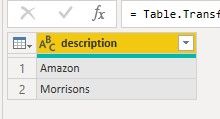
1. We need to create a new table that contains the group name.


G1.jpg


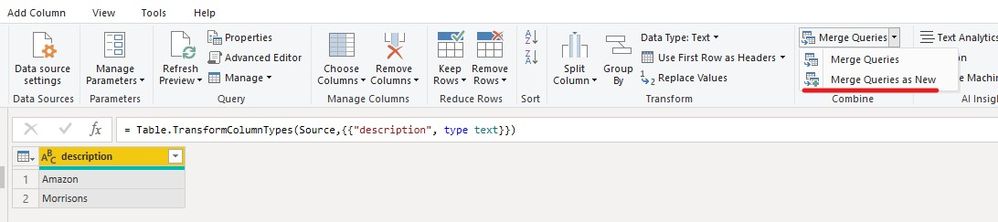
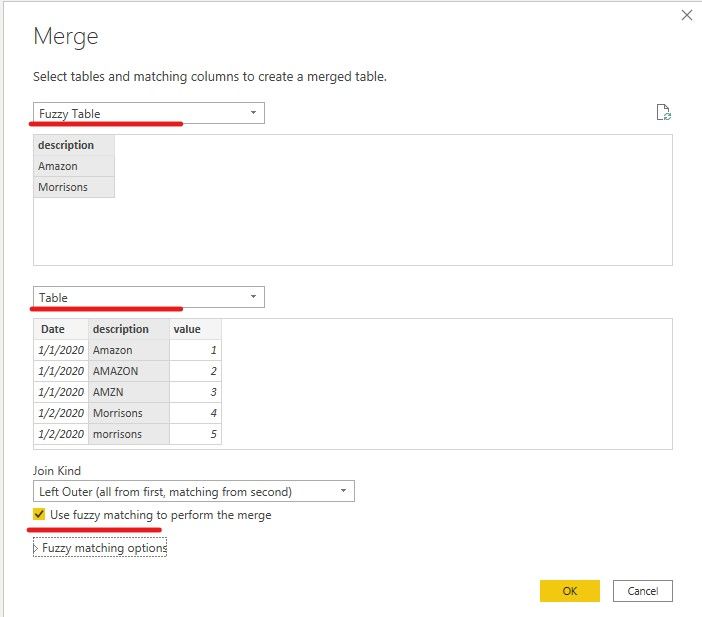
2. Then we can use the merge query in this table. And select use fuzzy matching.


G2.jpg


G3.jpg


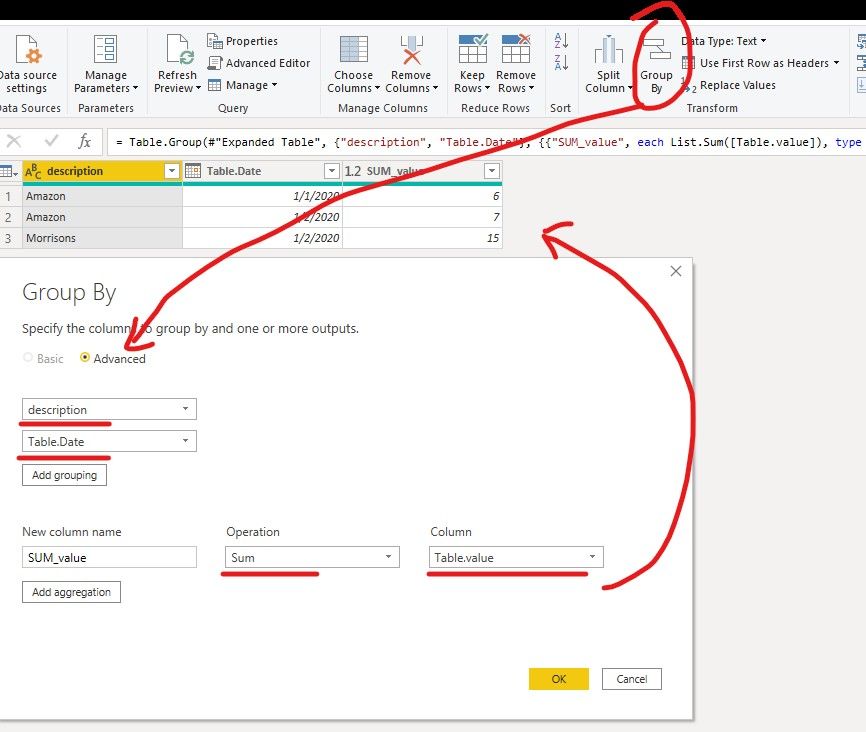
3. At last we can group by description and Date.


G4.jpg


If it doesn’t meet your requirement, could you please show the exact expected result based on the table that we have shared?

BTW, pbix as attached.


Best regards,


Community Support Team _ zhenbw

If this post helps, then please consider Accept it as the solution to help the other members find it more quickly.

View solution in original post

4 REPLIES 4
Anonymous
Not applicable

@v-zhenbw-msft @amitchandak @mahoneypat 


Thank you all so much for taking the time to guide me here - appreciated 🙂

v-zhenbw-msft
Community Support
Community Support

Hi @Anonymous ,


We can use the following steps to meet your requirement.


1. We need to create a new table that contains the group name.


G1.jpg


2. Then we can use the merge query in this table. And select use fuzzy matching.


G2.jpg


G3.jpg


3. At last we can group by description and Date.


G4.jpg


If it doesn’t meet your requirement, could you please show the exact expected result based on the table that we have shared?

BTW, pbix as attached.


Best regards,


Community Support Team _ zhenbw

If this post helps, then please consider Accept it as the solution to help the other members find it more quickly.

amitchandak
Super User
Super User

@Anonymous , Refer if this can help

https://powerbi.microsoft.com/en-us/blog/power-bi-desktop-october-2018-feature-summary/#fuzzyMatching

https://powerbi.microsoft.com/en-us/blog/tag/fuzzy-matching/

Share with Power BI Enthusiasts: Full Power BI Video (20 Hours) YouTube
Microsoft Fabric Series 60+ Videos YouTube
Microsoft Fabric Hindi End to End YouTube
mahoneypat
Microsoft Employee
Microsoft Employee

Please see this link to learn how to make groups column to do what you described.


https://exceleratorbi.com.au/grouping-in-power-bi-desktop-without-using-dax/


If this works for you, please mark it as the solution.  Kudos are appreciated too.  Please let me know if not.

Regards,

Pat


Did I answer your question? Mark my post as a solution! Kudos are also appreciated!

To learn more about Power BI, follow me on Twitter or subscribe on YouTube.


@mahoneypa HoosierBI on YouTube


Helpful resources

Announcements
New to Fabric survey Carousel

New to Fabric Survey

If you have recently started exploring Fabric, we'd love to hear how it's going. Your feedback can help with product improvements.

Power BI DataViz World Championships carousel

Power BI DataViz World Championships - June 2026

A new Power BI DataViz World Championship is coming this June! Don't miss out on submitting your entry.

Join our Fabric User Panel

Join our Fabric User Panel

Share feedback directly with Fabric product managers, participate in targeted research studies and influence the Fabric roadmap.

March Power BI Update Carousel

Power BI Community Update - March 2026

Check out the March 2026 Power BI update to learn about new features.